
Log a fill-up on a machine
Record one fill-up from a machine's Fuel tab, with its meter reading, station, attendant, Sublocation and cost.
When you are dealing with one machine, log its fuel from the machine's own page. The form is the same row the Daily Fuel Entry page uses, so the fields and checks are identical.
Before you start
- You need Fuel: Edit.
- At least one fuel station and one fuel attendant must exist. Someone with Fuel: Manage adds them under Fuel Settings. See Fuel stations and attendants.
Log the fill-up
- Open the machine's page and choose the Fuel tab.
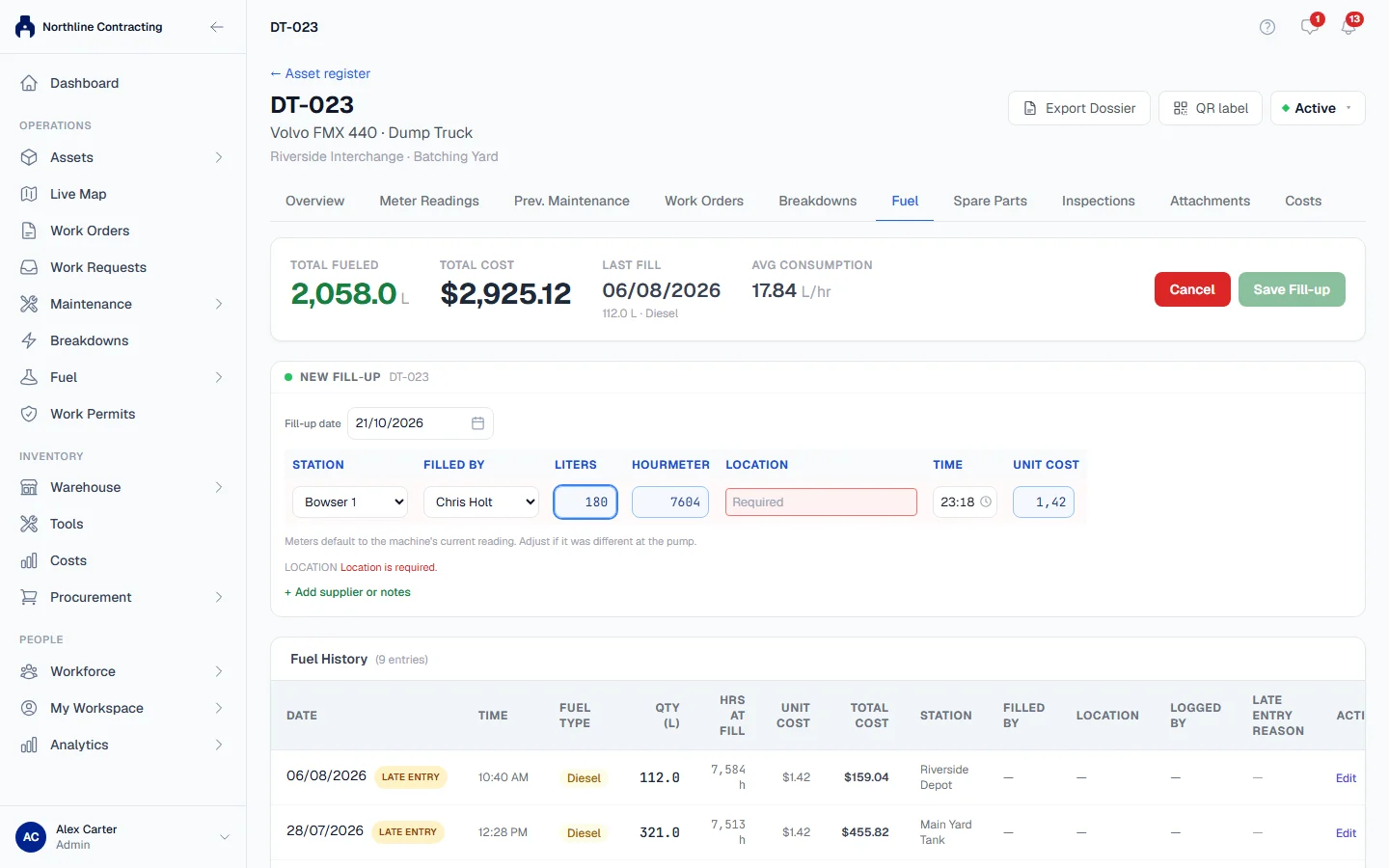
- Click + Log Fuel. A New Fill-up form opens with the machine's number.
- Check the Fill-up date. It defaults to today. If you choose an earlier date, read the note that appears and give a Reason for late entry if one is asked for.
- Choose the Station the fuel came from and who dispensed it under Filled By.
- Type the Liters.
- Check the Hourmeter and Odometer readings. They start at the machine's current reading; change them to what the meter showed at the pump.
- Choose the Location: the Sublocation where the machine was fuelled.
- Check the Time. It starts at the current time.
- Check the Unit Cost. If the station has a price per litre, it is filled in for you; type over it if you paid a different price.
- Click Add supplier or notes if you want to add either.
- Click Save Fill-up.
Every field except supplier and notes is required. Until they are filled in, the save button tells you how many fields are still to fill in or fix, and each problem is listed under the row.
What happens next
- The fill-up appears at the top of Fuel History on the tab, with the time, litres, readings, cost, station, attendant, Sublocation and who logged it.
- The meter readings join the machine's meter history, on its Meter Readings tab.
- The cost is posted to Costs.
- The figures at the top of the tab update: Total Fueled, Total Cost, Last Fill and Avg Consumption.
- For a few minutes you can undo what you just saved. See Edit, void or undo a fill-up.
Warnings before saving
Some readings are not wrong but unusual. Solmex then shows Worth a second look before saving, listing what it noticed:
- a reading lower than the machine's current recorded reading, on a fill-up dated today
- a meter jump bigger than a machine could run since its last reading (more than 24 hours a day, or 1,500 km a day)
- a fill-up that implies far more or far less fuel than this machine normally burns
- a fill larger than the machine's tank, when your company has set that check to ask for confirmation
Click Go back and check to correct the entry, or Save anyway if it is right. A machine that has just had its meter replaced, for example, really can show a lower reading.
Rules worth knowing
- A fill-up and its meter reading are one event. They share the same date and time.
- The fuel type comes from the machine's record. Set it on the machine if it is wrong.
- Choosing a Sublocation records where the machine was seen. If it is the newest information about the machine, its current Sublocation moves there too.
- The Avg Consumption figure needs at least three earlier fill-ups that carried a meter reading. Until then it says there is not enough history yet. See Fuel consumption figures.
Troubleshooting
| What you see | What to do |
|---|---|
| "Add a fuel station under Fuel Settings first" | No station exists yet. Ask someone with Fuel: Manage to add one. |
| "Add a fuel attendant under Fuel Settings first" | No attendant exists yet. Ask someone with Fuel: Manage to add one. |
| "Quantity must be greater than zero." | Type the litres delivered. |
| "Hourmeter reading is required." | Type the reading on the meter at the pump. |
| "A fill-up cannot be dated in the future." | Choose today or an earlier date. |
| A message that a station "has been archived and can no longer be selected" | Pick another station, or ask someone with Fuel: Manage to restore it. |
| "Failed to save fuel transaction." | Check your connection and save again. |
| No + Log Fuel button | Your role does not include Fuel: Edit. |