
Help CenterManaging Purchases and Stock
Add, edit or void a cost
Enter a cost by hand, such as labour, a rental charge or an outside repair, correct it, and void a cost entry that should not count.
Fuel and parts costs arrive on their own. Everything else, such as an outside workshop's invoice, a rental charge or contract labour, you add by hand on the Cost Ledger, and can correct afterwards. When an entry should not count, you void it: it stays on the ledger with your reason, but leaves every total.
Before you start
- You need Costs: Edit.
- Have the invoice or document to hand. Its number goes in Reference.
- Amounts are entered in your company's base currency. The currency symbol is shown beside Amount.
Add a cost
- In the sidebar, open Costs. The Cost Ledger page opens.
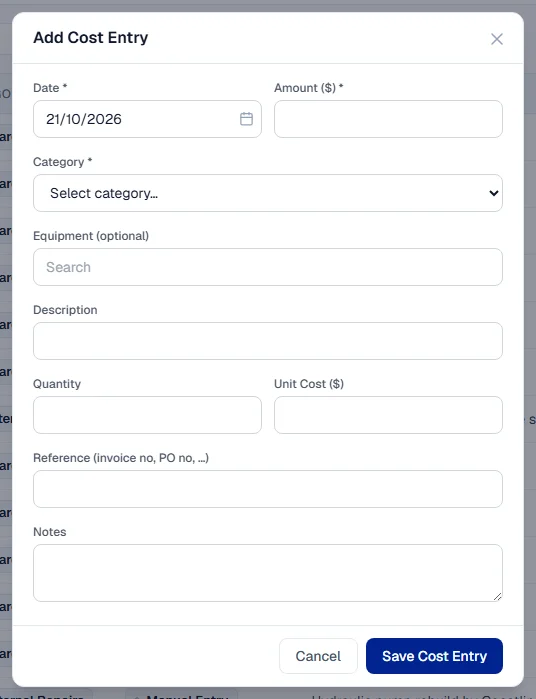
- Click + Add Cost. The Add Cost Entry window opens.
- Check Date: the date the cost belongs to, such as the invoice date.
- Choose a Category, such as Labor, Rental or External Repairs.
- To charge the cost to a machine, search for it under Equipment (optional) by number, type or brand, and pick it from the list. Leave it blank for a cost that belongs to no single machine.
- Write a Description, such as "Hydraulic pump rebuild, outside workshop".
- Enter the Amount. Or enter Quantity and Unit Cost: the amount is filled in as quantity times unit cost, and you can still overwrite it.
- Under Reference (invoice no, PO no, …), enter the invoice or order number.
- Add Notes if useful.
- Click Save Cost Entry.
The entry appears on the ledger as Posted, with the source Manual Entry, and counts in every total straight away. If you chose a machine, it also appears on that machine's Costs tab. See A machine's Costs tab.
Edit a manual cost
- On the Cost Ledger, find the entry. Its source is Manual Entry.
- Click Edit at the end of its row. On a phone, open the row's menu and choose Edit.
- In Edit Cost Entry, change what was wrong: the date, amount, category, machine, description, quantity, unit cost, reference or notes.
- Click Save Changes.
The change is written to the entry's Activity Timeline, with who made it and when.
Only manual entries can be edited, and only while they are Posted. A fuel or parts cost is corrected where it was recorded, and its cost follows.
Void a cost
- On the Cost Ledger, find the entry. Use the search box or the filters if needed.
- Click Void at the end of its row. On a phone, open the row's menu and choose Void. Only manual and fuel costs show Void.
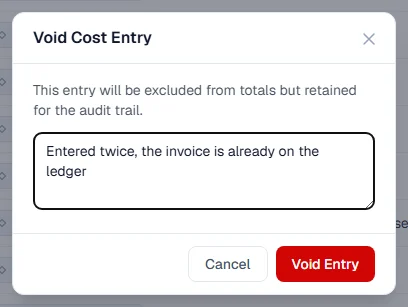
- In Void Cost Entry, write the Reason for voiding. It is required.
- Click Void Entry.
The entry's status becomes Voided. It stays on the ledger, and its details show who voided it and why, but it is no longer counted anywhere.
What voiding does to the record behind it
| The entry's source | What else happens |
|---|---|
| Manual Entry | Nothing else. |
| Fuel Log | The fill-up on the machine's Fuel tab is voided too. The window warns you before you confirm. |
| Warehouse Issue and other automatic sources | Cannot be voided here. Reverse the stock issue or the part usage where it was recorded, and its cost follows. |
Rules worth knowing
- Only posted entries can be voided. A voided entry cannot be voided again or restored.
- Only manual entries can be edited. A voided entry cannot be edited.
- Correct a fill-up on its own record, not here, when only a figure is wrong. See Edit, void or undo a fill-up.
- Only the company base currency is accepted. Convert a foreign invoice before you enter it.
Troubleshooting
| What you see | What to do |
|---|---|
| "No matching equipment found" | Check the number. Type at least two characters to search. |
| "Failed to save cost entry" | Check that Date, Amount and Category are filled in, then save again. |
| "Entry is already voided" | Someone voided it already. Refresh the page. |
| "Failed to void entry" | Check your connection and try again. |
| "This cost was recorded automatically. Reverse it where it came from (for example the stock issue or the part usage) and the cost follows." | Reverse the issue or the part usage in the warehouse, not on the ledger. |
| No Void link on a parts cost | Parts costs are reversed where they were recorded. See the row above. |
| No + Add Cost button, Edit or Void link | Your role does not include Costs: Edit. |