
Set and clear a blocker
Mark a work order as waiting for spare parts, a vendor, a permit or anything else that holds it up, so everyone can see why it is not moving.
A blocker says that a job is waiting for something outside the team's control, such as spare parts or a shutdown window. It does not change the work order's status or its progress steps. It puts a clear "Blocked" banner on the work order and flags it in the list, so nobody has to ask why it has not moved.
Before you start
- You need Work Orders: Edit to set, change or clear a blocker.
- The work order must not be closed or cancelled.
Set a blocker
- Open the work order.
- Click Set blocker in the header.
- Under What is this work order waiting for?, choose one reason.
- Optionally, add a Note (optional), such as a purchase order number, the vendor, or the date you expect it.
- Click Save blocker.
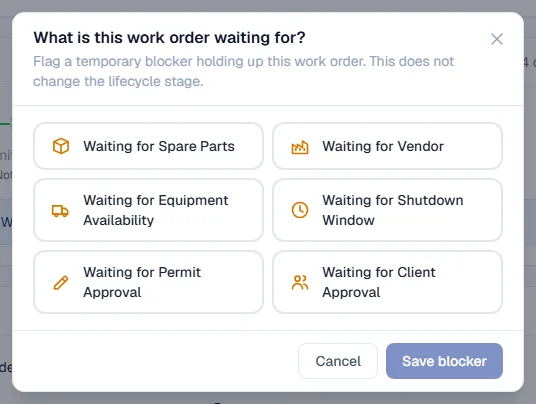
The reasons are:
| Reason | Use it when |
|---|---|
| Waiting for Spare Parts | Parts are on order or out of stock. |
| Waiting for Vendor | An outside company has to act first. |
| Waiting for Equipment Availability | The machine is not free to be worked on. |
| Waiting for Shutdown Window | The work can only happen during a planned stop. |
| Waiting for Permit Approval | A work permit has been raised but not approved. See Approve, sign and close a permit. |
| Waiting for Client Approval | The client must agree before work goes ahead. |
What happens next
- A banner at the top of the work order says Blocked: and the reason, with your note underneath.
- The header button changes from Set blocker to Blocked.
- In the Work Orders list, the job shows a "Blocked" line under its status, and it is counted under the Blocked figure at the top. Choose Blocked in the Status filter to see only blocked jobs.
Change or clear a blocker
- On the banner, click Change to pick another reason or edit the note, then Save blocker.
- When the job can move again, click Clear blocker on the banner, or in the blocker window.
Troubleshooting
| What you see | What to do |
|---|---|
| No Set blocker button | The work order is closed or cancelled, or your role does not include Work Orders: Edit. |
| "Cannot set a blocker on a closed or cancelled work order" | The job is over. Nothing can be waiting on it. |
| "Failed to update blocker." | Reload the page and try again. |