
Export to Excel
Download a register as an Excel file, choose its columns first, and know what every Solmex spreadsheet contains and why it is always in English.
Most registers in Solmex can be downloaded as an Excel file, to send to someone, print, or work on outside the app. Every export, from every module, produces the same kind of spreadsheet, so a reader who has seen one knows how to read them all.
Before you start
- Exporting needs the module's export permission, for example Equipment: Export for the Equipment Register. Without it, the export button is not shown.
- Set your filters, search and sorting first. The file holds exactly the records the page is showing, in the same order: all of them, not only the rows loaded on screen. See Filter, search and sort a list.
Export a register
- Click Excel (on some pages Export) at the top of the page. On a phone it may be in the page's menu at the top right.
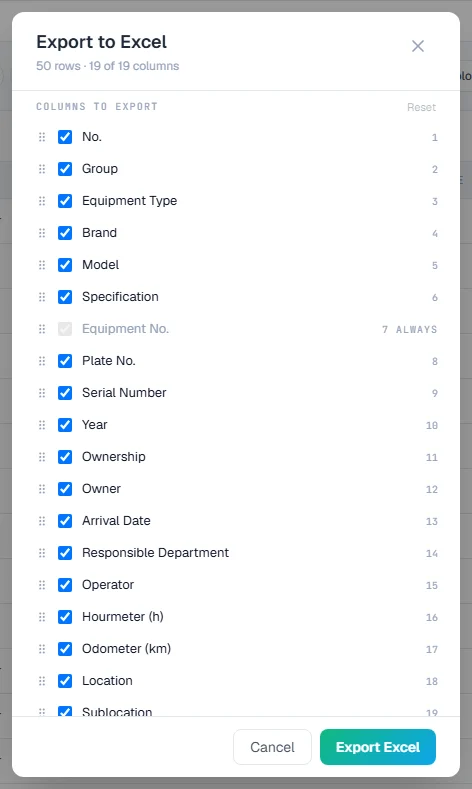
- The Export to Excel window opens. Its heading says how many rows the file will hold and how many columns are chosen, for example "1240 rows · 12 of 18 columns".
- Under Columns to export, untick any column you do not want. A column marked Always is always included.
- Drag columns into the order you want. On a phone, use the up and down buttons beside each column. Reset returns to the standard set and order.
- Click Export Excel. The file downloads.
Your column choice for the export is remembered in this browser, per register, and is separate from the columns you show on screen. You might keep the screen narrow and still send every column to the accounts team.
What every Solmex spreadsheet looks like
| Part | What it holds |
|---|---|
| First row | Your company logo and name, and the title of the export. Set them under Settings > Company Settings. |
| Second row | When the file was generated (date and time, as DD/MM/YYYY HH:MM), how many records it holds, and the filters it was made with. |
| Column headings | Frozen, so they stay in view as you scroll, with Excel filters switched on. |
| The records | One row per record. A state such as a status is a small coloured mark beside a word, so it still reads when printed in black and white. |
| Totals | On registers that have them, a totals row under the figures. |
| DATA NOTES | At the end, a short list of what the file does not claim: figures that could not be worked out, gaps in the records, and how to read them. |
The file is also set up to print: landscape, one page wide, with the column headings repeated on every sheet of paper, the company name at the top and "Page X of Y" in the corner.
Rules worth knowing
- Exports are in English, whichever language you use Solmex in. Turkish writes decimals with a comma, which breaks a spreadsheet that has to be opened anywhere; one language keeps every file readable by every program.
- Dates are shown DD/MM/YYYY, the same as in the app.
- Money is in your company's base currency, the currency the ledger is kept in, even if you were viewing figures converted to USD on screen. See Language, dates and appearance.
- A blank cell means not recorded, never zero. Where a whole column has gaps, DATA NOTES says so.
- Some pages offer a CSV as well. Fuel Management can download its transactions as CSV; a CSV always carries every column, because the column choice belongs to the Excel export.
Related
- Export the register to Excel: the Equipment Register's columns, one by one.
- Choose, arrange and resize columns: the on-screen columns.
Troubleshooting
| What you see | What to do |
|---|---|
| No Excel or Export button | Your role does not include exporting this module. Ask an administrator. |
| The file has fewer records than you expected | A filter or search is still set on the page. Clear it and export again. |
| The logo is missing from the file | No logo is set, or it is not a PNG or JPG. When a logo is set in another format, DATA NOTES says it was left out. Upload a PNG or JPG under Settings > Company Settings. |
| The button reads Generating… for a long time | Large registers take a moment, since every matching record is fetched. Wait for the download before clicking again. |