
Dispose of a machine and reinstate it
Record that a machine has been sold, scrapped, written off, lost or returned. It leaves the register but keeps its whole history, and can be reinstated if it was a mistake.
When a machine leaves your organisation for good, you dispose of it. It disappears from the Equipment Register, the counts and the pickers, and nothing new can be recorded against it. Its history, costs and documents stay, so past reports still add up.
Before you start
- You need Equipment: Dispose. This permission is given to administrator roles to begin with; an administrator can add it to other roles. Without it, Dispose of… is not shown.
- Finish or cancel the machine's work in progress first. A machine cannot be disposed of while it has open breakdowns, open work orders, or attachments still mounted (on it, or it on another machine).
Dispose of a machine
- Open the machine's page and click the status button at the top right.
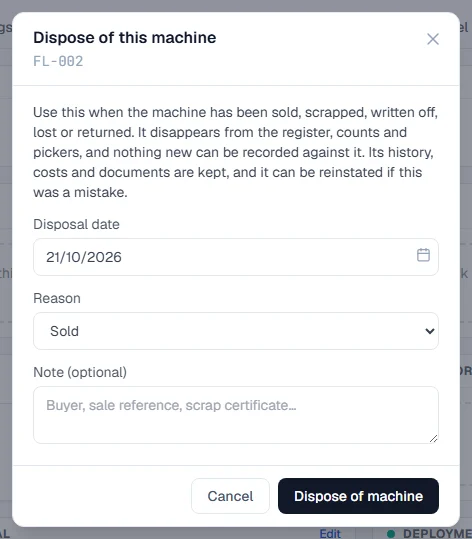
- At the bottom of the menu, click Dispose of…. The Dispose of this machine window opens and checks the machine for work in progress.
- If anything is listed under Finish or cancel this first:, close the window and deal with each item, then start again.
- Set the Disposal date.
- Choose a Reason: Sold, Scrapped, Written off, Lost or stolen or Returned to its owner.
- Optionally fill in Note (optional), such as the buyer, a sale reference or a scrap certificate number.
- Click Dispose of machine.
The machine's page now shows a banner: "Disposed of on 12/10/2026: Sold.", with your note and who recorded it.
What changes, and what stays
| Changes | Stays |
|---|---|
| The machine leaves the register, its status counts and the pickers on other screens. | The machine's page, with every tab and record. |
| Nothing new can be recorded against it: no work orders, breakdowns, inspections, readings, fuel or services. | Its history, costs and documents. |
| It is no longer counted as part of what you have today. | Figures for past periods, such as fuel and costs, still include it. |
To see disposed machines on the register, click the link below the status strip that says how many there are, such as 2 disposed. See Find machines on the Equipment Register.
Reinstate a machine
If a machine was disposed of by mistake, or has come back:
- Open the machine's page. Find it through the disposed link on the register.
- On the banner, click Reinstate. The Reinstate this machine window opens.
- Under Return it as, choose the status it comes back with.
- Under Why is the disposal being withdrawn?, say why. A reason is required.
- Click Reinstate machine.
The machine returns to the register with the status you chose. The disposal and the reinstatement both stay in the audit log.
Troubleshooting
| What you see | What to do |
|---|---|
| No Dispose of… in the menu | Your role does not include Equipment: Dispose. |
| Finish or cancel this first: with a list | Resolve or cancel the breakdowns, close or cancel the work orders, and detach the attachments listed, then try again. See Close, cancel or reopen work. |
| "A disposal cannot be dated in the future." | Choose today or an earlier date. |
| A message saying the disposal date is before the machine arrived | Choose a date on or after the machine's arrival date. |
| "Choose why the machine was disposed of." | Pick a Reason. |
| A message saying the machine was disposed of and you cannot record something | The machine is disposed of. Reinstate it first if that was a mistake. |
| "Say why the disposal is being withdrawn." | Fill in the reason before reinstating. |