
Undo a Daily Meter Entry save
Take back your last Daily Meter Entry save within 15 minutes, for example after typing a round under the wrong date.
Saved a round against the wrong date, or into the wrong column? For 15 minutes after a save on Daily Meter Entry, you can remove the whole save in one step and put every meter back where it was.
Before you start
- You need the Equipment: Edit permission.
- You can undo only your own most recent save, and only for 15 minutes.
Undo the save
- Open Assets > Daily Meter Entry. After a save, a banner reads "Your last submission of N readings can still be undone until" a time.
- Click Undo submission.
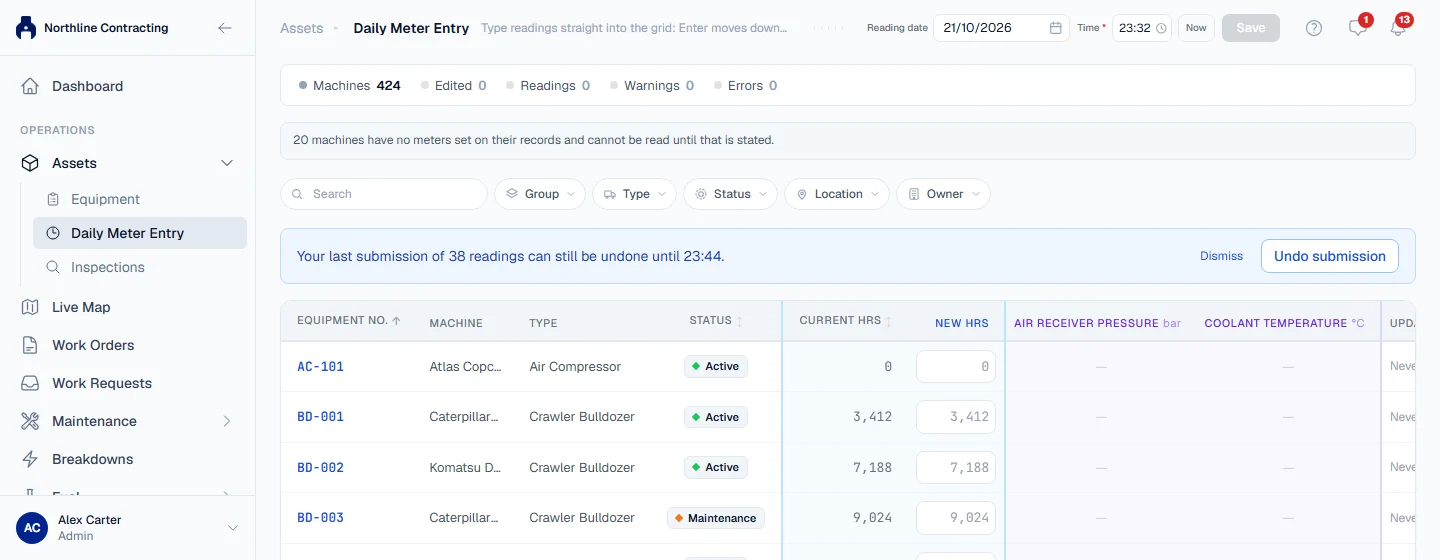
A message confirms how many readings were removed and how many machines were restored. Each meter goes back to the figure it had before your save, including a machine's opening figure if your reading was its first.
The banner comes back if you reload the page within the 15 minutes. Click Dismiss to hide it.
Rules worth knowing
- The whole save is undone, never part of it. Main meter readings and any tracking meter readings from the same save are removed together.
- It is refused once something newer is recorded. If anyone has logged a reading on one of those machines since your save, the undo is refused. Correct the latest reading instead. See Correct a meter reading.
- Nothing disappears without a trace. What the save contained is written to the audit log before it is removed.
Troubleshooting
| What you see | What to do |
|---|---|
| No undo banner | More than 15 minutes have passed, or the last save was someone else's. Reload the page to check; otherwise correct the readings one by one. |
| "A newer reading has been recorded since this submission, so it can no longer be undone. Correct the latest reading instead." | Correct each wrong reading on the machine's Meter Readings tab. |
| "There is no recent submission of yours left to undo." | The 15 minutes are up, or the save was already undone. |
| "Could not undo that submission." | Check your connection and try again. |