
Help CenterManaging the Organisation
The Audit Log
See who changed what and when, with the values before and after, and filter the record by kind, action, person and date.
The Audit Log is the permanent record of changes made in Solmex: every machine edited, status changed, reading corrected, user added and role changed, with who did it, when, and what the values were before and after. Use it to answer "who changed this?" and to show an auditor that records are not quietly rewritten.
Before you start
- You need Administration: Manage. The Audit Log tab is not shown without it.
- The Audit Log records changes. To see who simply signed in and looked, use Session Activity.
Open the Audit Log
- Open Settings and go to the Audit Log tab. It reads "Immutable record of all system changes."
- The newest entries are at the top, 50 to a page. Use Next and Previous at the bottom to move through them.
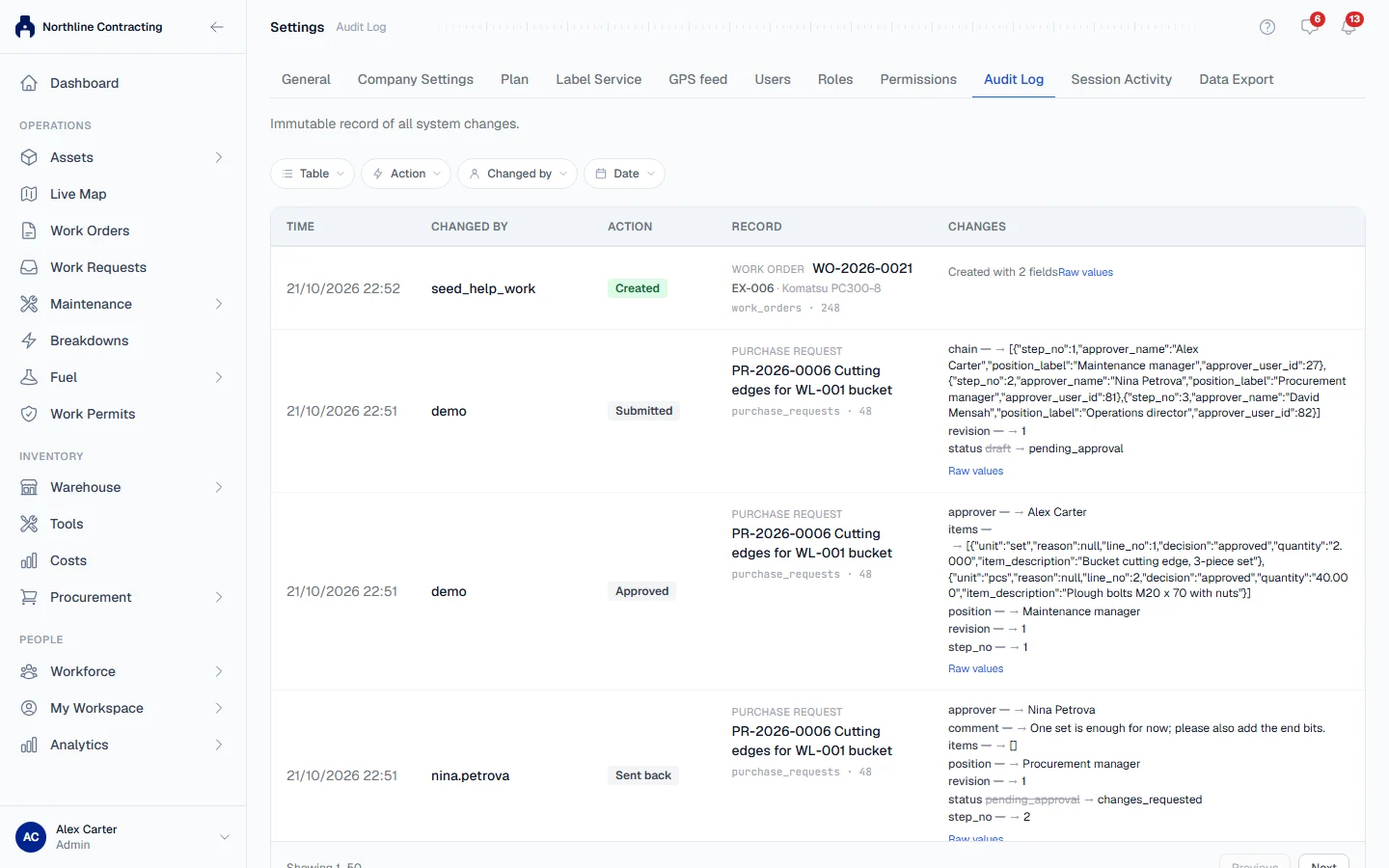
Each entry has five columns:
| Column | What it shows |
|---|---|
| Time | When the change was saved. |
| Changed by | The username of the person who made it. |
| Action | What kind of change it was. See the table below. |
| Record | The record that changed, by name, such as a machine number. "Record no longer exists" means it has since been removed; "No name recorded" means it has no name to show. |
| Changes | Each field that changed, from its old value to its new one. Click Raw values to see exactly what was stored. On a phone, tap an entry to open its changes. |
Filter the log
Use the filter bar above the list. Filters combine, so you can ask for one person's status changes last week.
- Table: the kind of record, such as Equipment, Work order or Role.
- Action: the kind of change, in words, such as Meter reading corrected or Breakdown cancelled. Every action Solmex records is in the list.
- Changed by: pick a person from the list of users, including people whose account has since been disabled. If the list cannot be loaded, the filter becomes a box where you type the exact username.
- Date: a from and to range.
The common actions
| Action | Means |
|---|---|
| Created | A record was created. The entry lists the fields it was created with. |
| Updated | A record was edited. |
| Deleted | A record was removed. |
| Status changed | A status was changed, such as a machine going to Standby. |
| Signed in | Someone signed in with their password. |
| Meter reading corrected | A meter reading was corrected. The entry carries the reason. |
| Meter entry undone | A Daily Meter Entry save was undone. The entry lists the readings it removed. |
| Breakdown date corrected | The reported date of a breakdown was corrected. |
| Access refused | Someone tried to use a permission they do not have. |
Many more actions are named after one specific step, such as Asset disposed, Breakdown cancelled, Fuel entry voided or Work order printed. Hover over an action to see the short code Solmex stores for it, which is what to quote to support.
Rules worth knowing
- Nobody can edit or delete an entry, including administrators.
- Signing in from a remembered session is not a change, so it does not appear here. A user who opens Solmex every morning without typing a password leaves no
LOGINentry. Session Activity records those visits. - Scanning a public QR card is recorded against the machine, with the address it came from in place of a username, because the person scanning has no account.
Troubleshooting
| What you see | What to do |
|---|---|
| "No audit log entries match your filters." | Widen the date range, or clear a filter. |
| "Failed to load audit logs." | Reload the page. If it repeats, check your role still has Administration: Manage. |
| A person is missing from Changed by | Changes made without an account, such as a public QR card scan, are recorded under an address instead. Clear the filter and narrow by Table and Date. |