
Work orders that need a work permit
Mark a hazardous job as needing a permit, raise the permit from the work order, and how the permit shows on the page, the progress steps and the printed sheet.
Hazardous work, such as hot work, confined spaces or working at height, should not start until a work permit is in place. A work order can say so, and then it reminds everyone at every step until the permit exists.
Before you start
- To raise the permit from a work order you need Work Permits: Edit.
- A permit cannot be raised against a closed work order.
Mark a job as needing a permit
When you create the work order, turn on Requires work permit under Safety. The work order gains a permit step, and work cannot start until the permit is active (approved, signed and activated).
Raise the permit from the work order
- Open the work order. The Work permit section says "This job needs a work permit before work starts."
- Click Create work permit, either in that section or as the next-step button at the top.
- The permit form opens with the work order and its machine already filled in. Complete it and save. The fields are explained in Create a work permit.
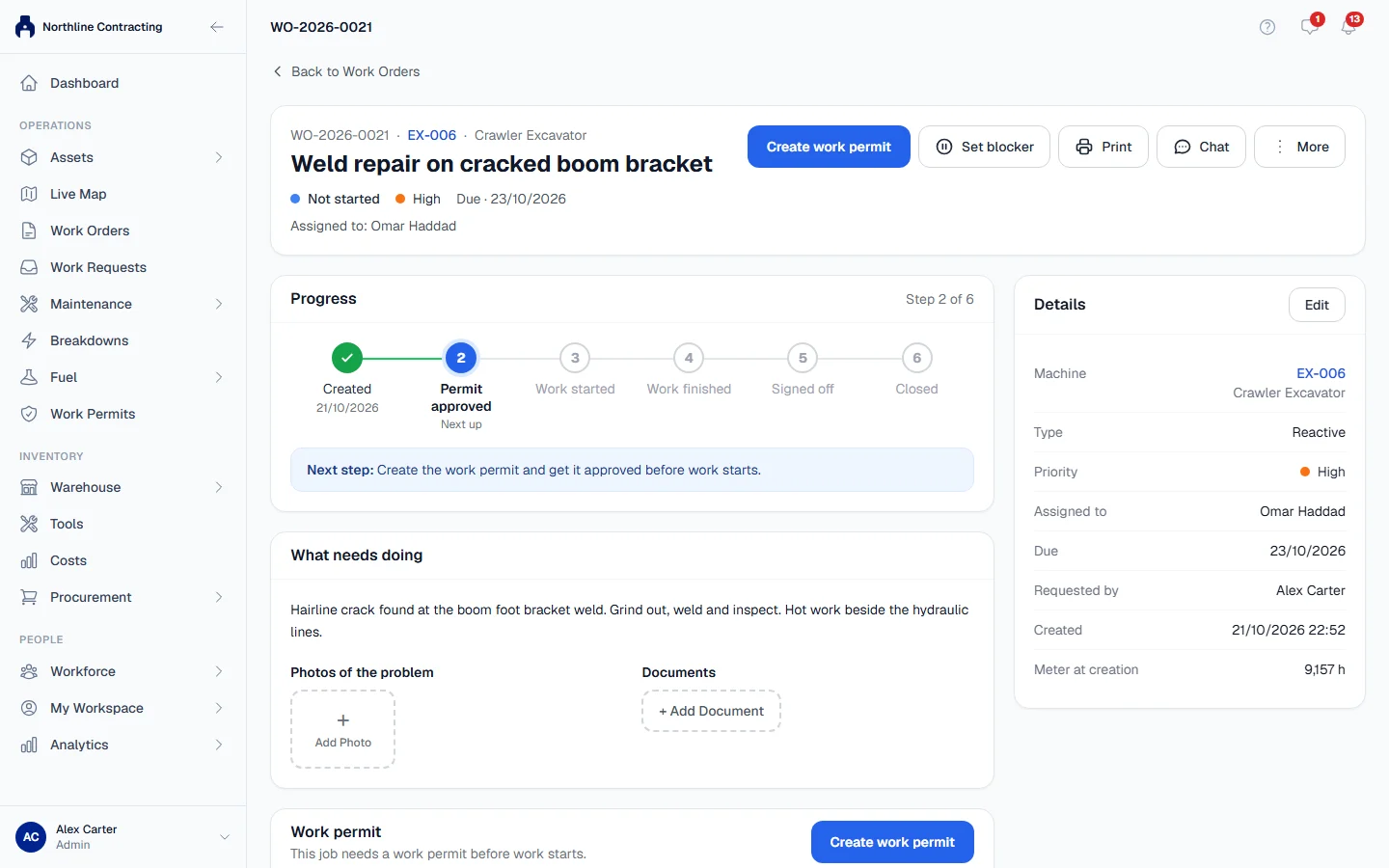
Solmex opens the new permit. If the work order was Not started, saving the permit moves it to In progress.
You can also raise it from Work Permits: click + New Permit, choose the Work Order scope and pick the work order in the Work Order field. Only open work orders are listed.
How the permit shows on the work order
- Work permit lists every permit raised for the job, with its number, status and when it is valid until.
- Progress shows the Permit approved step as done once a permit is active. See Approve, sign and close a permit. On a job that needs no permit, the step reads Not needed.
- Print puts a Before work begins box at the top of the sheet when a required permit is missing or still awaiting approval, so the technician reads it before the instructions. See Print a work order.
- If the permit is slow to come through, you can mark the job Waiting for Permit Approval. See Set and clear a blocker.
Closing a job with open permits
Closing the work order does not close its permits. If any are still pending, approved or active when you close it, Solmex shows Work Order Has Open Permits and lists them. Close the permits separately (see Approve, sign and close a permit), or click Close Anyway. See Close, cancel or reopen work.
Troubleshooting
| What you see | What to do |
|---|---|
| "Waiting for a work permit before work can start." and no button | You cannot raise permits. Ask someone with Work Permits: Edit. |
| "Failed to load equipment details for this work order." | Reload the page and click Create work permit again. |