
Manage finding categories
Choose the list of categories an inspector picks from when logging a finding, and rename, remove or restore them.
Every finding is filed under a category, such as Engine, Hydraulics or Brakes. The list is your company's own: you can add the categories your work needs, rename them and take out the ones you never use.
Before you start
- To change the list you need Inspections: Templates. Anyone with Inspections: View can open it and see how often each category is used.
- New companies start with thirteen categories: Brakes, Cab & Controls, Cooling System, Electrical, Engine, Fuel System, Hydraulics, Other, Safety Equipment, Structural, Transmission, Tyres / Tracks and Undercarriage.
Open the list
- In the sidebar, open Assets > Inspections.
- Click the gear button at the top right of the page. The Finding Categories window opens.
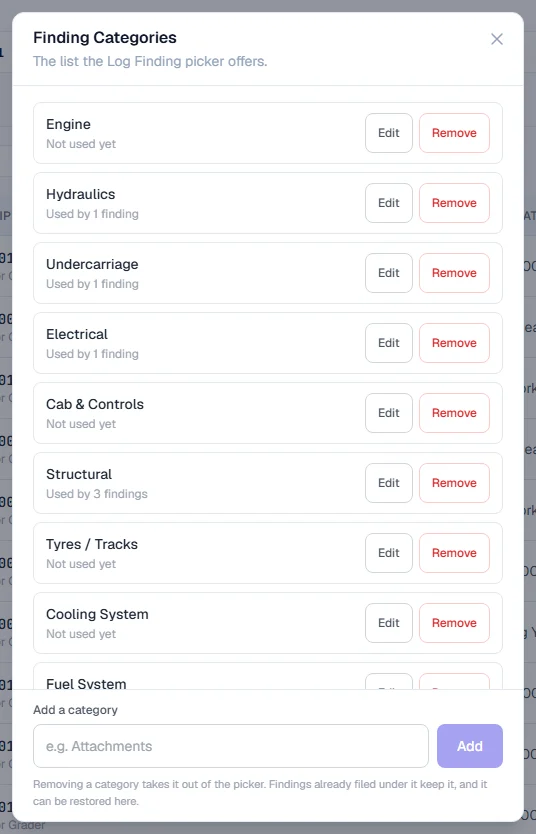
Each category shows how many findings use it, or Not used yet.
Add a category
- Under Add a category, type the name, such as "Attachments".
- Click Add, or press Enter.
The new category is offered straight away when anyone logs a finding.
Rename a category
- Click Edit beside the category.
- Change the name.
- Click Save, or press Enter. Press Escape to cancel.
Renaming also renames every finding already filed under that category, so one category never splits into two spellings.
Remove or restore a category
- Click Remove beside the category.
- Confirm. The category moves to the Removed heading at the bottom of the list.
To bring it back, click Restore beside it under Removed.
Rules worth knowing
- Names are unique, whatever the capitals. "Engine" and "engine" would look like two options and split your reports, so the second is refused.
- Typing a removed name brings it back. If you add a name that is under Removed, Solmex restores it instead of creating a duplicate.
- Limits. A name can be up to 100 characters, and you can have up to 200 active categories.
- The list is the same for everyone in your company.
Troubleshooting
| What you see | What to do |
|---|---|
| "'…' is already a finding category" | That name exists already, perhaps with different capitals. Use it, or choose a different name. |
| "A maximum of 200 active finding categories is supported" | Remove categories you no longer use before adding more. |
| No Edit or Remove buttons | You need Inspections: Templates. Ask your administrator. |