
Create a work order
Raise a job against a machine, say what needs doing, who does it and when, and whether it needs a work permit first.
A work order is a job that maintenance has accepted: what needs doing, on which machine, by whom and by when. Most work orders come from a work request, a breakdown or a planned service, but you can also raise one directly.
Before you start
- You need Work Orders: Edit to create a work order.
- To open the Work Orders page itself you need Work Orders: View.
- The machine must be on the register. See Add equipment.
Create a work order
- In the sidebar, open Work Orders.
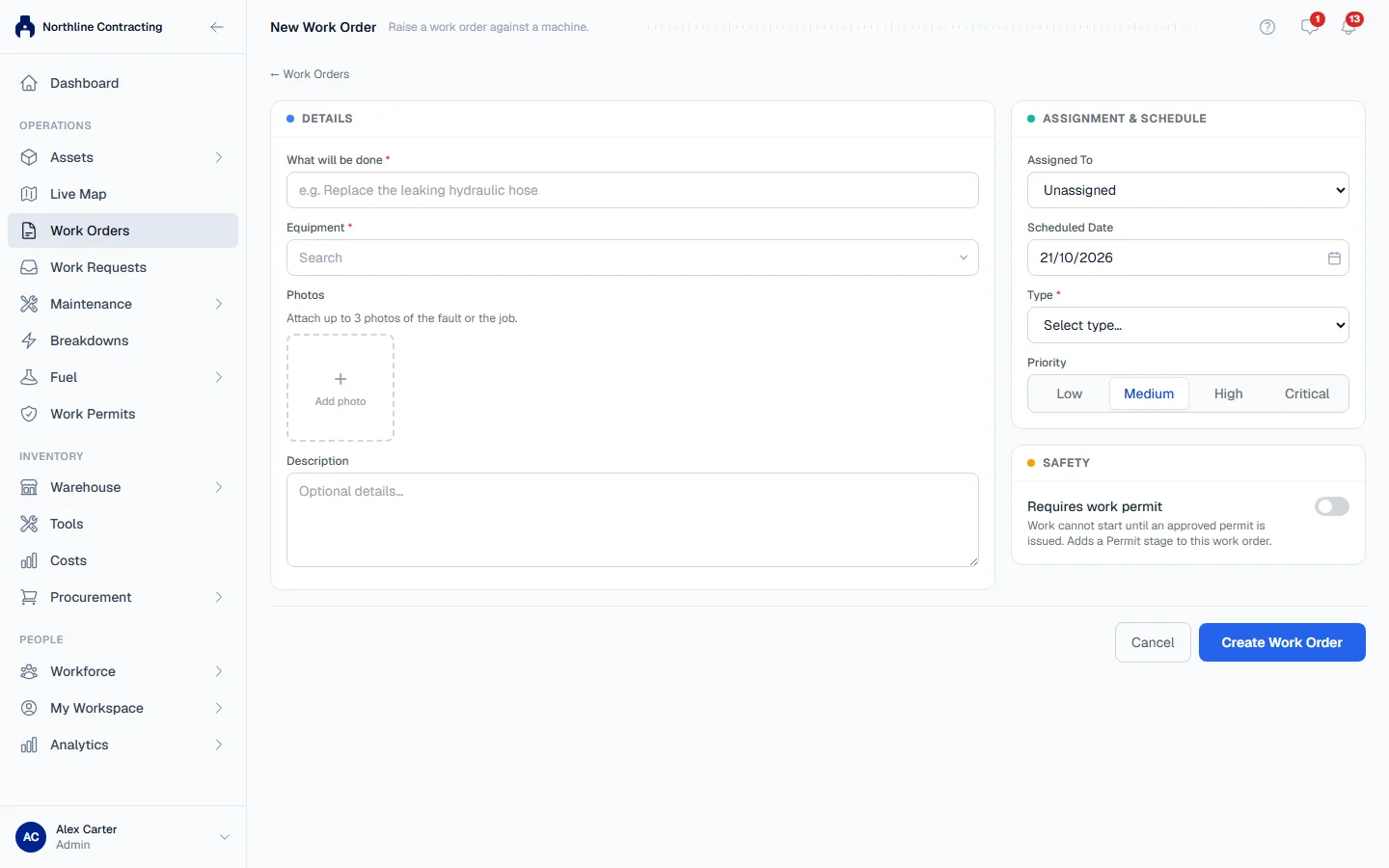
- Click + Create Work Order. The New Work Order page opens.
- Under Equipment, start typing the equipment number and pick the machine.
- Choose the Type: Preventive (planned servicing), Reactive (fixing something that went wrong) or Other.
- Check the Title. Solmex suggests one from the type and the equipment number, such as "Reactive: EX-001"; replace it with something more useful if you can.
- Choose the Priority. It starts at Medium.
- Optionally, write a Description of what needs doing.
- Optionally, add up to three Photos of the fault or the job.
- Under Assignment & Schedule, choose who it is Assigned To and the Scheduled Date. The date starts at today, in your own time zone.
- Under Safety, turn on Requires work permit if the job is hazardous. See Work orders that need a work permit.
- Click Create Work Order.
Solmex opens the new work order. The person you assigned it to is notified.
What happens next
The work order starts as Not started. The large button at the top of its page always names the next thing to do, starting with Start work. See The work order page.
You can change the title, type, priority, description, assignee and due date later, from Edit in the Details panel or Edit Work Order under More, until the work order is finished.
Rules worth knowing
- A title can be up to 255 characters and a description up to 4,000. A counter under each field shows what is left.
- Requires work permit is a statement about the job, not a reminder. When it is on, the work order gains a permit step, and the page asks for the permit before it offers Start work.
- A finished, closed or cancelled work order cannot be edited. What was signed off stays as it was signed off.
Troubleshooting
| What you see | What to do |
|---|---|
| "Equipment is required." | Pick the machine under Equipment. |
| "Type is required." | Choose a Type. |
| "Title is required." | Fill in the Title. |
| "The work order was created, but 1 photo could not be uploaded. Open the work order to add it there." | The work order exists. Click Open Work Order and add the photo under Photos of the problem. Do not create it again. |
| No + Create Work Order button | Your role does not include Work Orders: Edit. Ask your administrator. |
| Work Orders is missing from the sidebar | Your role does not include Work Orders: View. Ask your administrator. |