
Export a machine's dossier
Produce a printable PDF record of one machine, as a three-page summary or a full dossier with its whole history, for an owner, an auditor, an insurer or a buyer.
The dossier is the record of one machine on paper: what it is, where it is, what has happened to it, what it has cost and how well it has been maintained. Use it when someone outside Solmex needs the machine's history, for a handover, an audit, an insurance claim or a sale.
Before you start
- You need Equipment: View and Analytics: Export. Without Analytics: Export, the Export Dossier button is not shown.
- Each section of the dossier also needs the permission for its module. A section you cannot see in the app is left out of the dossier, and the document says so.
Export the dossier
- In the sidebar, open Assets > Equipment and open the machine.
- In the header, click Export Dossier. The Export equipment dossier window opens.
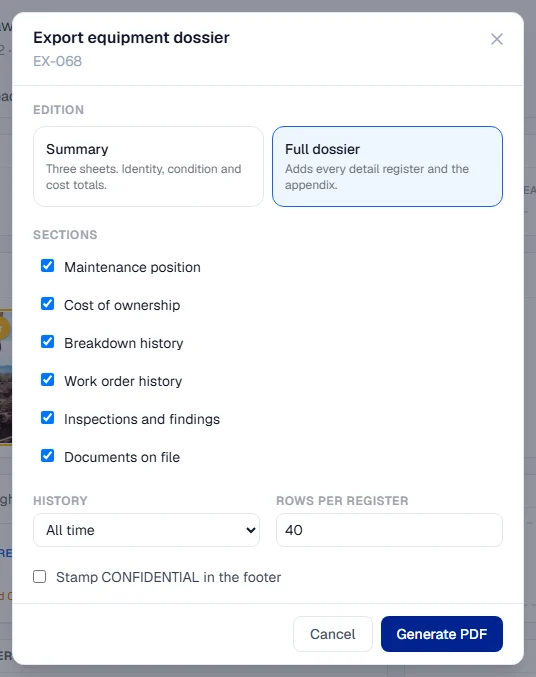
- Under Edition, choose Summary (three sheets: identity, condition and cost totals) or Full dossier (adds every detail register and the appendix).
- Under Sections, tick the sections you want. See the table below.
- For a full dossier, choose the History (All time, Last 24 months or Last 12 months) and the Rows per register: how many rows each table prints, 40 unless you change it, at most 200.
- Optionally tick Stamp CONFIDENTIAL in the footer.
- Click Generate PDF. The file downloads with a name such as
EX-001-Equipment-Dossier-20261012.pdf.
The sections
| Section | Needs | In the summary |
|---|---|---|
| Identity and condition | always included | Yes |
| Maintenance position | Preventive Maintenance: View | Yes |
| Cost of ownership | Costs: View | Yes |
| Breakdown history | Breakdowns: View | No |
| Work order history | Work Orders: View | No |
| Inspections and findings | Inspections: View | No |
| Documents on file | nothing extra | No |
In the summary edition, the sections that belong only to the full dossier are greyed out and marked "full dossier only".
What happens next
The PDF is A4 portrait, branded with your company name and logo, with page numbers on every page. It includes a QR code that opens the machine's public card, so a reader holding the paper can check the live record. See The public equipment card.
Each export is recorded in your audit log, with the sections it contained.
Rules worth knowing
- A section you may not see is named, not hidden. If you do not hold Costs: View, for example, the dialog shows Cost of ownership greyed out with the permission it needs ("Needs Costs: View"), and the PDF states on its first page and in its appendix that the cost section was not included. Nobody reading it will mistake a withheld section for a machine with no costs.
- Tables are capped; totals are not. A register prints at most the number of rows you chose, with the full count beside it, so the totals always describe the whole history.
- There is no availability percentage. The dossier prints the recorded downtime and the number of failures instead. Solmex has no record of the hours each machine was meant to work, and a percentage worked out against every hour of the calendar would make every machine look better than it is.
- Missing figures say why. A machine with no meter, one never serviced and one with no costs recorded each show their own wording, such as "No meter fitted" or "None recorded", rather than a zero.
- Documents are listed, not included. The Documents on file section names each document and its dates. The files themselves stay in Solmex. See Documents on a machine.
- The dossier is in English, whatever language you use the app in.
Troubleshooting
| What you see | What to do |
|---|---|
| No Export Dossier button | Your role does not include Analytics: Export. Ask an administrator. |
| A section is greyed out with a permission beside it | Your role does not include that permission. The rest of the dossier can still be exported. |
| "The document could not be generated. Try again, or narrow the history window." | Try again. For a machine with a long history, choose Last 24 months or Last 12 months, or fewer rows per register. |
| "Could not load the export options." | Check your connection, close the window and open it again. |