
Record past services
Enter services done before a machine was tracked in Solmex, from paper records or an old system, with the date, the service and the meter reading it was done at.
When you start with Solmex, your machines already have a service history. Log a PM lets you enter those older services one at a time, so the schedule knows what has already been done.
Before you start
- You need Preventive Maintenance: Edit.
- The machine must have a template, because each service is recorded against one of its intervals. See Assign PM templates to machines.
- Have the service sheet or logbook: the date, which service it was, and what the meters read.
Record a past service
- Open the machine and choose the Prev. Maintenance tab.
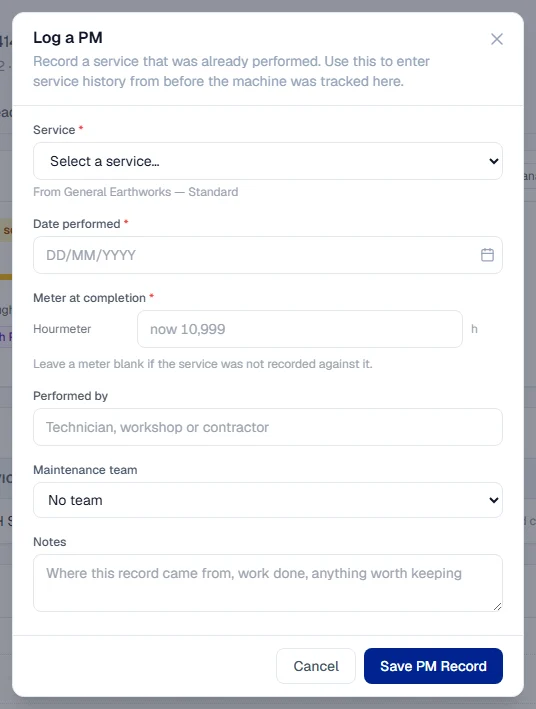
- In the PM History section, click + Log a PM.
- Under Service, choose which service was performed.
- Enter the Date performed.
- Under Meter at completion, enter the reading for each meter the service was recorded against. Leave a meter blank if the service was not recorded against it.
- Optionally fill in Performed by (a technician, workshop or contractor), the Maintenance team and Notes, such as where the record came from.
- Click Save PM Record.
Repeat for each service you want on the record. Each one is added to the PM History.
What happens next
- The service counts exactly like a service logged at the time. The machine's schedule picks up from it.
- The meter figure you entered is added to the machine's Meter Readings history at that date.
- No parts or fluids move, and no checklist is asked for: a past service records what happened, not what is being issued now.
Rules worth knowing
- Use the reading from the service sheet. It decides which milestone the service counts for. See How PM due dates are worked out.
- A blank meter means "not recorded". It is never treated as zero.
- The first real service replaces an imported starting point. If the machine had a last PM imported, logging a real service takes over from it for good.
- Dates in the future are refused.
- The PM History section always shows, even on a machine with no services yet, so you can enter the first one.
Troubleshooting
| What you see | What to do |
|---|---|
| "This machine has no PM template assigned, so there is no service to record against. Assign a template first." | Assign a template, then come back. |
| "Choose which service was performed." | Pick the service under Service. |
| "Enter the date the service was performed." | Fill in Date performed. |
| "Enter the meter reading the service was performed at." | Enter at least one meter reading. |
| "A meter reading cannot be negative." | Check the figure. |
| "Check the meter reading" with a list of warnings | The reading disagrees with the machine's other readings. Correct it, or click Save anyway if it is right. |
| A service already on record is refused as a duplicate | That service is already logged at the same reading. Check the PM History. |