
A machine's location history
How Solmex knows which Sublocation a machine is in, where those records come from, and how to read the Location history card.
Machines move between jobs, often without anyone updating the register. Solmex keeps a record of every time somebody says where a machine was, called a sighting, and shows the machine in the Sublocation of its newest sighting.
Where sightings come from
A sighting is written whenever somebody records a place as part of their work:
| Where | When it records a place |
|---|---|
| An inspection | The inspector fills in where the machine was found. See Carry out an inspection. |
| A fuel fill | The fill-up names the Sublocation where the machine was fuelled. |
| Routine work | The day's work names where it was done. See Record a day's work. |
| The equipment record | Somebody changes Current Sublocation on the machine, or logs a location by hand. |
| GPS | If your company has a GPS feed connected: the tracker's position, at most once an hour unless the machine changes Sublocation. |
Machines registered before sightings existed start with one entry, At registration, for the Sublocation they already carried.
Solmex never guesses a place. A work order, a part issued or a meter reading suggests somebody was near the machine, but none of them says where, so none of them becomes a sighting.
The newest sighting wins, not the latest typed
The register shows the place from the sighting with the latest date and time, whichever was entered last. If a fuel receipt for Tuesday is typed up on Thursday, it is recorded as Tuesday's, and it does not move the machine if it was seen somewhere else on Wednesday.
Read the Location history card
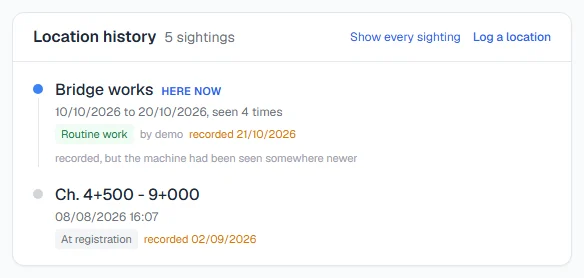
Open the machine. The Location history card is on the Overview tab.
- Each entry shows the Sublocation, when the machine was seen there, what recorded it (such as Inspection, Fuel entry, Set by hand or At registration) and by whom.
- The top entry is marked Here now.
- By default, back-to-back sightings at one place are grouped into one stay, shown as a date range with how many times it was seen. Click Show every sighting to list them one by one, and Group by place to group them again.
- An entry typed in later than the day it describes also shows when it was recorded, so you can tell a live entry from a late one.
- An entry marked "recorded, but the machine had been seen somewhere newer" was kept as history and did not move the machine.
- Only the most recent entries are shown at first. Click Show all history to see the rest.
When a record is withdrawn
If the record that stated a place is withdrawn, for example a fuel fill is voided, its sighting stops counting. Solmex works out the machine's Sublocation again from the sightings that remain. It never simply puts back the previous value.
Troubleshooting
| What you see | What to do |
|---|---|
| "No location recorded" | Nobody has stated a place for this machine yet. Log a location. |
| "A sublocation that is no longer listed" | That Sublocation has since been archived. The history keeps it as it was. |
| "The location history could not be loaded." | Reload the page. |
| The machine shows in an old Sublocation | Nobody has recorded a newer place yet. Log where it is now. |