
Log where a machine is
Record by hand which Sublocation a machine was in and when, including a move made days ago.
Most locations are recorded as a side effect of other work: an inspection, a fuel fill, routine maintenance. When a machine moves between jobs with none of those, Log a location records the move directly, with the date and time it actually happened.
Before you start
- You need the Equipment: Edit permission.
- The Sublocation must exist in the machine's Location. If your role includes Sublocations: Edit, you can add a new one from the picker. See Add Locations and Sublocations.
- A disposed machine cannot have a location logged.
Log a location
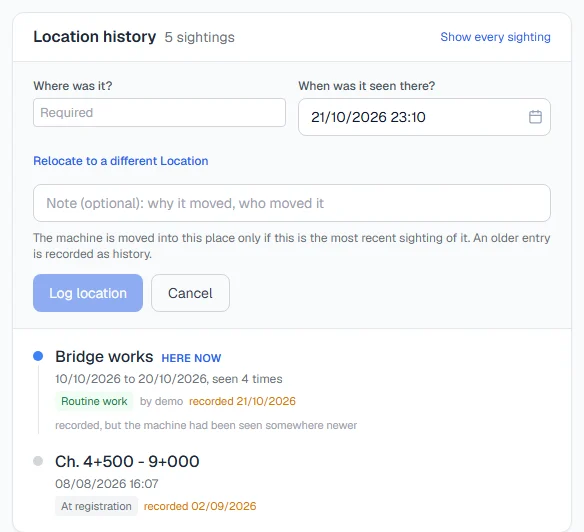
- Open the machine. On the Overview tab, find the Location history card.
- Click Log a location.
- Under Where was it?, choose the Sublocation. Only active Sublocations of the machine's own Location are offered.
- Under When was it seen there?, set the date and time. It starts at now; change it if the move happened earlier.
- Add a note if it helps, such as why it moved or who moved it.
- Click Log location.
The card then tells you what happened:
- "Recorded. The machine is now shown at" the Sublocation you chose: this was the newest word on the machine, so the register moved.
- "Recorded. The machine had been seen somewhere more recently, so the register was left as it is.": you logged an earlier moment, so it was kept as history only.
Rules worth knowing
- A backdated entry does not move the machine if something newer already says where it is. It still appears in the history at the right date. See A machine's location history.
- The moment cannot be in the future. Nobody has seen the machine there yet.
- To move a machine to another Location, use Relocate to a different Location in the same form. That is a transfer. See Transfer a machine to another Location.
Troubleshooting
| What you see | What to do |
|---|---|
| No Log a location button | Your role does not include Equipment: Edit. |
| The Sublocation you need is not in the list | It belongs to another Location, is archived, or does not exist yet. Add it, or transfer the machine. |
| "A sighting cannot be in the future: nobody has seen the machine yet." | Choose a date and time up to now. |
| "That sublocation belongs to another Location. Choose 'Relocate to a different Location' to transfer the machine." | Use Relocate to a different Location. |