
See which inspections are due
The Due tab lists every machine whose inspection is overdue or coming up soon, worked out from its templates and its last completed inspection.
The Due tab answers one question: which machines need inspecting now, and which will soon. Solmex works it out for every machine and every active template that applies to it, so nobody has to keep a separate schedule.
Before you start
- You need Inspections: View to see the list, and Inspections: Edit to start an inspection from it.
- At least one active template must exist. See Create inspection templates.
Open the list
- In the sidebar, open Assets > Inspections.
- Open the Due tab.
- Click a column heading to sort by it.
- Click Start on a row to open New Inspection with that machine and template already chosen.
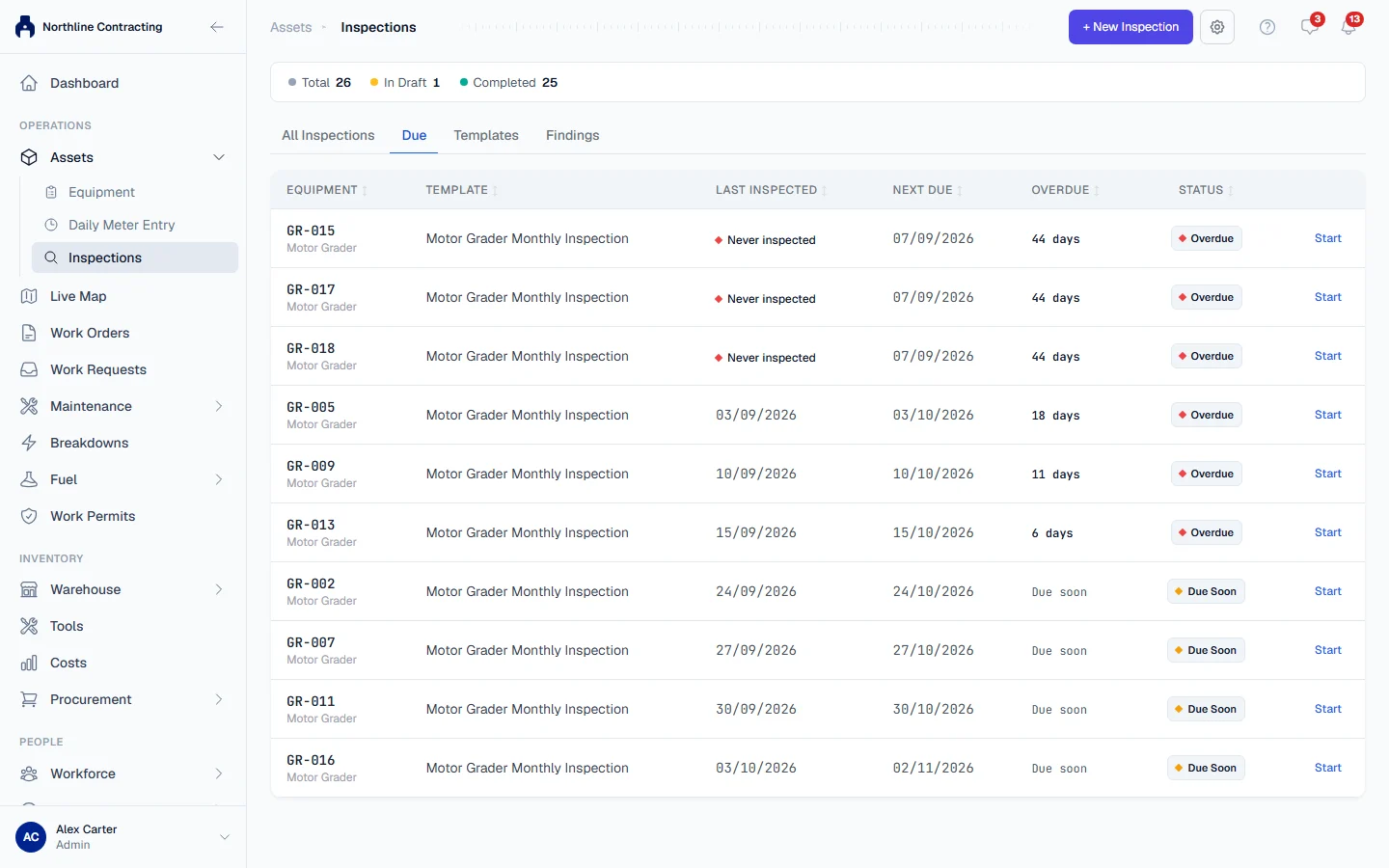
When nothing is due, the tab says "All clear: inspections are up to date".
Inspections that fall due also appear on the Due for Service tab of the Work Orders page, where they can be planned on a date. See Due for Service, Calendar and Workload.
What the columns mean
| Column | Meaning |
|---|---|
| Equipment | The machine number, with its equipment type underneath. |
| Template | The inspection that is due. A machine appears once for each template that applies to it. |
| Last Inspected | The date of the last completed inspection with this template, or Never inspected. |
| Next Due | The date, or the meter reading, at which the next inspection falls due. |
| Overdue | How many days, hours or km past due it is, Due now on the day itself, or Due soon. |
| Status | Overdue or Due Soon. |
The list is sorted with overdue machines first, the longest overdue at the top.
How the due date is worked out
| Template | Next due | Due Soon when |
|---|---|---|
| Calendar | The last completed inspection plus the frequency, for example 30 days | 14 days or less remain |
| Meter | The meter reading at the last completed inspection plus the frequency, for example 250 hours | 50 hours or km or less remain |
A machine that is neither overdue nor due soon is not listed.
Never inspected is not overdue
A machine with no completed inspection is not overdue on the day you register it. Its first cycle is counted from a starting point:
- Calendar templates: from the machine's arrival date, or its mobilization date, or the day it was registered, whichever is known first in that order.
- Meter templates: from zero on the meter. A machine at 180 hours on a 250-hour template is not yet due.
A machine that has genuinely run past its first interval without an inspection still shows as Overdue, with Never inspected in the Last Inspected column.
Rules worth knowing
- Only completed inspections count. A draft does not restart the cycle. Complete the inspection to take the machine off the list.
- Templates match by equipment type. A template for "Excavator" applies only to machines of that type. A template with no equipment type applies to every machine.
- Machines off site are left out. Machines that are transferred, demobilized or disposed of never appear.
- Meter templates need a reading. A machine with no current meter reading cannot be measured, so it never appears for a meter template. Record its readings on Daily Meter Entry or the machine's Meter Readings tab.
- Meter templates use the main meter. On a machine with both an hourmeter and an odometer, the hourmeter is the one counted, and the reading recorded on the inspection is the starting point for the next cycle.
- Inactive templates schedule nothing. Deactivating a template removes it from this list straight away.
Troubleshooting
| What you see | What to do |
|---|---|
| A machine you expected is missing | Check that a template with its exact equipment type is active, that the machine is not transferred, demobilized or disposed of, and, for a meter template, that it has a meter reading. |
| A machine stays overdue after its inspection | The inspection is still a draft. Open it and click Complete Inspection. |
| "All clear: inspections are up to date" but you have no templates | Nothing can fall due without a template. Create one. |