
Your equipment lists
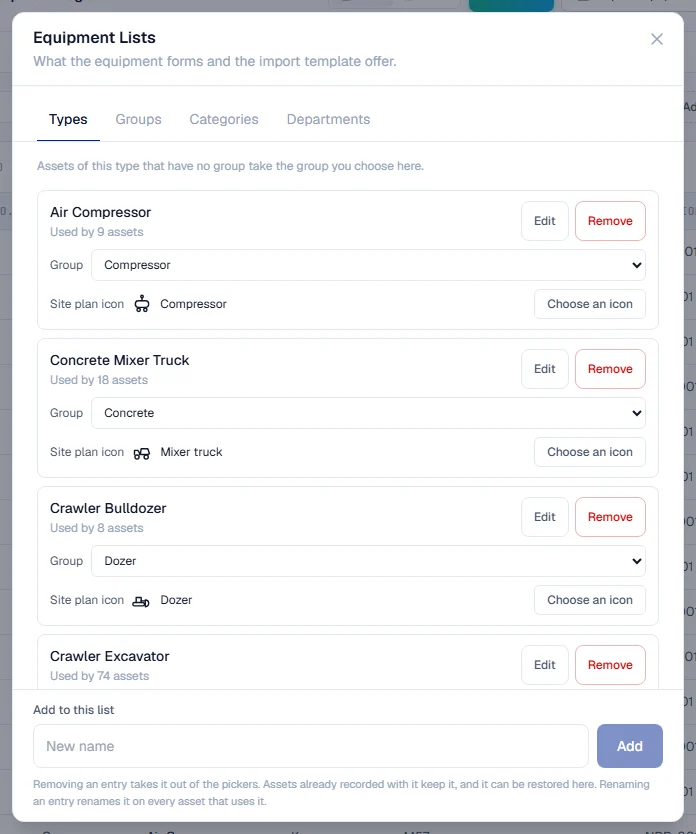
Manage the types, groups, categories and departments your machines are recorded in. Rename an entry on every machine at once, or remove it from the pickers without touching any record.
The words your machines are classified by (their type, group, category and department) are your company's own lists. Solmex does not ship a fixed vocabulary: you decide whether a machine is an "Excavator" or a "Tracked Excavator", and the forms, filters and import template all offer exactly what your lists hold.
Before you start
- You need Equipment: Edit. Without it, the Settings gear is not shown.
- Open the Equipment Register and click the Settings gear at the top right, then Equipment Lists. On a phone, it is in the menu at the top right, under Settings.
The four lists
| List | What it is for |
|---|---|
| Types | What the machine is, such as "Excavator" or "Air Handling Unit". Every machine has one. |
| Groups | A broad family, such as "Earthmoving" or "Trucks", so you can filter or report on all of them together. |
| Categories | An extra classification of your own, if you use one. |
| Departments | Who is responsible for the machine. |
Each entry shows how many machines use it, such as "Used by 12 assets", or "Not used yet".
Add an entry
- Open the tab for the list.
- Under Add to this list, type the name and click Add.
You can also add an entry while registering or editing a machine: choose + Add new type… (or group, category, department) in the picker and type the name. It joins your list when the machine is saved.
Rename an entry
- Click Edit beside the entry.
- Type the new name and click Save.
- Confirm. Solmex tells you how many machines will be updated.
The new name appears on every machine that used the old one. You never have to correct machines one by one.
Remove an entry, and restore it
- Click Remove beside the entry and confirm.
The entry leaves the pickers, so nobody can choose it for a machine again. Machines already recorded with it keep it. Removed entries are listed under Removed at the bottom of the tab; click Restore to bring one back. Typing a removed name into Add to this list also restores it.
Give a type its group
On the Types tab, each type has a Group picker. Choose the group machines of this type belong to. Machines of this type that have no group yet take it straight away, and so does any machine of this type registered or imported later with its group left blank. A machine that already has a group keeps it. Add groups on the Groups tab first.
Solmex never guesses a group from the words in a type's name. A type with No group leaves the group blank until someone chooses one.
A map icon for a type
If your company uses Live Map, each type on the Types tab also has a Site plan icon. Click Choose an icon and pick one from the library, or click Upload a picture to use a small PNG of your own. Machines of this type are then drawn with that icon on the map. Choose No icon to clear it.
Rules worth knowing
- Names are matched without regard to capitals. "excavator" and "Excavator" are the same entry, so you cannot add a second spelling by accident.
- A list holds up to 500 active entries.
- Equipment Models is a separate page under the same Settings gear, for brands, models and the documents every machine of a model shares.
Troubleshooting
| What you see | What to do |
|---|---|
| No Settings gear on the register | Your role does not include Equipment: Edit. |
| "'Excavator' is already in this list" | That name exists already. Use it, or rename the existing entry. |
| "Name is required" | Type a name before saving. |
| "Could not load the equipment lists" | Check your connection and open the window again. |
| Machines of a type are missing from a group filter | Their group is blank. Give the type a group on the Types tab, or set it on each machine's Overview tab. |