
Help CenterManaging Purchases and Stock
Close short or cancel a purchase order
Close an order when the rest of it is not coming, or cancel one before anything has arrived. Both need a reason and both stay on record.
Not every order arrives in full. Close short finishes an order that has been partly delivered when the rest will never come. Cancel order withdraws an order before anything has been received. Neither deletes the order: it stays on the register with its reason.
Before you start
- You need Procurement: Order for both.
- Have the reason ready. Both actions require one.
Close an order short
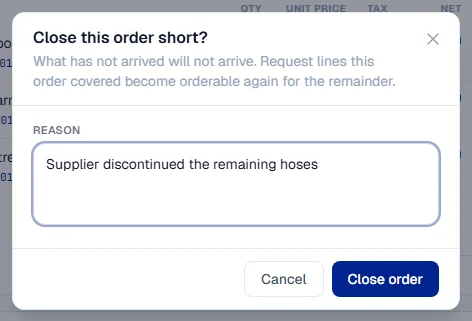
Use this when the supplier has delivered part of the order and cannot or will not deliver the rest.
- Open the order. It must be Sent to Supplier or Partially Received.
- Click Close short. The window Close this order short? opens.
- Write the Reason, for example "Supplier discontinued the remaining 4 filters".
- Click Close order.
The order becomes Closed and the banner says who closed it. What has arrived stays received.
Cancel an order
Use this when an order should not go ahead at all, or when an approved order must change.
- Open the order. It can be a Draft, Pending Approval, Approved or Sent to Supplier, with nothing received yet.
- Click Cancel order. The window Cancel this purchase order? opens.
- Write the Reason.
- Click Cancel order. Click Keep it if you change your mind.
The order becomes Cancelled and is kept on record.
What happens next
Any purchase request lines the order covered become available to order again:
| You did | The request line can be ordered again for |
|---|---|
| Close short | The quantity that never arrived |
| Cancel order | The whole quantity the order held |
So when a supplier lets you down, you can raise a new purchase order for the remainder with another supplier, from the same approved request.
Rules worth knowing
- Once anything has arrived, you cannot cancel. Close the order short instead.
- A closed, cancelled or fully received order is finished. Nothing more can be received against it.
- Closing short is only for orders already sent or partly received. An approved order that was never placed is cancelled, not closed.
Troubleshooting
| What you see | What to do |
|---|---|
| "Closing short needs a reason." | Write the reason, then click Close order. |
| "Cancelling needs a reason." | Write the reason, then click Cancel order. |
| "Goods have been received against this order; close it short instead." | Use Close short. |
| A message that only an order that has been sent can be closed short | Cancel the order instead. |
| "The order could not be closed." or "The order could not be cancelled." | Check your connection and try again. |
| No Close short or Cancel order button | Your role does not include Procurement: Order, or the order is in a state that does not allow it. |