
Cancel a breakdown logged in error
Withdraw a breakdown that should never have been logged, such as a wrong machine or a duplicate. It stops counting in every figure, and the record is kept with your reason.
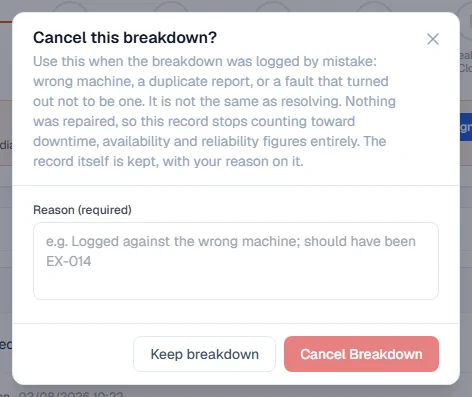
Sometimes a breakdown is logged by mistake: against the wrong machine, as a duplicate of one already reported, or for a fault that turned out not to be one. Cancelling it withdraws the record honestly, instead of pretending a repair took place.
Before you start
- You need the Breakdowns: Close permission, the same one that lets you resolve a breakdown.
- Any work order raised against the breakdown must be closed or cancelled first. See the rules below.
Cancelled is not resolved
A breakdown can end in two ways, and they say opposite things:
| Status | What it says | Counts in downtime and reliability figures? |
|---|---|---|
| Resolved | The machine failed and was repaired. | Yes |
| Cancelled | The machine did not fail. The record was a mistake. | No, never |
Cancel a breakdown
- Open the breakdown from the Breakdowns page.
- Open the More actions menu (the three dots) and click Cancel Breakdown. It is the last item in the menu.
- In Reason (required), say why, for example "Logged against the wrong machine; should have been EX-014". At least three characters.
- Click Cancel Breakdown to confirm.
What happens next
- The breakdown's status becomes Cancelled, and its page shows Cancelled: logged in error with your reason, who cancelled it and when.
- The machine is released. If it has no other open breakdown, its status goes back to what it was before.
- Any blocker and expected return date are removed, because there is no repair to wait for.
- The progress panel shows the breakdown as reported and every later stage as skipped. It never shows as repaired.
- The breakdown disappears from counts, averages, downtime, availability and reliability figures, on screen and in the reports.
Finding a cancelled breakdown again
Cancelled breakdowns are kept, never deleted. They are hidden from the Breakdowns list by default. To see them, set the Status filter to Cancelled. They also still appear on the machine's Breakdowns tab.
Rules worth knowing
- You cannot cancel while a work order on it is still open. If somebody raised a work order, real planning happened and the work order has its own labour and parts. Close or cancel the work order on its own page first, if it was also raised in error. See Close, cancel or reopen work. There is no override.
- You can cancel a breakdown that was already resolved. This is for breakdowns that were resolved in the past only because there was no other way to clear them. The dialog warns you that it has been counting as a real failure.
- A cancelled breakdown is final. It cannot be resolved, reopened or given a new work order. If the machine really has failed, log a new breakdown.
Troubleshooting
| What you see | What to do |
|---|---|
| "Cannot cancel this breakdown: work order WO-2026-0001 was raised against it. Cancel the work order first if it was also raised in error." | Open that work order and cancel it (or close it), then cancel the breakdown. |
| "This breakdown is already cancelled" | Nothing to do. |
| Cancel Breakdown cannot be clicked | Write a reason of at least three characters. |
| No Cancel Breakdown in the menu | You need Breakdowns: Close. Ask your administrator. |