
Help CenterManaging Purchases and Stock
Receive a delivery
Record what arrived against a purchase order, in full or in part. Lines linked to stock items go straight into the warehouse.
When goods arrive, you record the delivery on the purchase order. A delivery can be the whole order or part of it, and you record each one as it comes. Lines linked to a stock item are received into the warehouse at the same time, at the order's price.
Before you start
- You need Procurement: Receive.
- The order must be Approved, Sent to Supplier or Partially Received. It does not have to have been marked as sent.
- Have the supplier's delivery note to hand.
Record a delivery
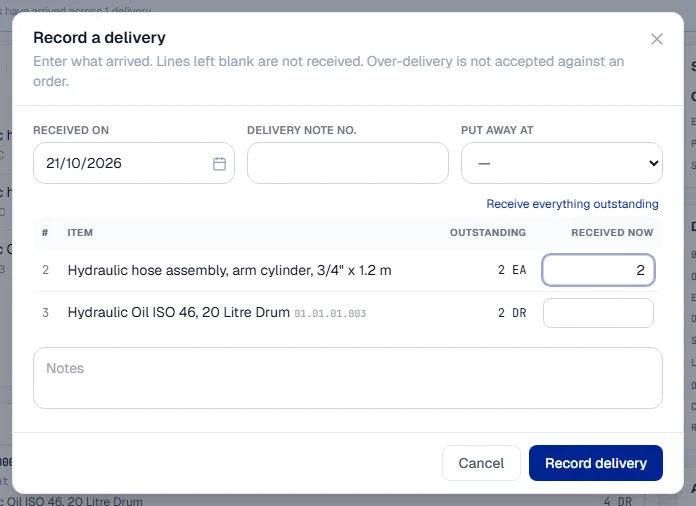
- In the sidebar, open Procurement > Purchase Orders and open the order. The On Order tab lists orders still waiting for goods.
- Click Record delivery. The Record a delivery window lists each line with what is Outstanding.
- Check Received on. It defaults to today; change it if the goods arrived earlier.
- Enter the Delivery note no.
- If the delivery includes stock items, choose Put away at: the warehouse location they go into. It starts at the order's delivery location.
- Under Received now, enter what arrived on each line. Leave a line blank if nothing arrived for it. To take everything outstanding, click Receive everything outstanding.
- Add Notes if something is worth recording, such as damaged packaging.
- Click Record delivery.
The delivery is listed under Deliveries on the order with its own receipt number, such as POR-2026-0003, the delivery note and who received it. Each line's Received column shows how much has arrived, such as "6 / 10".
What happens next
| Delivered so far | The order becomes |
|---|---|
| Part of it | Partially Received |
| Everything | Received. The order is complete. |
The buyer is told about each delivery, and so is anyone whose purchase request the delivery covered. On the request, the Ordering panel shows what has arrived.
For a stock item, the quantity is now in the warehouse at the location you chose, valued at the order's unit price. The delivery shows a Stock receipt number beside it. A line that is not linked to a stock item is recorded on the order only and does not touch the warehouse.
Rules worth knowing
- One delivery, one record. Record each delivery separately, even from the same order.
- Deliveries cannot be dated in the future.
- When the rest is not coming, close the order short. See Close short or cancel a purchase order.
Troubleshooting
| What you see | What to do |
|---|---|
| "Enter a quantity on at least one line." | Type a quantity under Received now on the lines that arrived. |
| A message that a line has a smaller quantity outstanding and over-delivery is not accepted | Receive only what is outstanding. Close the order short or raise a new order for any difference. |
| "This delivery includes catalogue items, so a receiving location is needed to put them away." | Choose Put away at. |
| "A delivery cannot be received on a future date." | Correct Received on. |
| "The delivery could not be recorded." | Check your connection and try again. |
| No Record delivery button | Your role does not include Procurement: Receive, or the order is not approved, already received in full, closed or cancelled. |