
Edit, void or undo a fill-up
Take back a save you just made, correct a saved fill-up, or void one that should never have been recorded.
A fill-up is never deleted, but there are three ways to put a mistake right. Which one you use depends on how long ago it was saved and what is wrong with it.
| Situation | Use | Who |
|---|---|---|
| You saved something by mistake a few minutes ago | Undo submission | The person who saved it, within 15 minutes |
| The litres, price, station, attendant, time or notes are wrong | Edit | Fuel: Manage |
| The fill-up should not exist, or its machine, date, fuel type or Sublocation is wrong | Void, then log it again | Fuel: Manage |
| The meter reading is wrong | Correct it on the machine's Meter Readings tab | See the meters articles |
Undo your last save
After you save fill-ups, either on a machine's Fuel tab or on Daily Fuel Entry, a banner appears on the Fuel tab of any machine in that save: "Your last fuel submission ... can still be undone until" a time.
- Open the Fuel tab of a machine you just fuelled.
- Click Undo submission.
The whole save is taken back, not just this machine's row. When the save covered several machines, the banner says how many of its entries are on this machine and that undoing retracts all of them. The meter readings the save created are removed too.
Undo is for your own most recent save only, and only for 15 minutes. Fill-ups brought in by importing a fuel log cannot be undone this way.
Edit a saved fill-up
- Open the machine's Fuel tab.
- In Fuel History, click Edit on the row.
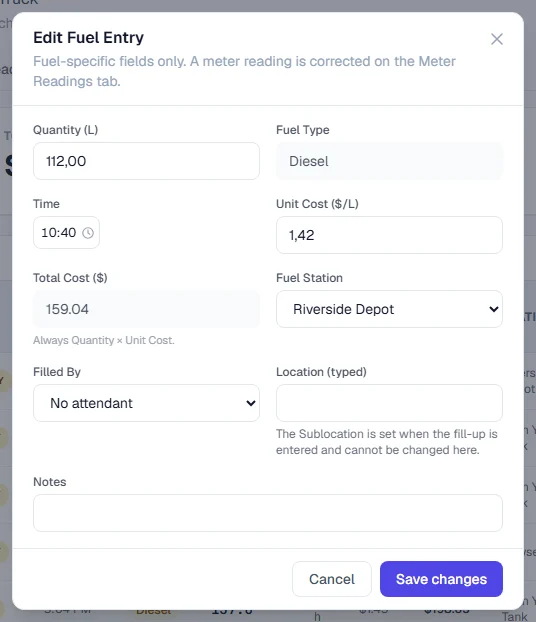
- In Edit Fuel Entry, change what is wrong: Quantity (L), Time, Unit Cost, Fuel Station, Filled By, Location (typed) (the place as it was typed, not the Sublocation; the Sublocation is set when the fill-up is entered and cannot be changed here) or Notes.
- Click Save Changes.
Fuel Type and Total Cost are shown but cannot be changed. The total is always the quantity multiplied by the unit cost. The cost in Costs is updated to match, or voided if you removed the cost.
Void a fill-up
- Open the machine's Fuel tab.
- In Fuel History, click Void on the row.
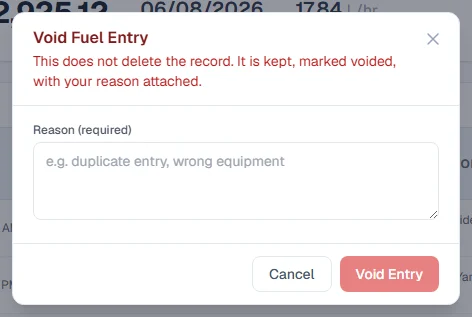
- In Void Fuel Entry, type a Reason (required), such as "duplicate entry" or "wrong equipment".
- Click Void Entry.
The record is kept, struck through and marked Voided, with your reason attached. The linked cost in Costs is voided too. The meter reading the fill-up created is removed only if it is still the latest reading on that meter; if a newer reading has been recorded since, the reading stays where it is.
What a voided fill-up does
A voided fill-up never counts again. It is left out of the tab's Total Fueled, Total Cost and Last Fill, out of every Fuel Management figure, and out of the consumption baseline.
It also breaks the consumption span it sat in. Solmex does not join the fill-ups either side of it into one longer span, because that would put the voided entry's hours into the calculation without its fuel and make the machine look more efficient than it is. Voiding can make a figure less certain; it can never make it look better.
Rules worth knowing
- Edit and Void appear only for Fuel: Manage, and work on any entry, at any time.
- A voided entry cannot be edited or voided again.
- Edit cannot change the date, the fuel type or the Sublocation chosen when the fill-up was logged. The Sublocation recorded where the machine was seen, and the fuel type decided how the cost was filed. A fill-up wrong in any of these is voided and entered again, so nothing is quietly rewritten.
Troubleshooting
| What you see | What to do |
|---|---|
| "A newer reading has been recorded on top of one of these fill-ups, so the submission can no longer be undone. Void the entry instead." | Ask someone with Fuel: Manage to void the wrong fill-up. |
| "There is no recent fuel submission of yours left to undo." | More than 15 minutes have passed, or the save was not yours. Ask someone with Fuel: Manage to void it. |
| "This fuel entry has been voided and can no longer be edited." | Log a new fill-up with the right details. |
| "Failed to void entry." | Check that a reason is filled in and try again. |
| No Edit or Void on the rows | Your role does not include Fuel: Manage. |