
Sign off a work order
Collect the signatures on the work record, finish the work order with Finish & sign off, and what Solmex checks before it lets you.
Signing off is how the people who did the work vouch for it. Each person named on the work record signs in their own box, and then the work order is finished with one button. Finishing locks the record and moves the work order to Finished, awaiting closure.
Before you start
- The work must be recorded in the Work done section and saved. See Record the work done.
- You need Work Orders: Execute to sign and to finish.
- Which roles must sign is set by your company. See Configure sign-off roles.
Sign your box
- Open the work order and scroll to Signatures in the Work done section. There is one box per sign-off role, showing who holds it.
- In your box, click Sign here. The Sign: window opens with the role's name.
- Check the Printed name.
- Draw your signature in the box. Use Clear to start again.
- Click Save signature.
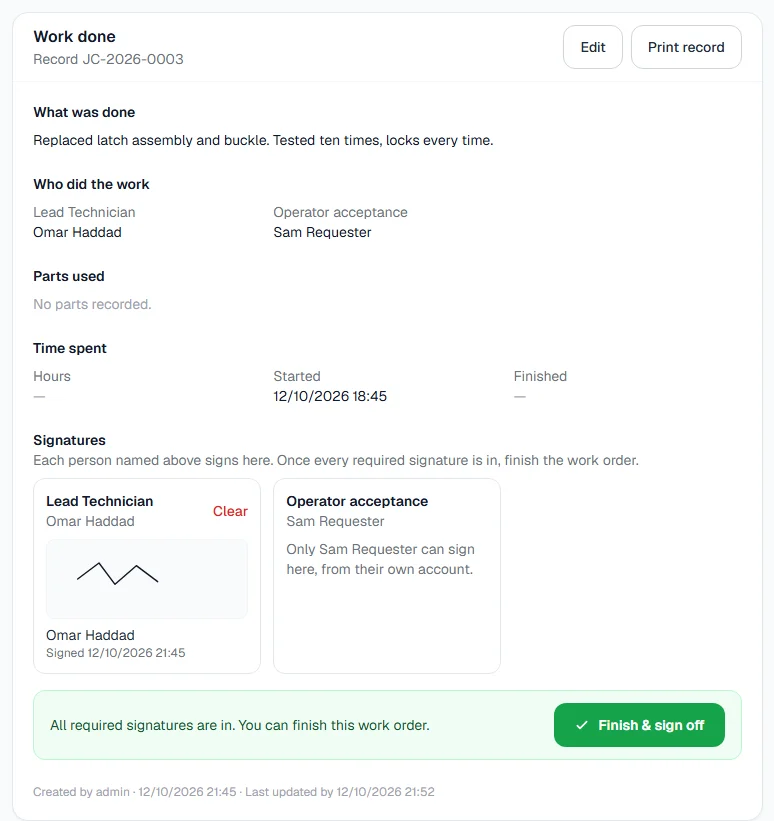
The box now shows your signature and when you signed.
Finish the work order
When every required signature is in place, the section says "All required signatures are in. You can finish this work order." Optional roles never hold this up, signed or not.
- Click Finish & sign off, either in the Work done section or at the top of the page.
- The work record is locked and the work order becomes Finished, awaiting closure.
Any parts recorded on the work are issued from the store at this moment. A supervisor then closes the work order: see Close, cancel or reopen work.
Who may sign which box
- Someone with their own Solmex account signs from their own account. Everyone else sees "Only (their name) can sign here, from their own account." in that box.
- Someone with no Solmex account can be signed for by another person with Work Orders: Execute, for example a foreman signing for a fitter. Solmex records which account drew the signature.
- A box with nobody assigned says "Assign somebody first, then save." Choose a person under Who did the work and save the record first.
What must be signed before finishing
| Role is | Must it be signed? |
|---|---|
| Required | Yes. Somebody must be assigned to it and must have signed. |
| Optional | Never. It does not hold up finishing, even when somebody is assigned to it. |
If anything is missing, the section shows Before finishing: with a list, such as "Workshop Supervisor must sign."
Rules worth knowing
- A signature can be cleared while the record is open, with Clear on the box, for example if it was drawn badly.
- You cannot change who holds a role after they have signed. Clear the signature first.
- Once finished, signatures are locked. To add a missing one, reopen the record with a reason.
Troubleshooting
| What you see | What to do |
|---|---|
| "Workshop Supervisor must be assigned and sign." (with your role's name) | Choose someone for that role under Who did the work, save, and have them sign. |
| "Sign-off required before this work can be finished:" followed by a list | Someone required has not signed. Collect the signatures listed. |
| "Insufficient stock for part" with a stock code | The store does not hold enough of a part on the record. Receive the stock, or correct the quantity, then finish again. |
| A message that a role "has already signed this work record. Clear the signature before changing who holds the role." | Clear that signature first, then change the person. |
| No Sign here button in your box | The box belongs to someone with their own account, or your role does not include Work Orders: Execute. |