
Read many machines with Daily Meter Entry
Type a whole meter round into one grid and save every reading at once.
Daily Meter Entry is a grid of machines with a box for each meter, for the person who walks the yard with a round sheet every morning. You type the readings down the column and save them all in one go.
Before you start
- You need the Equipment: Edit permission. The page is not in your sidebar without it.
- Only machines with an hourmeter or an odometer appear. Machines with No meter fitted, or whose meters are not stated, are left out and counted in a note above the grid.
Enter a round
- In the sidebar, open Assets > Daily Meter Entry.
- At the top right, set Reading date and Time. Every reading in this save is recorded at that date and time. Click Now to reset the time to the current time.
- Narrow the list if you want to, with the search box or the Group, Type, Status, Location and Owner filters.
- Click into the first box under New Hrs (or New Km) and type the reading. The grey figure inside the box is the current reading.
- Press Enter to move down to the next machine in the same column. The up and down arrow keys move too; Tab moves across the row.
- Leave a box empty for any machine you did not read.
- Click Save N Readings at the top right.
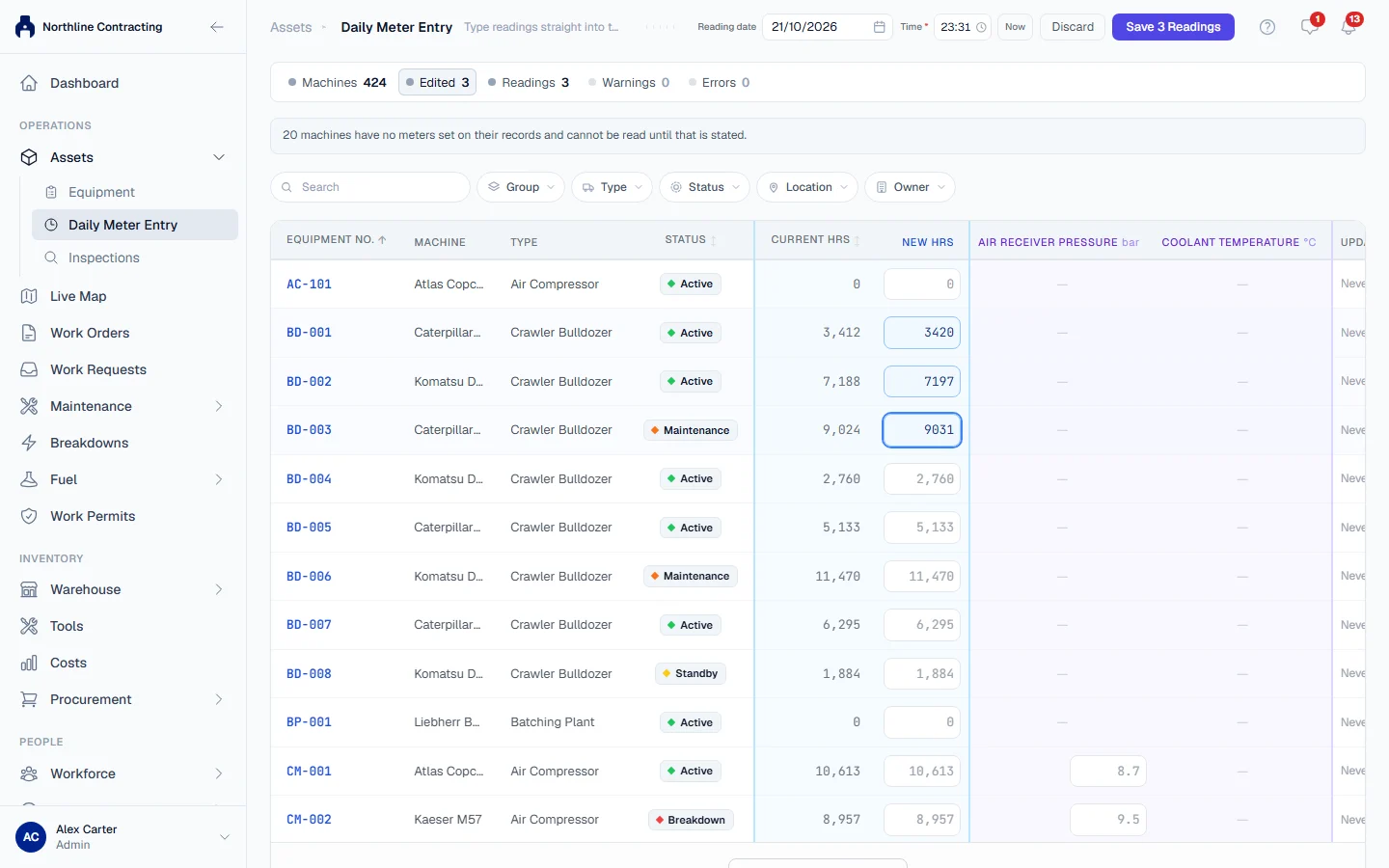
The counters under the title show how many Machines are listed, how many you have Edited, how many Readings will be saved, and how many Warnings and Errors there are.
Errors and warnings
Each box is checked as you type and coloured if something looks wrong. Hover over it to see why.
- Errors stop the save: a negative figure, a date or time in the future, or a reading below the machine's last one. Fix every red box before you can save.
- Warnings do not stop the save: a jump of more than 24 hours a day (or 1,500 km a day) since the last reading, or a reading unchanged from the last one. When you save, a dialog titled N readings worth a second look lists them. Click Go back & edit to fix them, or Save anyway to keep them.
Rules worth knowing
- An empty box is not zero. It means "not read today" and nothing is saved for that machine.
- The save is all or nothing. If anything is refused when you save, nothing is saved, and the rows to fix are marked.
- Your typing survives filtering. Readings you typed stay when you change a filter or the sort. If some edited machines are no longer on screen, a banner names them, and they are still saved with the rest.
- The status filter starts at on site. Machines that are demobilized, transferred or off hire are left out unless you choose another status.
- Leaving the page with unsaved readings asks first, so a stray click does not lose your morning.
- Tracking meters appear here too. If the listed machines carry tracking meters, each one gets its own column after the main meters, and its readings are saved in the same save.
After saving, a banner offers to undo the save for 15 minutes. See Undo a Daily Meter Entry save.
Troubleshooting
| What you see | What to do |
|---|---|
| The Time box has a red ring and Save is greyed out | The reading time is empty. Pick a time or click Now. |
| "Some readings were refused. Fix the rows below and save again." | Someone recorded a reading on one of these machines while you were typing. Fix the marked rows and save again. |
| "Nothing left to save: those values were already on record." | The readings you typed were already recorded. |
| A note that machines "are recorded as having no meter" | Those machines have No meter fitted and are left out on purpose. |
| A note that machines "have no meters set on their records" | Open each machine and set its meters with Edit meters on the Overview tab. |
| "No machines match the current filters" | Clear a filter or the search. |