
Record a day's work
Tick the daily jobs done on each machine on the Record tab and save them in one go, or log a single job from the machine's own page.
The Record tab is the daily round as one sheet: machines down the side, your jobs across the top, one date and one save. Use it at the end of a round to record everything the crew did that day.
Before you start
- You need Routine Maintenance: Edit to record work.
- Your job list must exist. See Set up your job list.
- Teams are optional. If you set them up, you can say which team did the work. See Set up maintenance teams.
Record the round
- In the sidebar, open Maintenance > Daily Maintenance and click the Record tab.
- Check the date at the top. It starts on today.
- If your company has teams, pick the team in the team list beside the date. If you belong to exactly one team, it is already picked for you.
- Type who did the work in Done by (whole day), if you want to record it. It is optional.
- Find the machines with the search box and the Equipment group, Location and Owner filters.
- Tick each job done on each machine.
- For any machine, you can also fill in its meter reading, the place the work was done, its own team, its own Done by and a Note.
- Click Save. The button shows how many entries you are about to save, such as "Save 14 entries".
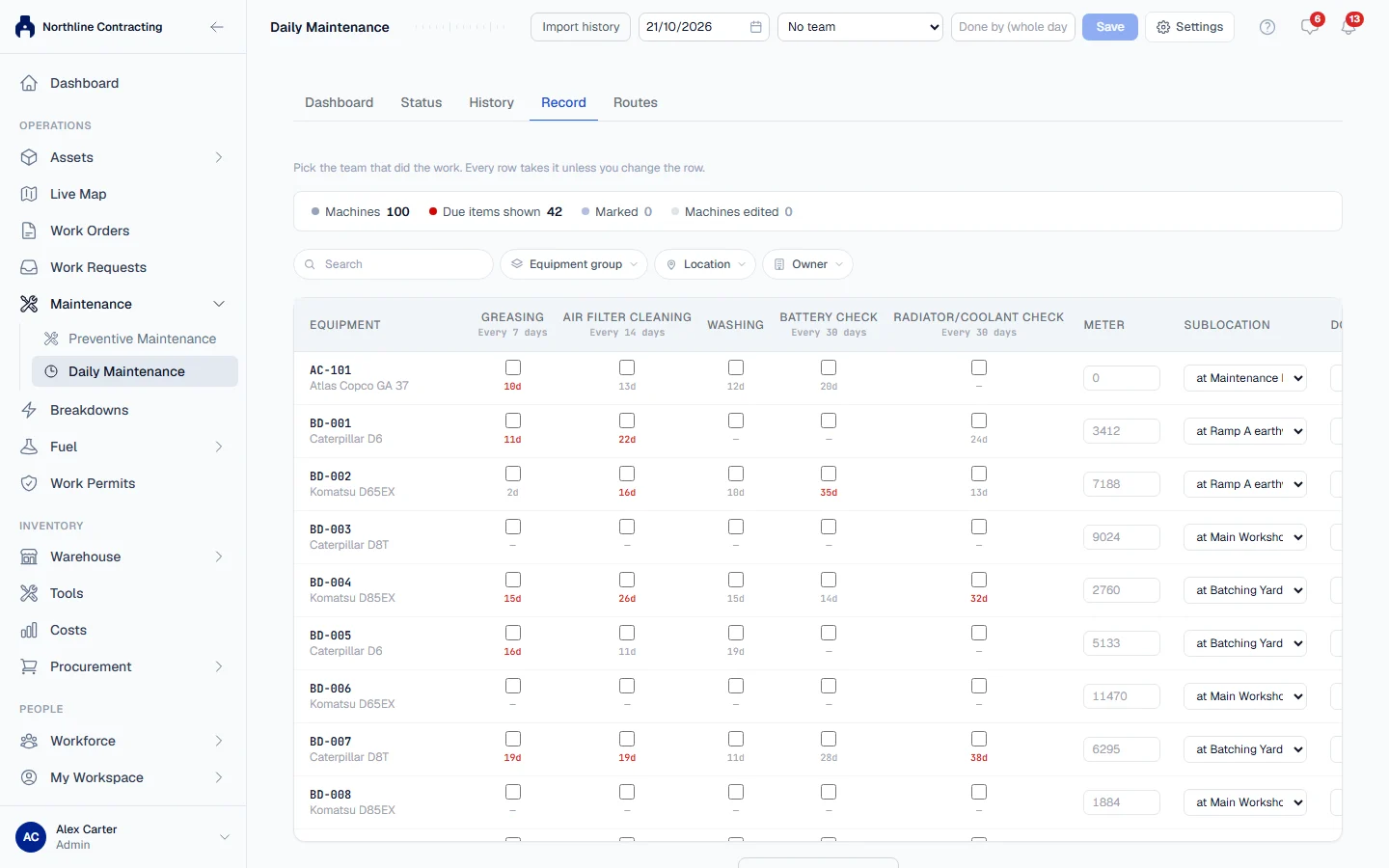
Each row takes the date, team and Done by from the top unless you change that row.
What you can record per machine
| Column | Notes |
|---|---|
| Meter | The hour meter or odometer reading when the work was done. Optional: leave it blank if nobody looked. A machine recorded as having no meter has no box. |
| Sublocation | Where the work was done, chosen from your Sublocations. Optional. |
| Done by, Note | Who did it, if not the whole-day name, and any remark. |
A meter reading is also added to the machine's meter history, once per machine. Choosing a place records that the machine was there that day, and moves it there unless it has been seen somewhere else more recently.
Save rules
- All or nothing. If any row has a problem, nothing is saved and the problems are listed so you can fix them and save again.
- Already recorded. If a job is already on record for the same machine on the same day, Solmex warns you and asks Save anyway? Greasing twice in one day is unusual but real, so you decide.
- Meter readings. A reading dated today that is lower than the machine's current meter is held for you to confirm. For an earlier date, a reading that contradicts readings already recorded before and after it is refused.
- Edited machines stay in the batch. After a filter change, a banner names edited machines no longer on screen. Saving still includes them.
Dates you can use
The Record tab accepts today and up to 7 days back. Future dates are refused.
For older work, use Log Work on the machine's page (below), or bring a whole logbook in at once with Import routine maintenance history.
Undo your last save
After saving, a banner says "Your last submission (... entries) can still be taken back." Click Undo to remove the whole batch, including any meter readings it recorded.
You can undo only your own most recent save, for 15 minutes. If someone has recorded a newer meter reading on one of those machines since, the undo is refused, because removing a reading underneath a later one would leave the meter history wrong.
Log one job from the machine's page
- Open the machine and click the Prev. Maintenance tab.
- In the Routine Maintenance card, click Log Work.
- Choose the job in Work done, set the Date, and fill in the optional meter readings, Sublocation, Done by and notes.
- Click Log.
This form accepts any past date.
Withdraw an entry recorded by mistake
Use Withdraw on the History tab, or on the machine's Routine Maintenance card. See Daily Maintenance history.
Troubleshooting
| What you see | What to do |
|---|---|
| "Nothing was saved. Fix the rows below and save again." | Correct each listed row, then click Save again. |
| "The entry grid accepts dates up to 7 days back." | Log older work on the machine's page or import it from a spreadsheet. |
| "Routine maintenance cannot be dated in the future" | Choose today or an earlier date. |
| "This machine is recorded as having no meter, so no reading can be taken." | Leave the meter blank, or correct the machine's meters on its record. |
| "Team '...' is archived and cannot be picked for new work" | Choose an active team, or restore the team. |