
Daily Fuel Entry
Log the day's fill-ups for many machines on one screen and save them together, with a station, attendant and time that apply to every row.
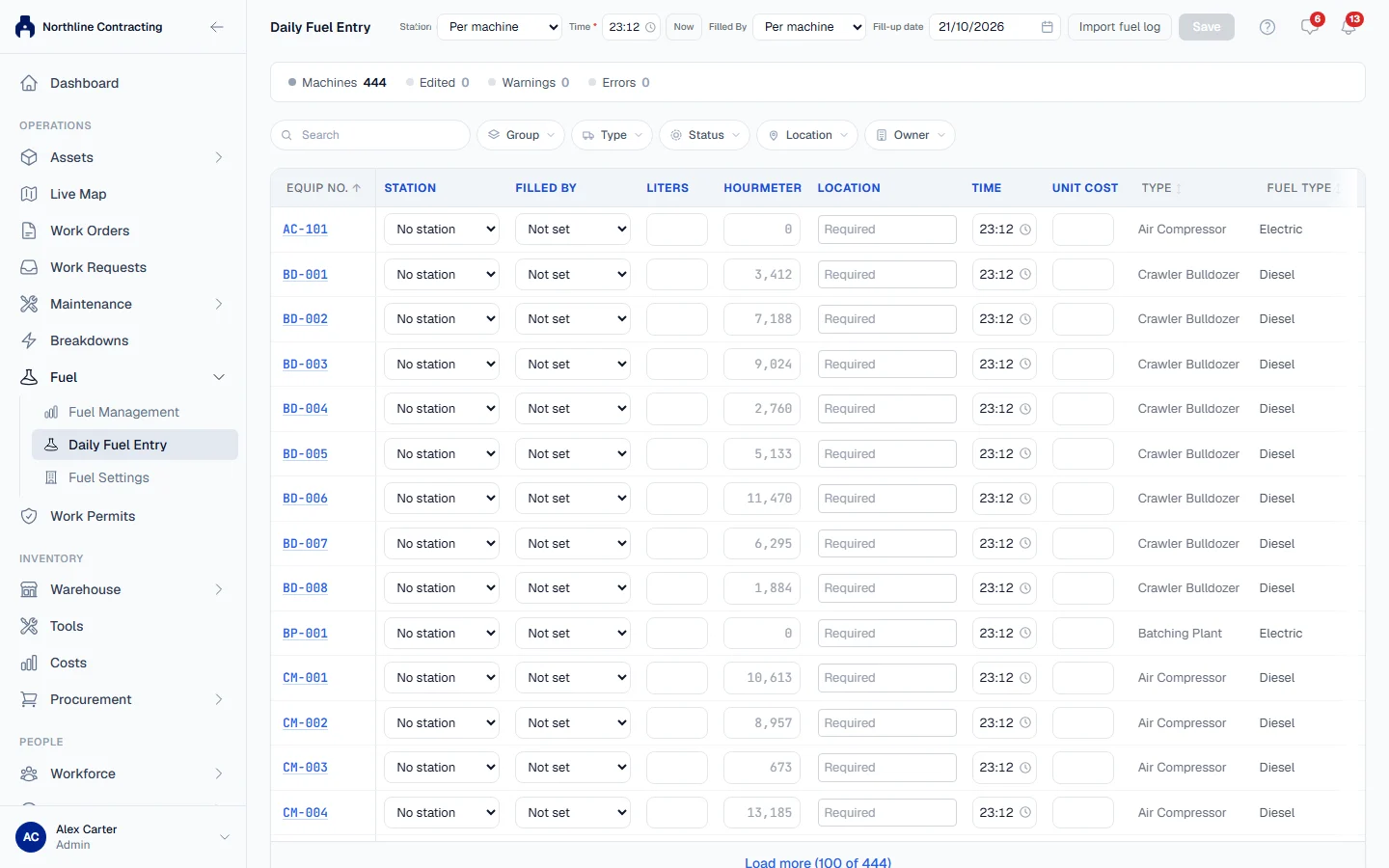
Daily Fuel Entry logs a whole round of fill-ups at once, such as a bowser driver's sheet or a morning of receipts. Every machine is a row; you fill in the ones you fuelled and save them together.
Before you start
- You need Fuel: View to open the page and Fuel: Edit to save. Without Fuel: Edit the page tells you that you have read-only access.
- At least one fuel station and one fuel attendant must exist. See Fuel stations and attendants.
Set up the round
In the sidebar, open Fuel > Daily Fuel Entry. The header holds the settings that apply to the whole round:
| Setting | What it does |
|---|---|
| Station | The station for every row that has not chosen its own. Leave it on Per machine to choose on each row. |
| Time | The time for every row that has not chosen its own. It starts at the current time; Now sets it back to now. |
| Filled By | The attendant for every row that has not chosen its own. |
| Fill-up date | The date of every fill-up in this save. |
Use the filters above the table to narrow the list by Group, Type, Status, Location or Owner, or search by number. By default only machines that are on site are listed.
Log the fill-ups
- Find a machine you fuelled and type the Liters on its row.
- Type a reading for each meter the machine carries, under Hourmeter and Odometer. The grey number in the cell is the current reading, for reference.
- Choose the Location: the Sublocation where the machine was fuelled.
- Check the Unit Cost. See the next section for how it is filled in.
- Change Station, Filled By or Time on the row only if this machine differs from the round.
- Repeat for every machine you fuelled. The counters above the table show how many rows you have Edited, and how many Warnings and Errors there are.
- Click Save N Fill-ups.
A cell turns red when something must be fixed and amber when something is unusual. Hover over a cell to read why. Rows you have not touched are ignored; a blank row is never saved as zero.
How the unit cost is filled in
The Unit Cost on each row is filled in this order:
- what you typed on that row
- otherwise, the first cost you typed anywhere in this round
- otherwise, the price per litre of the row's station, if the station has one
So when every machine was filled from one bowser at one price, type the cost once and it carries to every other row.
Warnings and errors
Errors stop the save. A missing liters, meter reading, station, attendant, Sublocation, time or unit cost is an error. So is a date beyond the backdating limit your company has set.
Warnings ask you to confirm. When you save with warnings, a dialog lists the entries worth a second look. Click Go back and edit to correct them, or Save anyway if they are right. Solmex checks again when you save, and may find warnings the page could not, such as a fill-up far above this machine's usual consumption.
The save is all or nothing. If any row is refused, nothing is saved and the message says "Some entries were refused. Fix the rows below and save again." Fix the rows listed and save again; your typing is kept.
After you save
A message confirms how many fill-ups were saved across how many machines, and the rows clear. Each fill-up appears on its machine's Fuel tab, its meter readings join the machine's meter history, and its cost is posted to Costs.
To take back a save you just made, open the Fuel tab of any machine in it within 15 minutes. See Edit, void or undo a fill-up.
Rules worth knowing
- Discard clears everything you have typed without saving.
- A late round asks for one reason. When the Fill-up date is in the past, a note says so, and if your company requires it, one Reason for late entry covers every row. See Late entries and meter checks.
- Import fuel log in the header brings in a spreadsheet of past fill-ups instead. See Import a fuel log.
- On a phone the page shows one machine at a time as a Fuel round, with Save & next to move down the list.
Troubleshooting
| What you see | What to do |
|---|---|
| "Some entries were refused. Fix the rows below and save again." | Correct each row named in the list, then save again. Nothing was saved. |
| "Station is required." on many rows | Choose a Station in the header to fill every row at once. |
| A message that the date "may only be backdated" a number of days | The date is older than your backdating limit. Ask someone with Fuel: Manage to change it in Fuel Settings if the entries are genuine. |
| "No machines match the current filters" | Clear a filter, or change Status to include machines that are not on site. |
| No save button | Your role does not include Fuel: Edit. |