
Help CenterManaging Purchases and Stock
Receive goods
Record a delivery with a goods receipt: one document for the whole delivery note, however many lines, with prices where you know them and the supplier's invoice attached.
A goods receipt records a delivery arriving in your store. One receipt covers the whole delivery note, however many parts are on it, so the supplier, the invoice and the prices stay together. Posting it adds the stock to the storage location you chose.
Before you start
- You need Warehouse: Edit.
- Every part on the delivery must already be in the catalogue. See Add a part.
- Know which storage location the goods are going into. Parts used on work orders and PMs are issued from each part's put-away location, so each line is put there for you unless you change it.
Post a receipt
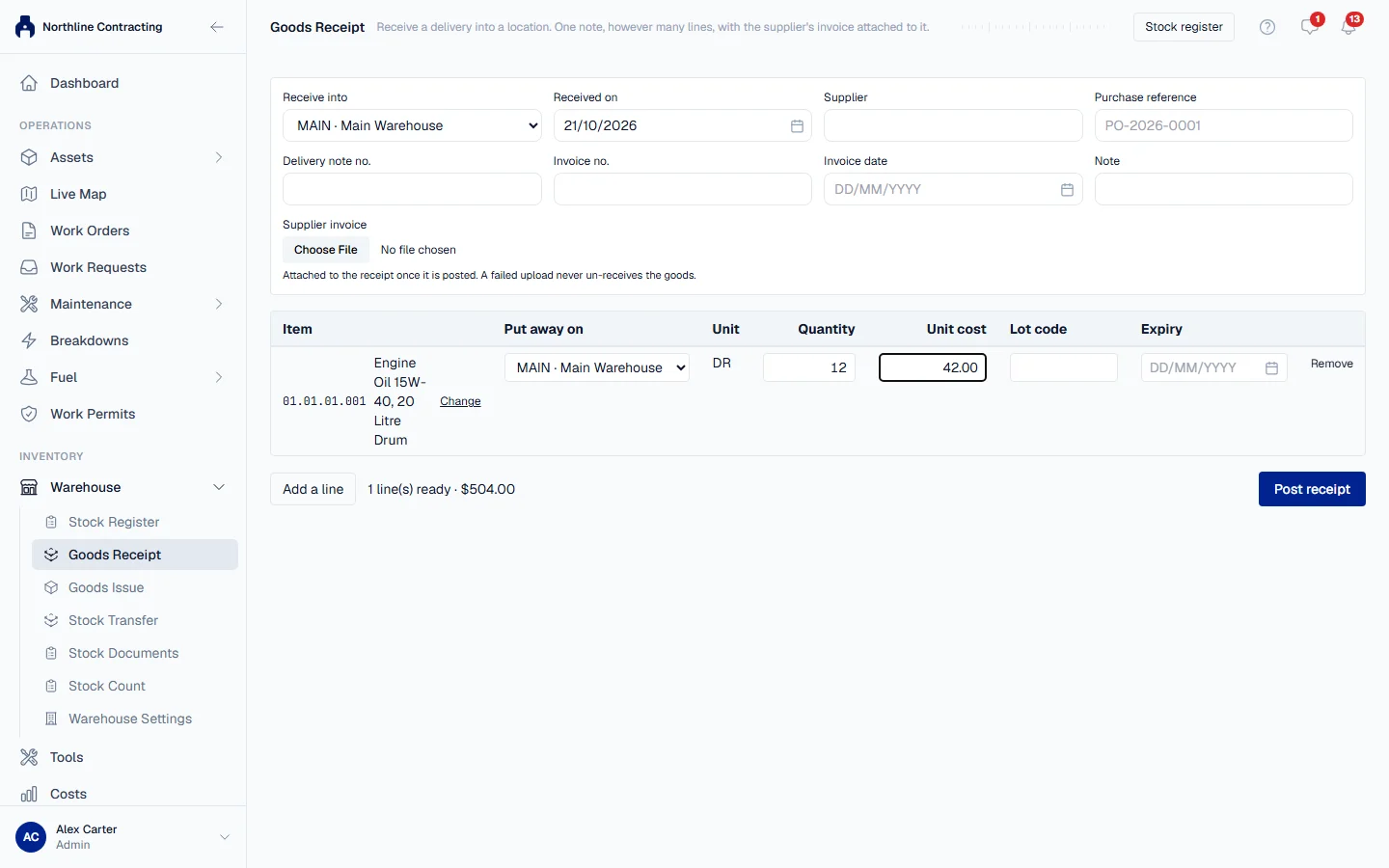
- In the sidebar, open Warehouse > Goods Receipt. To receive one part, you can also expand its row on the Stock Register and click Goods Receipt; that part is placed on the first line for you.
- In Receive into, choose the storage location for the delivery. If you have only one store, it is chosen for you. A line whose part has no put-away location goes here.
- Check Received on. It defaults to today and cannot be a future date.
- Fill in what you have from the paperwork: Supplier, Purchase reference, Delivery note no., Invoice no., Invoice date and a Note. All are optional.
- To attach the supplier's invoice, choose the file under Supplier invoice.
- On the first line, search the Item by stock code or description and pick it. The part's Unit is filled in, and Put away on is set to the part's put-away location. Change it if this delivery is going somewhere else; the line then tells you where jobs issue the part from.
- Enter the Quantity, and the Unit cost if you know it. Add a Lot code and Expiry if the goods carry them.
- Click Add a line for each further part on the delivery.
- Click Post receipt.
A green message gives the receipt's number, such as GRN-2026-0001, with the number of lines and the total quantity, and a link to open the receipt. The In Stock figure on the Stock Register goes up at once.
Open a posted receipt
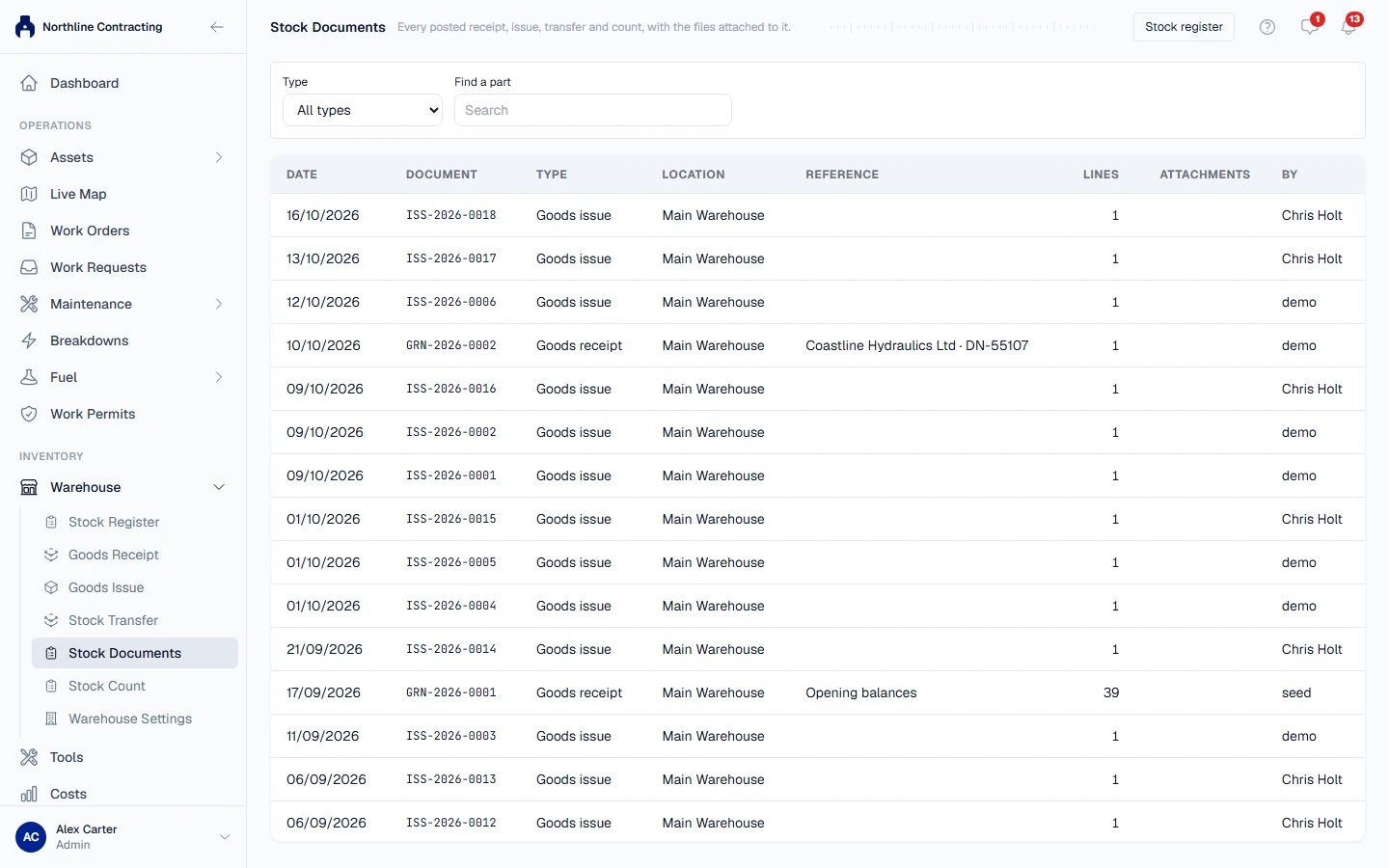
Every posted receipt stays available under Warehouse > Stock Documents. Search by receipt number, supplier, invoice or delivery note, and click the row to see its lines and its attachments. View opens a file and Download saves it. With Warehouse: Edit you can Attach file to add the invoice, a delivery note photo or anything else that belongs with the receipt.
Unpriced lines
Leave Unit cost blank when you do not know the price yet, for example while the invoice is still to come. Before you post, Solmex tells you how many lines have no unit cost.
Rules worth knowing
- The unit cost is per unit of the part, as shown in the Unit column. Enter the price of one piece, not of the box.
- A posted receipt cannot be edited. If a quantity was wrong, correct the shelf with a stock count.
- Each line goes on its own shelf. One receipt can put lines on different storage locations, so a delivery for several racks is still one document with one invoice.
- Prices are in your company's base currency. Receipts priced in another currency are not supported.
- If the invoice upload fails, the goods are still received. Solmex tells you so. Open the receipt from Stock Documents and attach the file there; an invoice that arrives after the goods is attached the same way.
- Each delivery keeps its own price. Parts are issued oldest delivery first, at the price that delivery cost. See How spare parts work.
Troubleshooting
| What you see | What to do |
|---|---|
| "You do not have permission to receive stock." | Ask an administrator for Warehouse: Edit. |
| Post receipt stays greyed out | Choose a location in Receive into, and give at least one line a part and a quantity above zero. |
| "... is archived and cannot receive stock" | Choose an active storage location, or restore that one on the Warehouse Setup tab. |
| "... is inactive and cannot be received" | The part has been made inactive. Use an active part. |
| "A stock document cannot be dated in the future" | Change Received on to today or earlier. |
| "The stock was received, but the invoice upload failed..." | The receipt is posted; do not post it again. Open it from Stock Documents and attach the invoice there. |
| A part is not found in the Item search | Type at least two characters. If it is still missing, add it to the catalogue first. |