
Mount one machine on another
Record that a bucket, breaker or other attachment is fitted to a host machine, detach it when it comes off, and see where it has been.
Buckets, hydraulic breakers, augers and similar equipment move from machine to machine. In Solmex each of them is an ordinary machine on the Equipment Register with its own record, and the Attachments tab records which host it is fitted to and for how long.
Before you start
- Both machines must already be on the register. To add the attachment itself, see Add equipment. For a breaker or bucket, No meter fitted and fuel type None: not fuel-powered are usually the right answers.
- You need Equipment: View to see the Attachments tab, and Equipment: Edit to attach or detach.
Attach equipment to a host
- In the sidebar, open Assets > Equipment and open the host machine, the one the attachment is fitted to.
- Open the Attachments tab.
- Click + Attach Equipment.
- Under Equipment to Attach, search by number, type or brand, and pick the attachment from the list.
- Choose the Relationship Type: Attachment, Tool, Component or Temporary Mount.
- Click Attach.
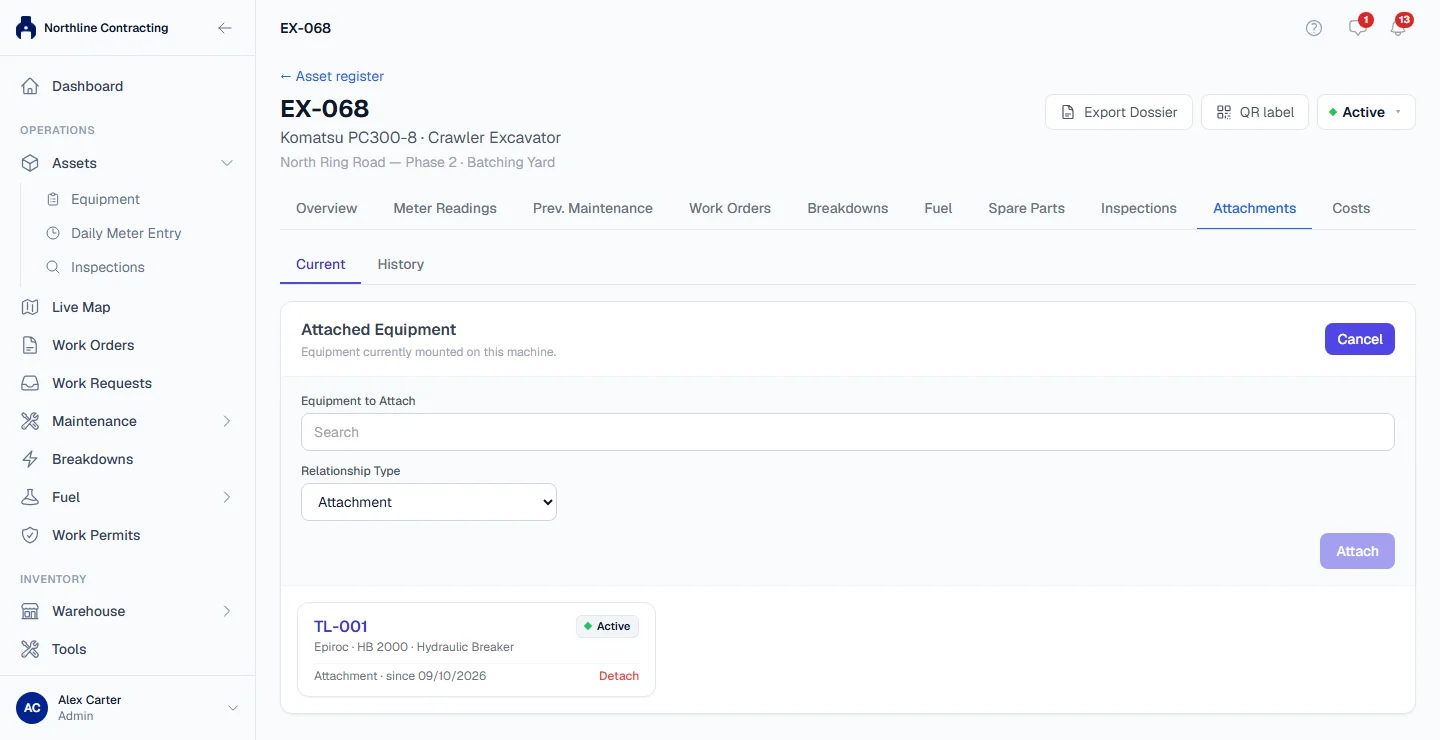
The attachment appears under Attached Equipment with its type and the date it was fitted ("Attachment · since 12/10/2026"). Click its number to open its own record.
On the attachment's own Attachments tab, a banner now reads "Currently mounted on" followed by the host's number, so whoever opens either record sees the link.
Detach it
- Open the host machine's Attachments tab.
- On the attachment's row, click Detach and confirm Detach this equipment?
The attachment leaves Attached Equipment and is free to be mounted on another machine.
See where a machine has been
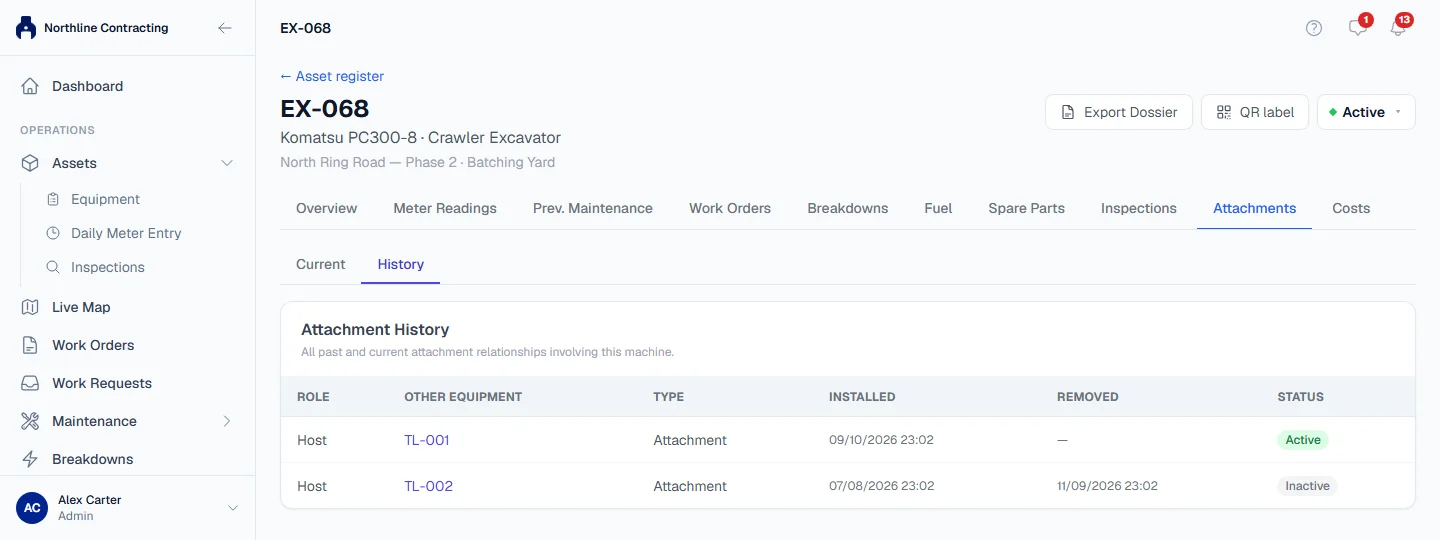
Open the Attachments tab and press History. The Attachment History table lists every link this machine has ever had, both as a host and as an attachment:
| Column | Shows |
|---|---|
| Role | Host when this machine carried the other, Attachment when it was carried. |
| Other Equipment | The machine on the other side of the link. |
| Type | The relationship type chosen when it was attached. |
| Installed / Removed | When the link started and ended. |
| Status | Active while it is mounted, Inactive after it was detached. |
Rules worth knowing
- One host at a time. An attachment can be mounted on only one machine at once. Detach it from its current host before attaching it elsewhere.
- No loops. A machine cannot be attached to itself, and you cannot attach a host to something that is already mounted on it.
- Detaching keeps the history. The link is closed with the date it ended, never deleted, so you can always see which breaker was on which excavator last month.
- Each machine keeps its own record. Mounting does not merge anything: the attachment keeps its own status, meters, documents, photos and maintenance.
- Disposed machines cannot be linked. A machine that has been disposed of cannot be attached or receive an attachment. A machine that carries an attachment, or is mounted on a host, cannot be disposed of until the link is detached.
Troubleshooting
| What you see | What to do |
|---|---|
| "Equipment is already attached to another machine" | Open the attachment, follow the Currently mounted on link to its host, and detach it there first. |
| "This would create a circular attachment relationship" | The machine you chose is already carrying the host, directly or through another machine. Check the chain on the History tab. |
| "Equipment cannot be attached to itself" | Choose a different machine. |
| A message saying the machine "was disposed of" and you cannot attach it | Reinstate the machine first if it was disposed of by mistake. |
| "No matching equipment found" | Check the number. The machine may not be on the register yet. |
| No + Attach Equipment or Detach buttons | Your role does not include Equipment: Edit. |