
Delete a machine registered by mistake
Permanently remove a machine that should never have been registered, such as a duplicate or a mistyped number. Only possible while the machine has no records.
Machines in Solmex are not normally deleted: one that leaves your site changes status, or is disposed of. Deleting exists for the other case, a machine that should never have been on the register at all, such as a duplicate row, a mistyped number or a test entry.
Before you start
- You need Equipment: Delete. This permission is given to administrator roles to begin with; an administrator can add it to other roles. Without it, the delete option is not shown.
- The machine must have no records attached. If it has any, Solmex refuses and lists them.
- If the machine is real and has simply left, do not delete it. Change its status, or dispose of it.
Delete the machine
- Open the machine's page and stay on the Overview tab.
- Scroll to the bottom. Beside "Registered this machine by mistake? It can be deleted while it has no records.", click Delete equipment.
- Solmex checks the machine for records.
- If none are found, read the explanation, then type the equipment number exactly as shown under Type EX-001 to confirm (with your machine's number).
- Click Delete permanently.
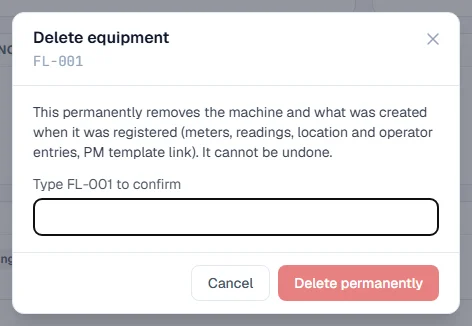
The machine is removed and you return to the Equipment Register. This cannot be undone.
What is deleted with it
Deleting removes the machine and what was created when it was registered:
- its meters and meter readings,
- its location and operator entries,
- its link to a PM template, and any imported last-PM figures,
- its tracking meters, and attachment links that have already ended.
What stops a delete
Any record of something that happened stops the delete. The window lists each kind with a count, under "This machine has records attached, so it cannot be deleted:". They include:
| Kind of record | What it covers |
|---|---|
| Work orders, work records, work requests | Work raised for the machine. |
| Breakdowns, inspections, inspection findings | Faults and checks. |
| PM completions, maintenance schedules, routine maintenance | Services and routine work. |
| Fuel entries, cost entries | What it used and cost. |
| Spare parts, parts fitted, stock documents and movements | Parts issued or fitted. |
| Work permits | Permits naming the machine. |
| Documents and photos | Files filed on the machine. |
| GPS trackers and positions | Tracking history. |
| Active attachments | Equipment still mounted. |
Troubleshooting
| What you see | What to do |
|---|---|
| No Delete equipment button at the bottom of the Overview tab | Your role does not include Equipment: Delete. |
| "This machine has records attached, so it cannot be deleted:" | The machine has history. If it has left your site, dispose of it or change its status instead. |
| Delete permanently stays greyed out | The number you typed does not match the equipment number exactly. Check capitals, spaces and dashes. |
| "Could not check this machine's records." | Check your connection and open the window again. |
| "Could not delete this machine." | Try again. If it repeats, a record may have been added since the check; close the window and open it again to see the list. |