
The Work Orders list
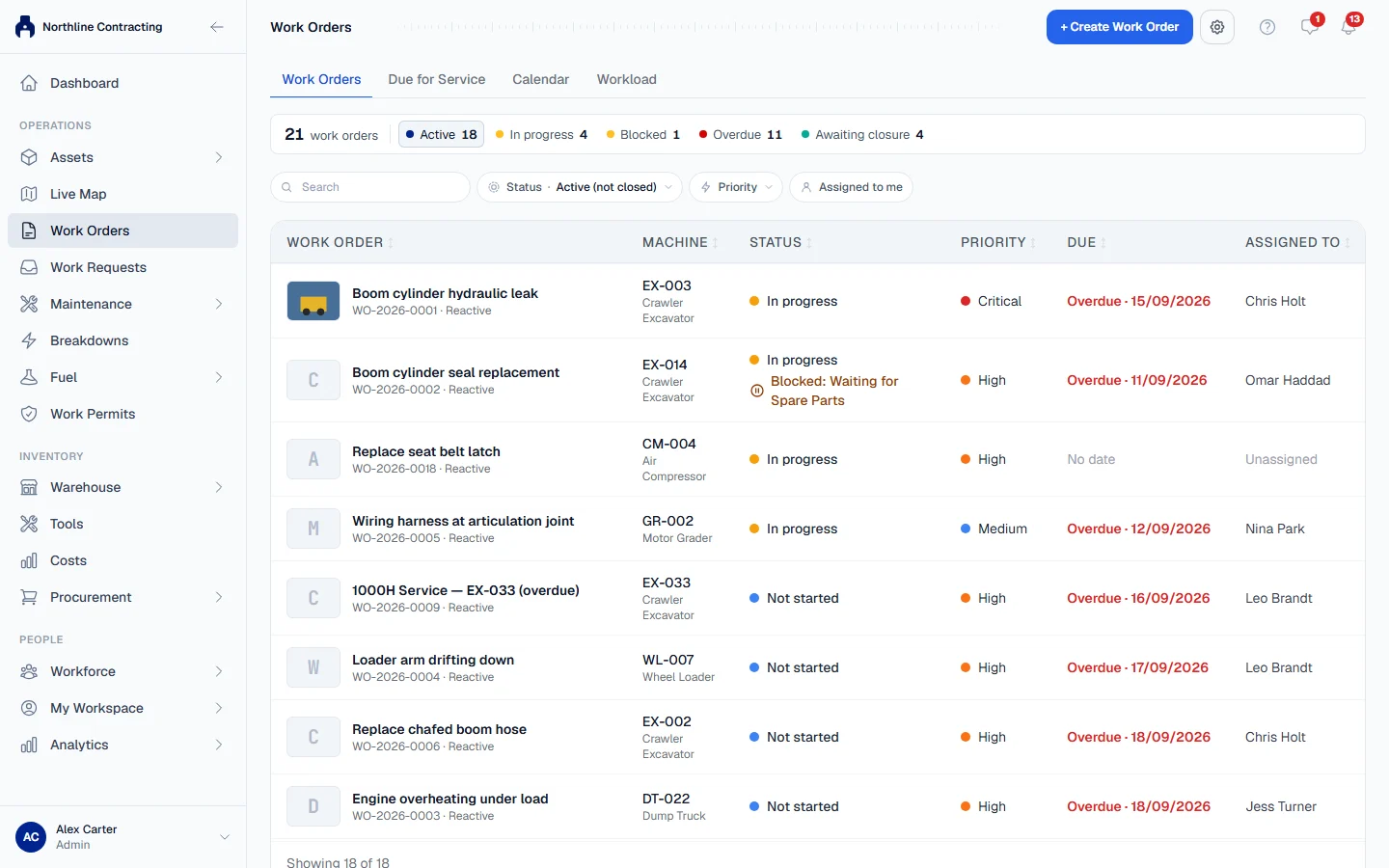
Find work orders with search, status, priority and Assigned to me filters, read the figures across the top, and understand the order the list is sorted in.
The Work Orders tab is the first tab of the Work Orders page. It lists every job somebody raised, most urgent first, and every row opens its work order. The other three tabs are covered in Due for Service, Calendar and Workload.
Before you start
- You need Work Orders: View to open the Work Orders page and see the jobs on it.
- The other three tabs (Due for Service, Calendar and Workload) need Maintenance Planning: View, which is on the Growth and Business plans. Without it the page shows the Work Orders tab alone.
Read the list
Open Work Orders in the sidebar. Each row shows the Work order (number and title), the Machine, Status, Priority, Due and Assigned to. A job past its due date shows Overdue in red beside the date, and a blocked job shows a "Blocked" line under its status.
On a phone, each work order is a card with the same information.
The order of the list
The list opens sorted by urgency:
- Jobs In progress first, then Not started, then Finished, awaiting closure.
- Within each, Critical priority first, down to Low.
- Then the earliest due date first. Jobs with no due date come last.
Click a column heading to sort by that column instead.
The figures across the top
The first figure counts every work order ever raised. The others are filters: click one to show those jobs, and click it again to go back.
| Figure | Counts |
|---|---|
| Active | Jobs not yet closed or cancelled. |
| In progress | Jobs where work has started. |
| Blocked | Active jobs with a blocker set. |
| Overdue | Jobs not started or in progress whose due date has passed. |
| Awaiting closure | Jobs finished and signed off, waiting for a supervisor to close them. |
On a phone only the number of work orders in the list is shown; use the Status filter instead.
Filter and search
| Control | What it does |
|---|---|
| Search | Finds a work order by number, title or machine. |
| Status | Active (not closed) (the default), Overdue, Not started, In progress, Blocked, Finished, awaiting closure, Closed, Cancelled or All. |
| Priority | One priority only. |
| Assigned to me | Only the jobs assigned to you. |
Clear all filters with the clear button in the filter bar. The list loads 50 jobs at a time; click Show more to load the next 50.
Rules worth knowing
- Overdue counts only work that has not been done. A finished job waiting to be closed is late paperwork, not late work, so it is never counted as overdue.
- A machine's own work orders are also listed on the Work Orders tab of its page.
Troubleshooting
| What you see | What to do |
|---|---|
| "No work orders match these filters." | Clear the filters, or set Status to All. |
| "No work orders yet. Press “Create Work Order” to raise the first one." | Nothing has been raised yet. See Create a work order. |
| "Could not load work orders." | Check your connection and reload the page. |
| Work Orders is missing from the sidebar | Your role does not include Work Orders: View. Ask your administrator. |