
An import was refused
Why a spreadsheet import saves nothing when one row is wrong, the difference between errors and warnings, and the most common reasons each importer refuses a file.
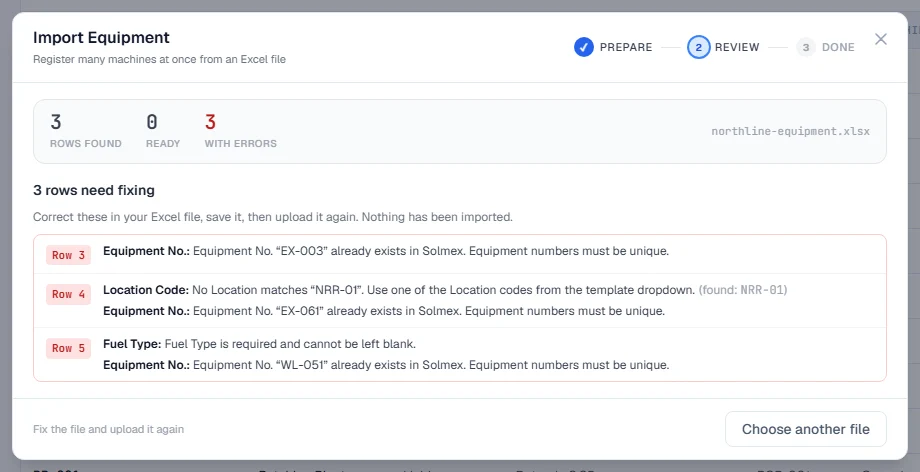
Short answer: every Solmex import is all or nothing. The whole file is checked first, and if any row has an error, nothing is saved. Fix the rows the review names, save the file as .xlsx, and upload it again. Warnings never block on their own, though some importers ask you to confirm you have read them.
Before you upload
- Start from the template. Each importer has a Download template button. Its column names, dropdowns and instructions sheet match what Solmex expects, including your company's own lists of Locations, Sublocations, stations and jobs.
- Save as an Excel workbook (.xlsx). CSV and older
.xlsfiles are refused. - Keep files to 2,000 rows for equipment, fuel logs and employees. Split a longer file into several.
- Write dates day first, as DD/MM/YYYY, or use real Excel dates.
- Add what the file refers to first: the machines, the Sublocations, the fuel stations, the jobs.
Messages common to every importer
| If you see… | What it means | What to do |
|---|---|---|
| "Only .xlsx files can be imported" or "That is not an .xlsx file." | The file is CSV, .xls or another format | In Excel, Save As > Excel Workbook (.xlsx) |
| "Missing required column(s): ..." | A heading was renamed or removed | Download a fresh template and copy your rows into it |
| "No machine in the asset register has the number ..." | The machine is not registered, or is spelled differently | Check the spelling against the register, or add the machine first |
| "The file is no longer valid: nothing was imported" | Something changed between the check and your confirmation | Upload the file again |
| "Something changed while you were reviewing, so nothing was recorded." | Someone recorded data meanwhile | Check the rows again and confirm |
Equipment
| If you see… | What to do |
|---|---|
| An error naming the row, the column and the fix | Correct that cell in Excel and upload again |
| "{n} machines have no Equipment Group" | Not an error. They import, but will not appear under a group filter |
The example row EXAMPLE-001 is skipped. See Import your equipment.
Fuel log
| If you see… | What to do |
|---|---|
| "This file cannot be imported as it stands" | A whole-file problem, such as a missing required column or a date column read month first. Correct the file |
| "Every row in this file is already on record" | The file was imported before. There is nothing new to record |
| "The import failed and nothing was recorded." | Try again. If the file is large, split it |
Errors include a meter going backwards or moving faster than a machine can run, the same fill-up twice, an unknown station, and a number such as 1.250 that could be a thousand or a decimal. Rows older than your backdating limit are refused too. Use Download the file with problems marked to get your file back with each problem beside its row. See Import a fuel log.
Last PM
| If you see… | What to do |
|---|---|
| "This row states nothing about the last PM." | Give hours, kilometres or a date, or delete the row |
| "... is already on row ... of this file." | Keep one of the two rows |
| "... already has a PM logged in Solmex, which has replaced the imported starting point for good." | Correct the logged PM instead |
| "Nothing would change" | Every machine already has this last PM, or a logged PM |
See Import last PM.
Routine maintenance history
| If you see… | What to do |
|---|---|
| "... is not one of this site's jobs." | Add the job, or add the spelling as one of its other spellings |
| "... has been archived from the job list" | Restore the job, or use another |
| "Date Performed is not a valid date." | Use a real Excel date, or type day/month/year |
| "No Sublocation named ... is registered." | Leave it blank, or add the Sublocation first |
See Import routine maintenance history.
Employees and site plans
| If you see… | What to do |
|---|---|
| "Could not find 'First Name' and 'Last Name' columns in the file header row" | Put those two headings in the first row. See Add and manage employees |
| "The import failed. Nothing was written." (KMZ) | Fix the problems in the review and click Check file again. See Create a site plan |