
Dashboard widgets
What each dashboard widget shows, where its figures come from and the permission you need to see it.
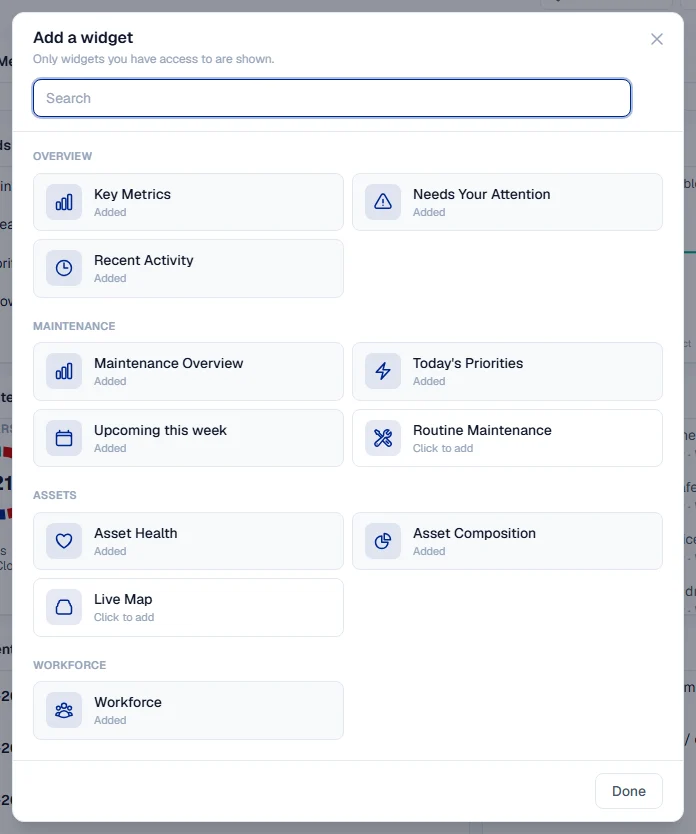
This is the reference for every widget you can put on your dashboard. Use it to decide what to add, and to understand a figure before you act on it. To add, move or hide widgets, see The dashboard.
Before you start
- A widget appears in Add a widget only when your role can read the module behind it. The table below names the permission.
- A widget for a module your plan does not include is not offered either. See Plans, the free trial and seats.
The widgets
| Widget | Category | What it shows | You need |
|---|---|---|---|
| Key Metrics | Overview | A strip of headline figures: Due PM, Open Work Orders, Breakdowns, Asset Availability, Low Stock Parts and Critical Alerts. Each tile you can read appears. | Any one of Maintenance Planning: View, Breakdowns: View, Equipment: View or Warehouse: View |
| Needs Your Attention | Overview | Counts that want action: Overdue PMs, Overdue inspections, Active breakdowns, High-priority work orders and Parts below min stock. Shows All clear. when there is nothing. | Maintenance Planning: View, Breakdowns: View or Warehouse: View |
| Recent Activity | Overview | The latest changes in records you are allowed to see, newest first. | Nothing extra |
| Asset Health | Assets | A ring with your asset availability, and counts for Total, Available, Repair and Off Site, with a chart of Availability, last 14 days. | Equipment: View |
| Asset Composition | Assets | A ring of your machines by equipment group, each with its count and status split. | Equipment: View |
| Live Map | Assets | Each Location with a site plan, how many machines are drawn on it and how many are down. | Live Map: View, where your company has Live Map |
| Maintenance Overview | Maintenance | Three small charts: Work Orders, Preventive Maintenance and Breakdowns by status. | Work Orders: View, Maintenance Planning: View or Breakdowns: View |
| Today's Priorities | Maintenance | The individual jobs to deal with today: breakdowns (with how many days down), overdue PMs, overdue inspections and high-priority work orders. | Maintenance Planning: View or Breakdowns: View |
| Upcoming this week | Maintenance | The next seven days of scheduled work, one column a day. | Maintenance Planning: View |
| Routine Maintenance | Maintenance | Routine jobs Overdue and Due soon, the Machines affected and the most overdue machines. | Routine Maintenance: View |
| Fuel Overview | Fuel | Liters and cost over the last 30 days, the average per month and the average price per liter, with a chart of daily liters. | Fuel: View |
| Low Stock | Warehouse | Parts at or below their minimum stock, with Out marking those at zero. | Warehouse: View |
| Tools | Tools | Tools Assigned, Available, In maintenance and Lost, plus Calibration due and Overdue returns. | Tools: View |
| Workforce | Workforce | Active workforce, On leave today, Pending approvals and Today's timesheets. | Employees: View, Leave: Approve or Timesheets: View |
| Work Permits | Safety | Permits Active, Expiring today, Expiring soon, Pending approval and Recently closed. | Work Permits: View |
Notes on some figures
Key Metrics

- Asset Availability is the share of your on-site machines that are not down. On site means Active, Standby, Breakdown, Maintenance or Mobilizing. Down means Breakdown or Maintenance. So a machine on Standby or Mobilizing counts as available, and one in Breakdown or Maintenance does not. Machines that are Demobilized, Transferred, off hire from a rental or disposed are not counted at all. The Asset Health ring and the Breakdown Status Report use exactly the same figure. Hover over the figure to read the definition. See Equipment statuses.
- Critical Alerts adds up overdue PMs, active breakdowns, high-priority work orders and low stock parts you can see.
- A small arrow with a number under a tile, such as +2, compares today's figure with yesterday's. It appears only when the figure moved, and only on the dashboard for all Locations.
Asset Health and Asset Composition
- The percentage in the Asset Health ring is Asset Availability, worked out as described under Key Metrics, so the two always agree. Available counts machines that are Active or Standby; machines that are Mobilizing are not in that count but are still available in the percentage, because a machine on its way to site is not broken down.
- Off Site groups machines that are Demobilized, Transferred or off hire. Repair groups machines in Breakdown or Maintenance.
- In Asset Composition, machines with no equipment group have their own grey slice, No equipment group assigned, so the ring always adds up to your total. Beyond seven groups, the smaller ones are folded into one Other slice. Show as table lists every group with its share.
- The 14-day chart builds up one day at a time. On a new account it reads Trend builds up day by day.
Fuel Overview
- Cost comes from your Costs records, so a fill-up logged without a price adds liters but no cost.
- Where your company's currency is not US dollars, the widget shows US dollars by default. The currency button in its header switches between the two. This changes only how the figures are shown, never the records. See Read the Cost Ledger.
Routine Maintenance
A machine and job that has never been recorded is not overdue: it is "not tracked yet", and the widget says how many such pairs there are. See What is daily maintenance.
Troubleshooting
| What you see | What to do |
|---|---|
| Trend builds up day by day | The availability chart needs a few days of history. It fills in on its own. |
| No fuel logged yet | No fill-ups were recorded in the last 30 days. See Log a fill-up. |
| No Location has a site plan yet. | Nobody has drawn a site plan. See Create a site plan. |
| A tile shows a dash | The figure could not be worked out, for example there are no on-site machines to measure availability against. |