
Import each machine's last PM
Tell Solmex where each machine is in its service cycle from one spreadsheet, and how an administrator edits one machine's imported last PM afterwards.
Machines already in service have been serviced before. If Solmex does not know when, it schedules them as though they were never serviced, and they can all show up at once as due. Import last PM gives every machine its starting point from one spreadsheet.
Before you start
- You need Preventive Maintenance: Edit to import. The button is on the Assign tab, which also needs Preventive Maintenance: Assign.
- The machines must already be on the Equipment Register.
- For each machine, have the meter reading at its last service, in hours, kilometres or both. The date is optional.
Import the file
- In the sidebar, open Maintenance > Preventive Maintenance and choose the Assign tab.
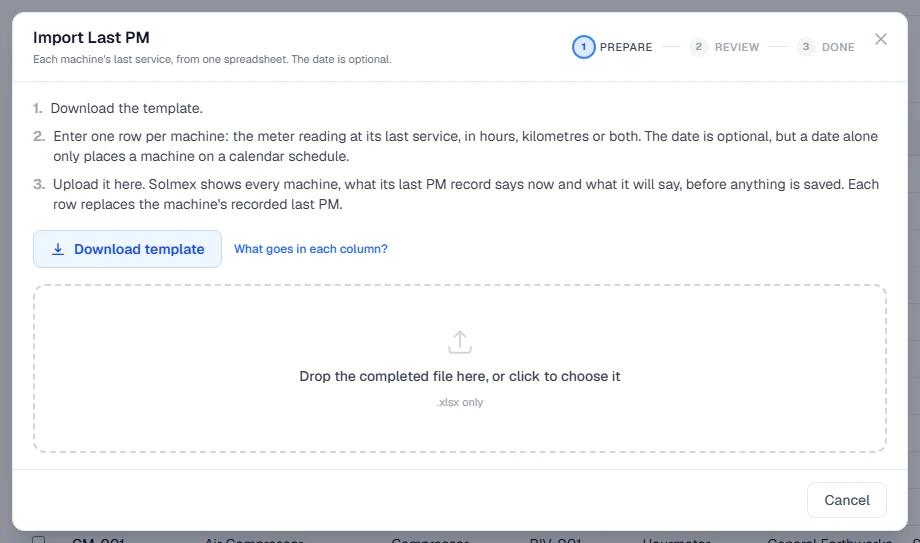
- Click Import last PM. The Import Last PM window opens.
- Click Download template. Click What goes in each column? to read the field guide.
- Fill in one row per machine (see the columns below). Save the file as an Excel workbook (.xlsx).
- Drop the file into the window, or click to choose it. Solmex checks the whole file and saves nothing yet.
- Review the rows. Each one shows what the machine's last PM says now, what it will say, and where it Places on schedule. Read any notes under Read before confirming.
- Click Update ... machines.
Their PM schedules now start from the last service you gave.
The columns
| Column | Notes |
|---|---|
| Equipment No. | Required. The machine, written exactly as it appears in the register. Upper and lower case do not matter. |
| Last PM Hours (hrs) | What the hourmeter read at the last service. This places the machine on an hours schedule. |
| Last PM Odometer (km) | What the odometer read at the last service, for machines serviced by kilometres. |
| Last PM Date | Optional. A real Excel date, or written as DD/MM/YYYY. |
A row needs at least one of the hours, the kilometres or the date. Leave a box blank if you do not know it: a blank is never read as zero.
Rules worth knowing
- Each row replaces the machine's last PM record. A box left blank clears that figure. Every figure that will be cleared is named in the review.
- Machines with a PM logged in Solmex are skipped. A logged service has already replaced the imported starting point for good. To fix it, correct that record.
- A machine with no template yet is still saved. Its starting point applies when a template is assigned.
- A reading above the machine's current meter is a warning only. Check the figure, or bring the meter up to date. The row still imports.
- One row per machine. A machine named twice in the file is refused.
- Nothing is saved until you confirm, and nothing is saved if any row has an error.
Edit one machine's imported last PM
An administrator can change one machine's imported starting point without a spreadsheet.
You need Preventive Maintenance: Edit Imported Last PM. By default only administrators have it, because it moves where the machine's whole schedule is measured from with no logged service behind it to check against.
- Open the machine's Prev. Maintenance tab, or the History tab of the Preventive Maintenance page.
- On the row marked Imported last PM, click Edit. The Edit imported last PM window opens.
- Change the Last PM date, Hours at last PM or Kilometres at last PM. A box you clear removes that figure.
- Under Which service was it?, keep Work it out from the reading, or choose the service the reading was.
- In Reason for the change, say why, for example "Customer sent the corrected service sheet".
- Click Save.
"Work it out from the reading" picks the largest service the reading divides into: a last PM at 5,000 hours on a 250, 500 and 1,000 hour template is taken as the 1,000 h service. Choose the service yourself when the sheet says otherwise.
Once a real PM has been logged for the machine, the imported starting point can no longer be edited. Correct the logged record instead.
Troubleshooting
| What you see | What to do |
|---|---|
| "No machine in the asset register has the number ..." | Check the spelling against the Equipment Register. |
| "... is already on row ... of this file." | Keep one of the two rows. |
| "This row states nothing about the last PM." | Give hours, kilometres or a date, or delete the row. |
| "... has no hourmeter recorded." or "... has no odometer recorded." | Leave that column blank, or add the meter on the machine's record first. |
| "... is recorded as having no meter" | Leave the reading blank. A date alone is fine. |
| "A last PM cannot be dated in the future" | Correct the date. |
| "... has been disposed of, so its service schedule is closed." | Remove the row, or reinstate the machine first. |
| "That is not an .xlsx file." | Open it in Excel and save it as an Excel Workbook (.xlsx). |
| "Nothing would change" | Every machine already has this last PM, or has a PM logged in Solmex. |
| "... already has a PM logged in Solmex, which has replaced the imported starting point for good." | Correct the logged record instead. |
| "A reason is required. It is kept with the change." | Fill in Reason for the change. |