
Report a breakdown
Log a machine that has stopped working, with what happened and a photo. The machine's status changes to Breakdown until the breakdown is resolved or cancelled.
A breakdown is the record of a machine that has failed and is out of service. Logging one tells maintenance straight away, starts the clock on how long the machine is down, and marks the machine as unavailable everywhere in Solmex.
Before you start
- You need the Breakdowns: Edit permission. Without it, raise a work request and maintenance can record it as a breakdown.
- The machine must be on your register. See Add equipment.
- A disposed machine cannot have a breakdown logged against it. Reinstate it first if it was disposed of by mistake.
Log a breakdown from the Breakdowns page
Use this when someone tells you a machine has stopped and you do not have its page open.
- In the sidebar, open Breakdowns.
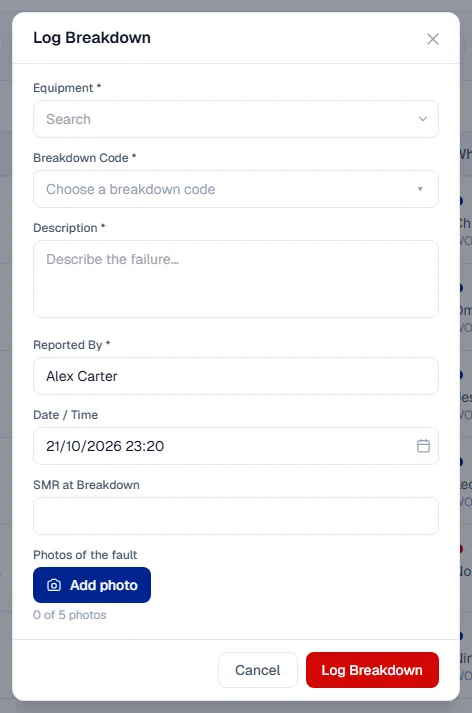
- Click + Add Breakdown. The Log Breakdown form opens.
- Under Equipment, type the machine's number and choose it from the list.
- Choose a Breakdown Code: the kind of failure, such as a hydraulic or electrical fault. Pick the most specific code you can be sure of. A broader one is better than a guess.
- In Description, write what happened in plain words.
- Add up to five Photos of the fault. A photo tells maintenance in a second what a paragraph cannot.
- Check Reported By. It is filled in with your name; change it if you are logging the breakdown for someone else.
- Check Date / Time. It is set to now. Change it if the machine stopped earlier.
- If someone read the hour meter, enter it in SMR at Breakdown. Leave it blank otherwise.
- Click Log Breakdown.
Solmex confirms the new breakdown number, such as BD-2026-0001, with an Open the record link.
Log a breakdown from the machine's page
- Open the machine from Assets > Equipment.
- Open its Breakdowns tab.
- Click Log Breakdown and fill in the same fields as above. The machine is already chosen.
What happens next
- The breakdown is created with the status Open.
- The machine's status changes to Breakdown. You never choose this status by hand: Solmex sets it while the machine has an open breakdown.
- The breakdown appears on the Breakdowns page, waiting for a diagnosis.
Next, maintenance diagnoses the fault and plans the repair. See Work a breakdown through to repair.
Rules worth knowing
- A breakdown code is required. The person reporting a failure is usually looking at the machine, so it is the best moment to say what kind of failure it is. You can change the code later, for example once the real cause is found. See Breakdown codes.
- The reported time cannot be in the future. Every "days down" figure is measured from it.
- A blank meter reading stays blank. It is never recorded as zero, which would read as a meter sitting at zero.
- The machine stays in Breakdown until every open breakdown on it is finished. When the last one is resolved or cancelled, the machine goes back to the status it had before.
If you logged it by mistake
Do not resolve a breakdown that never happened. Cancel it instead, so it does not count as a failure in your reports. See Cancel a breakdown logged in error.
Troubleshooting
| What you see | What to do |
|---|---|
| "Choose the machine that has broken down." | Pick a machine from the Equipment list before you continue. |
| "A breakdown cannot be reported in the future. Check the date and time." | Set Date / Time to now or earlier. |
| "BD-2026-0001 is logged, but 1 photo could not be uploaded. Add it from the breakdown record." | The breakdown was saved. Open it and add the photo on its Evidence tab. |
| "It is not in the list below, because the filters in force do not cover it." | The breakdown was saved, but your filters hide it. Use Open the record, or clear the filters. |
| A message saying the machine was disposed of and you cannot log a breakdown on it | The machine has been disposed of. If that was a mistake, reinstate it from its page first. |
| No + Add Breakdown button, or no Log Breakdown on the machine's Breakdowns tab | You do not have Breakdowns: Edit. Ask your administrator. |