
Correct a breakdown's reported date
Fix the day a breakdown was reported when it was entered or imported with the wrong date. It has its own permission because every downtime figure is measured from that date.
Every "days down" figure for a breakdown is measured from the moment it was reported. When you move existing breakdowns into Solmex, some may come in with the wrong date. This correction fixes the day without touching anything else.
Before you start
- You need the Breakdowns: Correct Report Date permission. At first, only the Admin role has it. An administrator can give it to another role from Settings > Roles.
- Have a short reason ready, such as where the correct date came from.
Correct the date
- Open the breakdown from the Breakdowns page.
- In the Details panel, find Reported At and click the pencil beside the date.
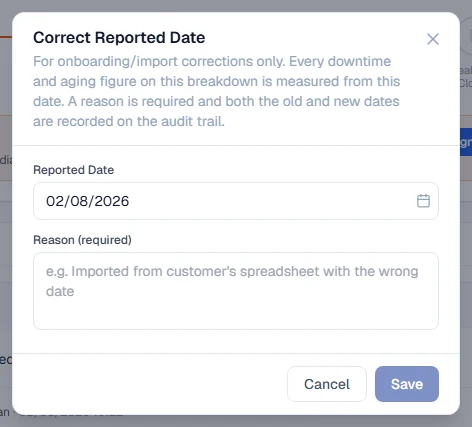
- In Correct Reported Date, choose the correct Reported Date.
- In Reason (required), say why, for example "Imported from customer's spreadsheet with the wrong date". At least three characters.
- Click Save.
What happens next
- Only the day changes. The time of day already recorded is kept.
- The breakdown's days down, age band and every report that uses it are worked out again from the new date.
- The change is written to the breakdown's Activity tab with the old date, the new date and your reason, and to the audit log.
Rules worth knowing
- It works on finished breakdowns too. Imported history is usually already resolved, so the correction is allowed on resolved and cancelled breakdowns.
- The date must make sense. It cannot be in the future, after the diagnosis date, or after the resolved date.
- It is meant for corrections, not routine edits. For a breakdown being logged now, set the right Date / Time on the form instead. See Report a breakdown.
Troubleshooting
| What you see | What to do |
|---|---|
| No pencil beside Reported At | You do not have Breakdowns: Correct Report Date. Ask your administrator. |
| Save cannot be clicked | Choose a date and write a reason of at least three characters. |
| "That is already the reported date" | The breakdown already has that date. Nothing to change. |
| "Reported date cannot be in the future" | Choose today or an earlier date. |
| "Reported date cannot be after the diagnosis date" | Choose a date on or before the day the breakdown was diagnosed. |
| "Reported date cannot be after the resolved date" | Choose a date on or before the day it was resolved. |