
A machine's Costs tab
See what one machine has cost over its life, this year and this month, broken down by category, with its most recent cost entries.
The Costs tab on a machine's page answers "what has this machine cost us?" at a glance. It reads the Cost Ledger, the single record of every cost in Solmex, and shows only the entries for this machine.
Before you start
- You need Costs: View. Without it, the Costs tab is not shown on the machine's page.
- Figures are in your company's base currency, set under Settings > Company Settings. See Set up your company.
Open the tab
- In the sidebar, open Assets > Equipment and open the machine.
- Open the Costs tab.
What it shows
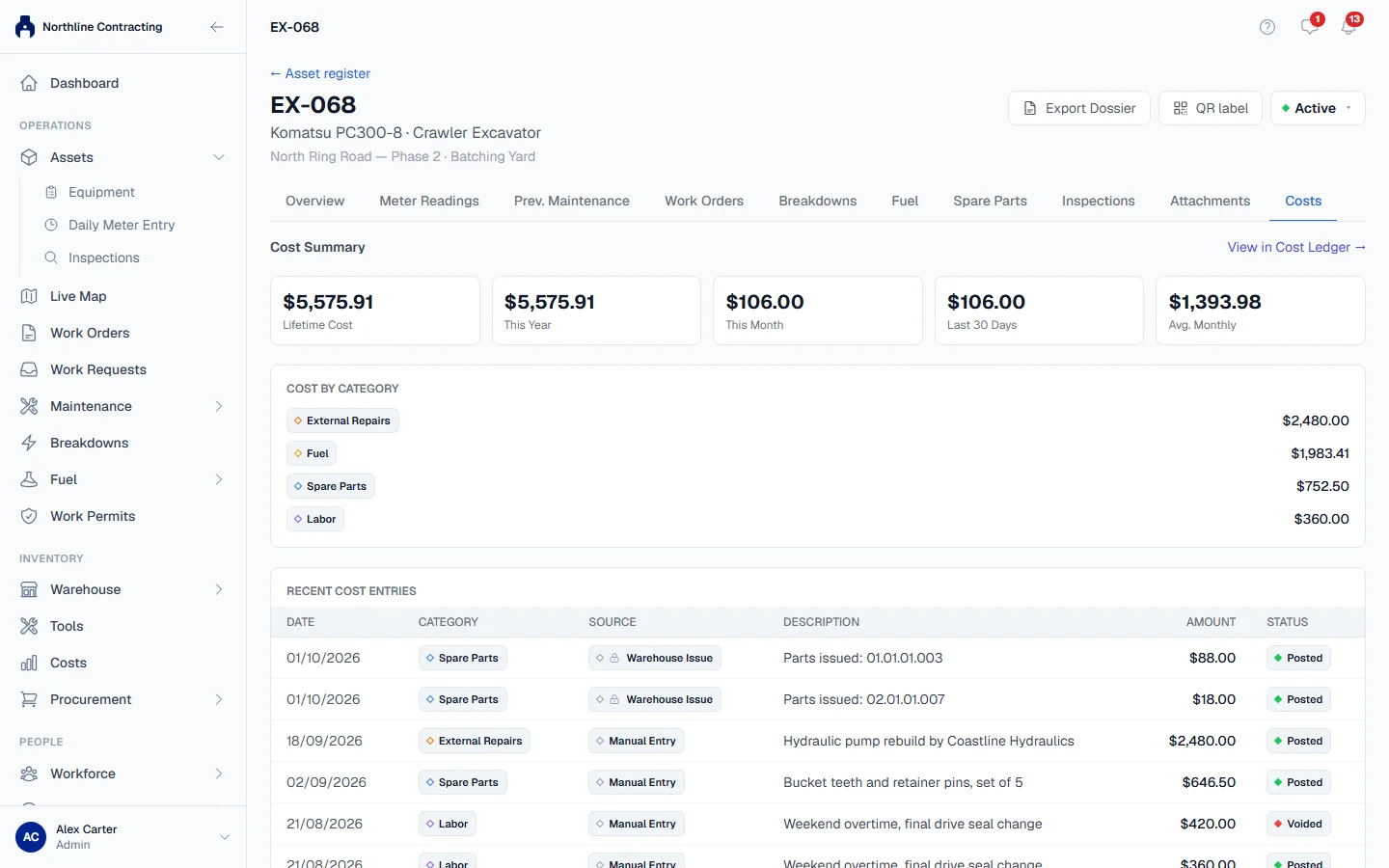
Cost Summary
| Figure | What it is |
|---|---|
| Lifetime Cost | Every cost ever recorded against the machine. |
| This Year | Costs dated from 1 January of this year. |
| This Month | Costs dated from the first day of this month. |
| Last 30 Days | Costs dated within the last 30 days. |
| Avg. Monthly | The lifetime cost divided by the number of months since the first cost was recorded, counting the first and the current month. |
Cost by Category
The lifetime cost split by cost category, such as fuel or parts, largest first. Categories with nothing recorded are not listed.
Recent Cost Entries
The 25 most recent entries for the machine, newest first, with the Date, Category, Source, Description, Amount and Status. The Source says where the cost came from: for example a fuel fill-up, a part issued from the warehouse, or an entry made by hand.
To see every entry, filter or export them, click View in Cost Ledger →. The Cost Ledger opens already filtered to this machine.
Where the costs come from
You do not type most costs on this tab. They arrive on their own when other work is recorded:
- a fuel fill-up logged with a price;
- parts and fluids issued to the machine from the warehouse, including those used on a work order or a PM service;
- costs entered by hand on the Cost Ledger, such as a repair by an outside workshop or a rental charge.
Rules worth knowing
- Voided entries never count. An entry that was voided still appears in Recent Cost Entries, with its status, so you can see it was retracted, but it is left out of every total above.
- A fill-up with no price adds nothing. Fuel logged without a unit cost has no cost to record, so the machine's fuel cost is understated by whatever those fills cost.
- Nothing here can be edited. Corrections are made where the cost was recorded: the fuel entry, the warehouse issue, or the entry on the Cost Ledger.
Troubleshooting
| What you see | What to do |
|---|---|
| "No cost entries recorded for this machine yet." | Nothing with a cost has been recorded against it. Fuel without a price and parts with no cost add nothing. |
| "Failed to load cost data." | Check your connection and open the tab again. |
| No Costs tab | Your role does not include Costs: View, or your plan does not include Costs. |