
The work order page and its next-step button
How a work order page is laid out, what each status and progress step means, and why one large button always tells you what to do next.
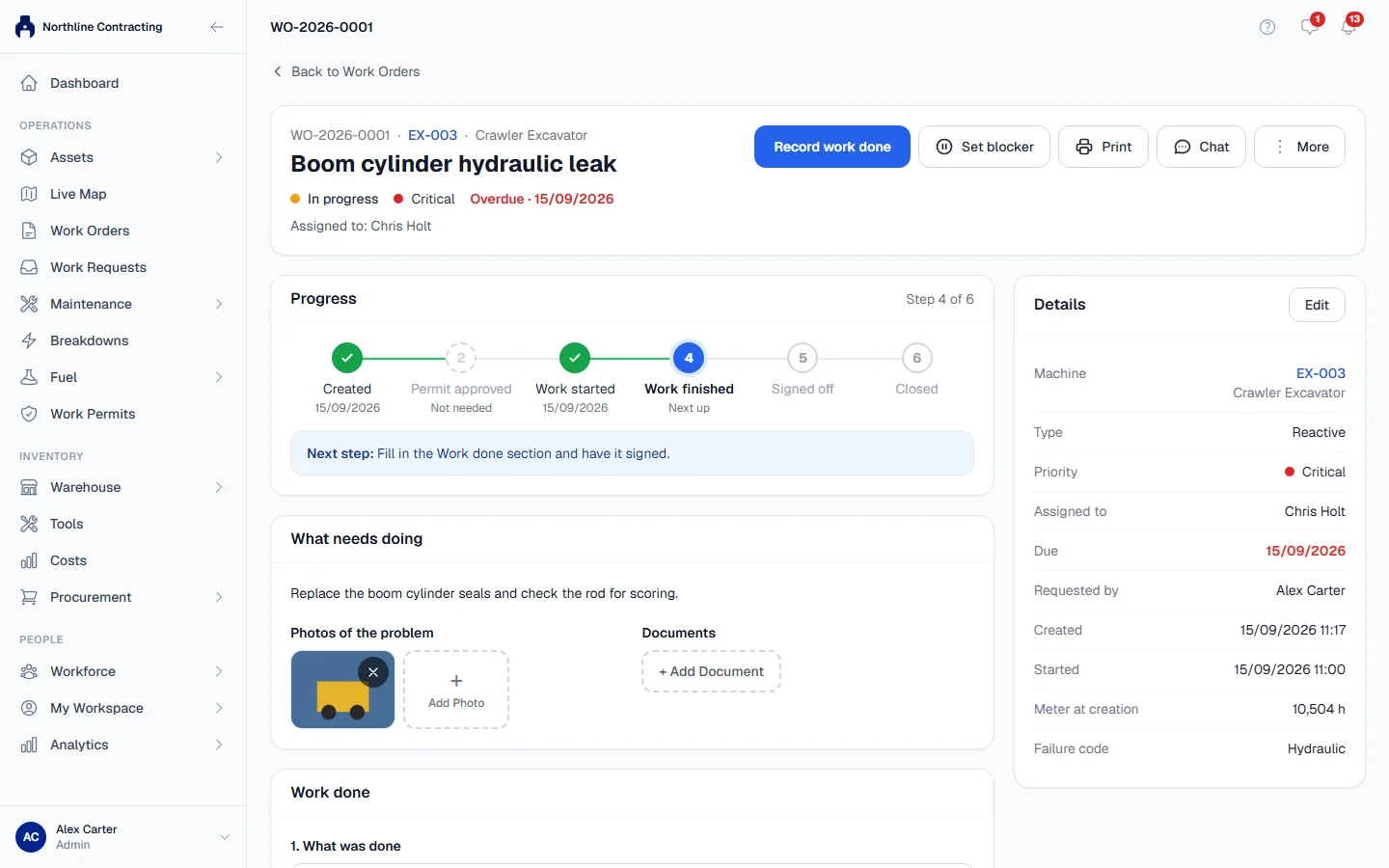
Every work order has one page that reads from top to bottom: what the job is, where it stands, what needs doing, and finally the record of the work done. There are no tabs to hunt through. One large button always names the next thing to do.
Before you start
- You need Work Orders: View to open a work order.
- Which buttons you see depends on your permissions. The table below says which permission each step needs.
How the page is laid out
| Part | What it shows |
|---|---|
| Blocked banner | Only when the job is waiting for something. See Set and clear a blocker. |
| Header | The work order number, the machine and its type, the title, status, priority, due date and who it is assigned to, with the action buttons. |
| Progress | The steps the job goes through, with Next step in one sentence underneath. |
| What needs doing | The description, Photos of the problem and Documents. |
| Work permit | Only when the job needs a permit or already has one. See Work orders that need a work permit. |
| Work done | The record of the work: what was done, who did it, parts, time, photos and signatures. |
| Details | Machine, type, priority, assignee, due date, who requested it, and when it was created, started and finished. On a phone this comes last. |
The header also has Set blocker, Print, Chat and More. Chat opens a side panel where the team can talk about the job and see its timeline and files.
The next-step button
The button changes as the job moves on. On a computer it sits in the header; on a phone it is fixed to the bottom of the screen.
| When the work order is | The button says | Who can press it |
|---|---|---|
| Not started, needs a permit that is not ready | Create work permit | Work Permits: Edit |
| Not started | Start work | Work Orders: Close |
| Not started, and you cannot start it yourself | Record work done | Takes you to the Work done section; a supervisor still starts the job |
| In progress, no work recorded yet | Record work done | Takes you to the Work done section |
| In progress, signatures missing | Sign off the work | Takes you to the signatures |
| In progress, everyone required has signed | Finish & sign off | Work Orders: Execute |
| Finished, awaiting closure | Close work order | Work Orders: Close |
When there is nothing you can do yourself, the page shows a sentence instead, such as "A supervisor with closing rights closes this work order."
Statuses
| Status | Meaning |
|---|---|
| Not started | Raised, nobody has started yet. |
| In progress | Work has started. |
| Finished, awaiting closure | The work has been recorded and signed off. A supervisor still has to close it. |
| Closed | Done and accepted. |
| Cancelled | Not going ahead. |
Progress steps
The Progress card shows six steps: Created, Permit approved, Work started, Work finished, Signed off and Closed. Under each is the date it happened, Next up for the current one, or Not needed for a step this job skips, such as the permit on a job that needs none.
Rules worth knowing
- Starting work stamps the start time once. If the job came from a breakdown, starting it also moves the breakdown on. See Work a breakdown.
- Closing a work order raised from a breakdown resolves that breakdown. A work order raised from an inspection finding does not close the finding: the finding still needs its own check. See Log and follow up findings.
- The status is never chosen from a list. It moves only through the buttons, so every change is recorded with who made it.
Troubleshooting
| What you see | What to do |
|---|---|
| "Waiting for a work permit before work can start." | The job needs a permit and you cannot create one. Ask someone with Work Permits: Edit. |
| "A supervisor starts this work order. You can already record the work below." | You can fill in the Work done section now; someone with Work Orders: Close starts the job. |
| "Sign off the work below before closing." | The work record is not finished yet. See Sign off a work order. |
| "Failed to update status." | Reload the page and try again. Someone may have changed the work order at the same time. |