
Configure sign-off roles
Decide who signs the work record on your work orders, in what order the boxes appear, and which signatures are required before a job can be finished.
Sign-off roles are the titles that sign the work record on every work order, such as Lead Technician or Workshop Supervisor. They are your company's own list: rename them to match how your workshop talks, add one for a QA inspector, remove one a small team does not use, and decide which must sign before a job can be finished.
Before you start
- You need Work Orders: Manage to change the list. Administrators have it.
- Anyone with Work Orders: View can open the list and read it.
- Solmex starts every company with three roles: Lead Technician, Maintenance Engineer and Workshop Supervisor. None of them is required until you say so.
Open the list
- In the sidebar, open Work Orders.
- Click the gear beside + Create Work Order. On a phone, it is in the ⋯ menu.
- The Work sign-off window opens, listing your roles in the order their boxes appear.
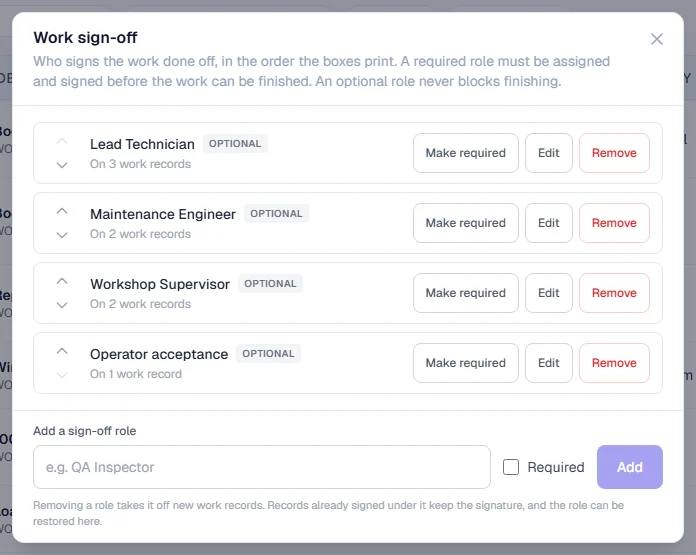
Add a role
- Type the name under Add a sign-off role, for example "QA Inspector".
- Tick Required if this role must sign before a job can be finished.
- Click Add.
Change a role
| To | Do this |
|---|---|
| Rename it | Click Edit, type the new name, click Save. |
| Make it required or optional | Click Make required or Make optional. |
| Change the order | Use the up and down arrows. The boxes on every work order follow this order. |
| Stop using it | Click Remove. It moves under Removed. |
| Bring it back | Click Restore beside it under Removed. |
Each role shows how many work records it appears on, or Not used yet.
Required or optional
| Role is | Effect on finishing a work order |
|---|---|
| Required | Somebody must be assigned to it and must have signed, or Finish & sign off is refused. |
| Optional | Never holds up finishing. Somebody can be assigned and sign, but it is not needed. |
If every role is optional, a work order can be finished with no signatures at all.
Rules worth knowing
- A rename reaches every work record, finished ones included. It corrects the title; the person and their signature stay exactly as they were.
- Removing a role never deletes a signature. Records already signed under it keep the signature and show the role's name. New work orders stop offering it, and it stops being required, so no open job is left unable to finish.
- Typing the name of a removed role restores it rather than creating a second one.
- You can have up to 12 active roles, each with a name of up to 80 characters.
Troubleshooting
| What you see | What to do |
|---|---|
| A message that a name "is already a sign-off role" | A role with that name exists. Rename or restore that one instead. |
| "A maximum of 12 active sign-off roles is supported" | Remove a role you no longer use before adding another. |
| No Add, Edit or Remove buttons | Your role does not include Work Orders: Manage, or your access is limited to some of your company's Locations. Ask an administrator. |
| "No sign-off roles are configured." on a work order | Every role has been removed. Add or restore one here. |