
Export the register to Excel
Download the Equipment Register as a printable Excel file, choosing which columns go in and in what order.
The Excel export turns the Equipment Register into a spreadsheet you can send, print or work on outside Solmex. It takes the machines your filters currently show, all of them, not only the rows loaded on screen.
Before you start
- You need Equipment: Export. Without it, the Excel button is not shown.
- Set the filters, search and sorting first. The file contains exactly the machines the register is showing, in the same order. See Find machines on the Equipment Register.
Export the register
- On the Equipment Register, click Excel at the top of the page. On a phone it is in the menu at the top right.
- The Export to Excel window opens. It says how many rows the file will hold and how many columns are chosen.
- Under Columns to export, untick any column you do not want. Equipment No is marked Always and is always included.
- Drag columns into the order you want. Reset returns to the standard set and order.
- Click Export Excel. The file downloads.
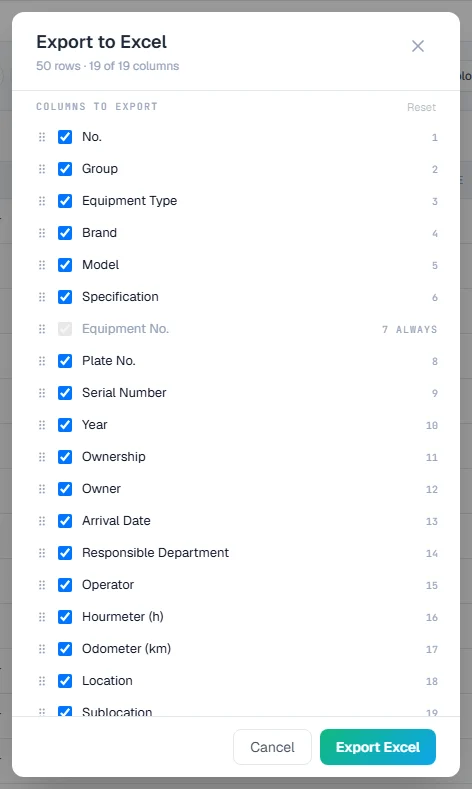
Your column choice for the export is remembered in this browser, separately from the columns you show on screen.
The columns available
| Column | What it holds |
|---|---|
| No. | A row number. |
| Group, Equipment Type | The machine's group and type from your equipment lists. |
| Brand, Model, Specification | As shown on the machine's record. |
| Equipment No., Plate No., Serial Number, Year | The machine's identity. |
| Ownership, Owner | How the machine is held (owned, rented, subcontractor), and its legal owner. |
| Arrival Date, Responsible Department, Operator | When it arrived, who is responsible, and the current operator. |
| Hourmeter (h), Odometer (km) | The latest reading on each meter the machine has. |
| Location, Sublocation | Where the machine is now. |
What the file contains
The sheet is designed to be read and printed, not only to be processed:
- A heading with your company name and logo and the title Asset Register.
- A line stating the scope: the date and time, how many machines, and every filter and search you used. A file that was narrowed says so, so nobody mistakes it for the whole register.
- The table, with headings that stay in place as you scroll and a filter on each heading.
- Data notes at the end, explaining what the sheet does and does not claim.
- Print settings ready to use: the headings repeat on each printed page, and each page is numbered.
Dates are written as DD/MM/YYYY.
Rules worth knowing
- The export follows the register, not the screen. It includes every matching machine, even those you have not loaded with Load More.
- Disposed machines are left out unless you have asked the register to show them.
- Location and Sublocation are where the machine is now, which may differ from where it was first registered.
- The headings are in English whatever language you use Solmex in, so the file reads the same wherever it is opened.
Troubleshooting
| What you see | What to do |
|---|---|
| No Excel button | Your role does not include Equipment: Export. Ask an administrator. |
| The Excel button is greyed out | The register is empty with the current filters. Clear them, or check the search. |
| Fewer rows than you expected | The filters, status chips or search are narrowing the list. The scope line at the top of the sheet names each one. |
| A column you wanted is missing | It was unticked in Columns to export. Export again and tick it, or click Reset. |