
How preventive maintenance works
Templates hold your service programme, each machine follows one template, and Solmex works out from the meters and the calendar which service is due next.
Preventive maintenance (PM) is the planned servicing a manufacturer asks for: an oil change every 250 hours, a bigger service every 1,000 hours, a calendar service every 6 months. Solmex holds that programme once, as a template, and tells you which machines are due, which are overdue and which are fine.
Small jobs repeated every few days, such as greasing or washing, belong in Daily Maintenance instead. See What daily maintenance is.
The three building blocks
PM template          "General Earthworks: Standard"
  └ Service interval   250 h service, 500 h service, 1,000 h service ...
└ Task change engine oil, replace fuel filter, grease points ...- A template is a named service programme, such as one for excavators and another for trucks.
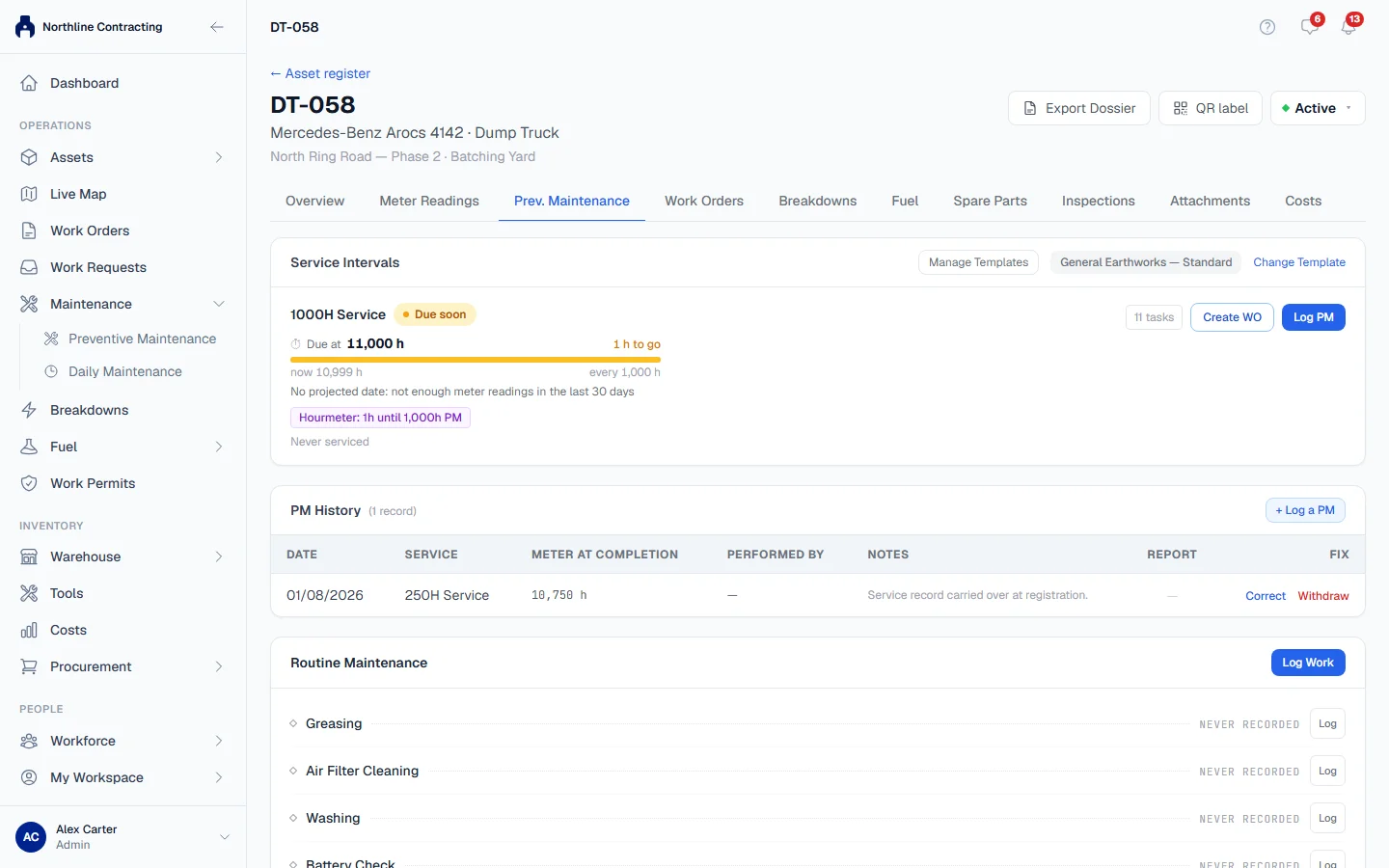
- Each template has service intervals. An interval says when a service falls due: every so many hours, every so many kilometres, every so many months or days, or a mix of these.
- Each interval has tasks: checklist items, parts and fluids. When a technician logs the service, the tasks are filled in for them.
One template per machine
Each machine follows one template at a time. Many machines can share the same template, so you write a programme once and give it to every machine of that kind. You can change a machine's template later; its service history stays on the record.
Templates are never written onto the machine itself. If you improve a template, every machine on it follows the new version.
Hours, kilometres and the calendar
An interval can be triggered by:
| Trigger | Measured by | Example |
|---|---|---|
| Hourmeter | the machine's hourmeter reading (SMR) | every 250 hours |
| Odometer | the machine's odometer | every 10,000 km |
| Calendar | time | every 6 months, every 30 days |
An interval can have more than one trigger. It falls due when any of them is reached, so "500 hours or 6 months, whichever comes first" is one interval with two triggers.
Hours and kilometres are judged separately. A truck can be on schedule by hours and overdue by kilometres at the same time, and Solmex shows both. It never converts one into the other.
Where the readings come from
Solmex schedules hours and kilometres services from the machine's current meter readings. Readings arrive from the Meter Readings tab, the daily meter entry, fuel entries, and from every PM you log. Keep the readings up to date: a schedule is only as fresh as the last reading.
The service history is the memory
Solmex decides whether a service has been done by looking at the machine's PM History: every service logged in Solmex, plus the machine's last PM from before it joined Solmex, if you gave one. Nothing else counts. That is why there are three ways to put a service on the record:
| You want to | Use |
|---|---|
| Record a service just done, with parts and checklist | Log a completed PM |
| Enter older services from paper records | Record past services |
| Tell Solmex where each machine is in its cycle when you start | Import each machine's last PM |
Where you work with PM
- On a machine's page, the Prev. Maintenance tab shows each service interval, how close it is to due, and the machine's PM History.
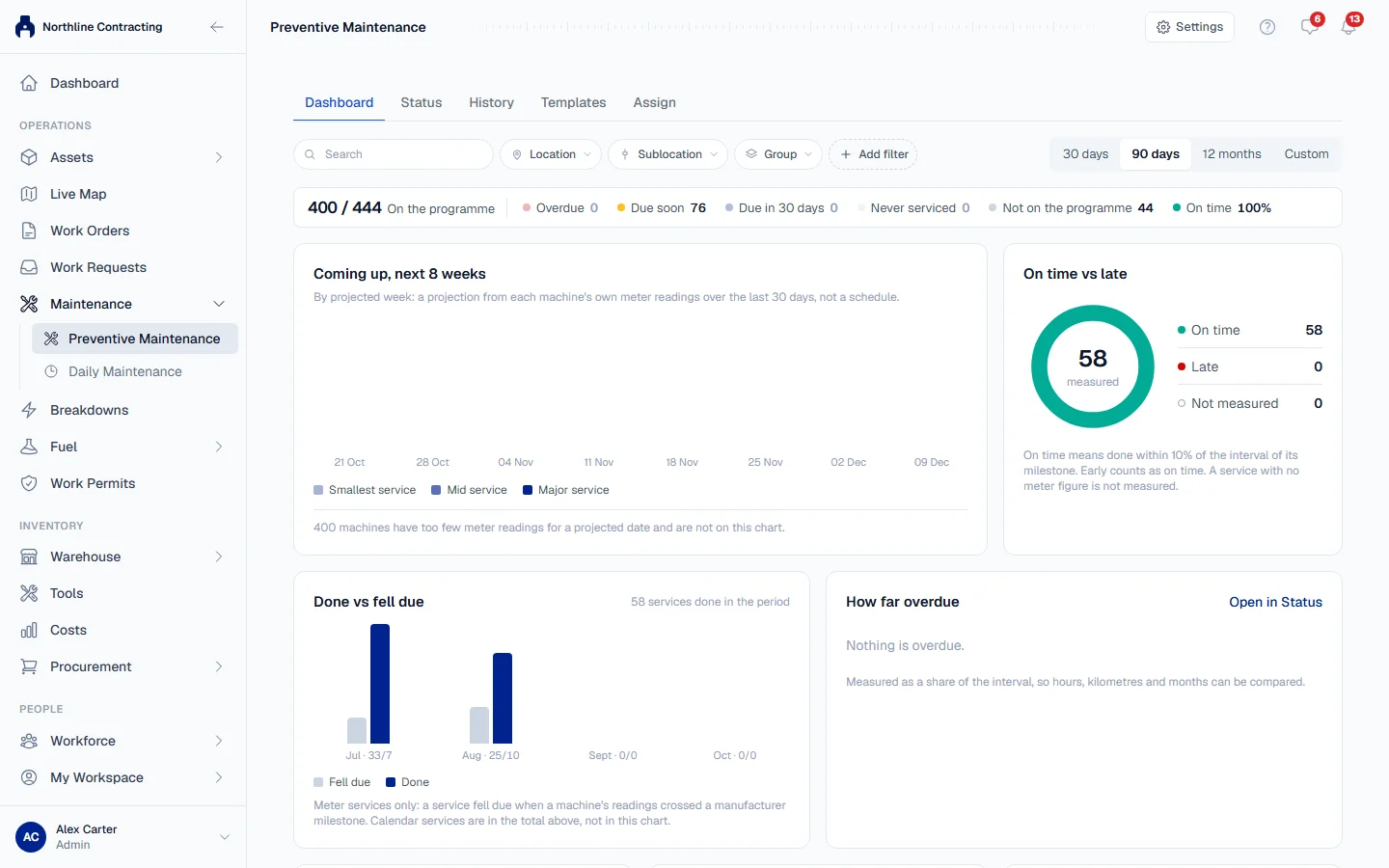
- In the sidebar, Maintenance > Preventive Maintenance shows every machine at once. See The Preventive Maintenance page.
The usual order of setup
- Create your PM templates.
- Import each machine's last PM, so machines already in service start at the right point in their cycle.
- Assign templates to machines.
- Keep meter readings coming in, and log each PM as it is done.
Read How PM due dates are worked out to understand exactly when a service turns due soon and overdue.