
Help CenterManaging Purchases and Stock
Set up the approval chain
Choose who approves purchase requests and in what order. Each request keeps the chain it was sent with.
The approval chain is the list of people who approve purchase requests, one after another. A request goes to step 1 first; when they approve, it moves to step 2, and the last approval makes it Approved. Until a chain exists, no request can be sent.
Before you start
- You need Procurement: Manage to change the chain. Anyone with Procurement: View can open the page and read it.
- Every approver needs a user account and Procurement: View, or a request reaching them will stop there.
- The chain applies to every purchase request in your company. It cannot vary by department or amount.
Set up the chain
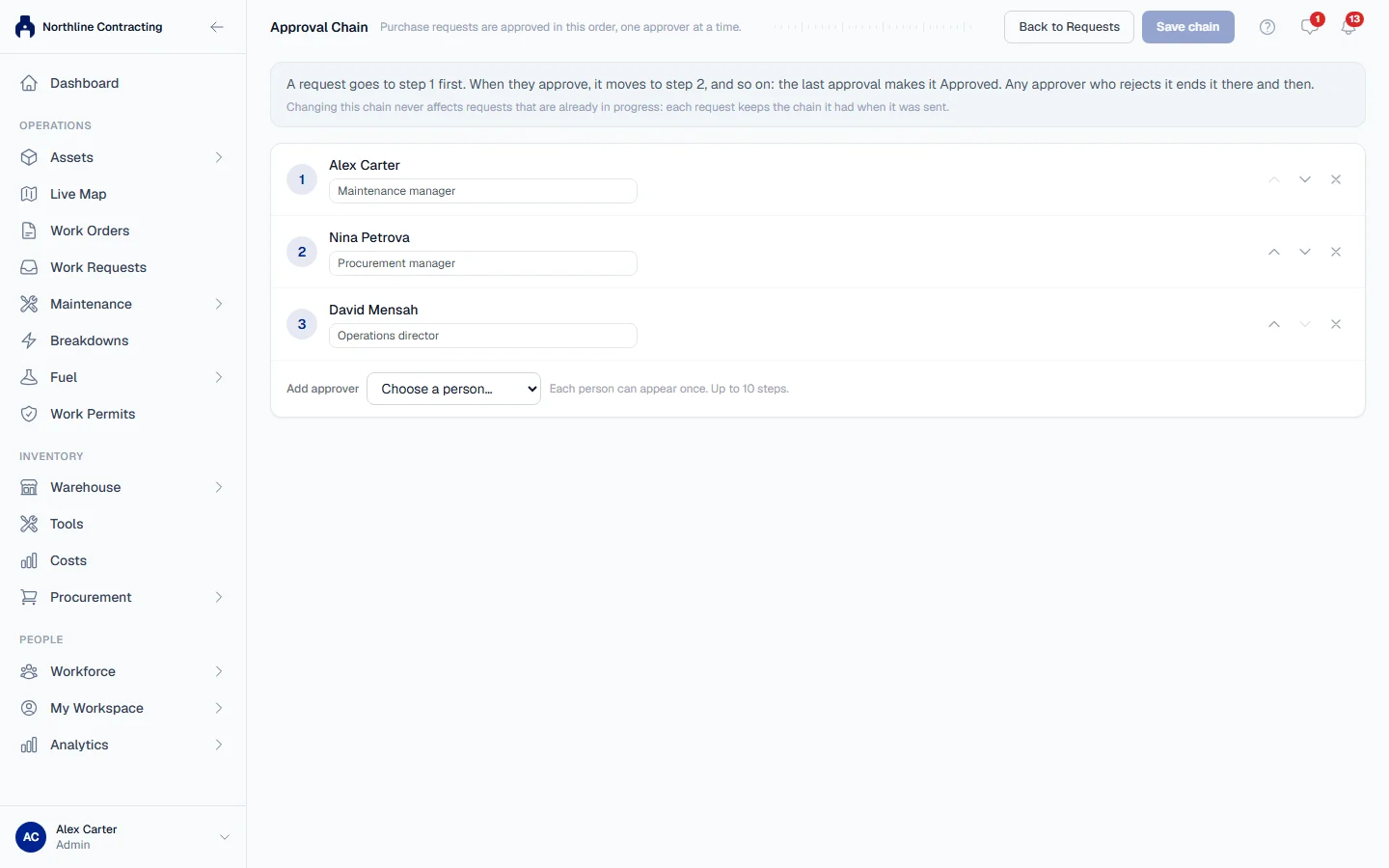
- In the sidebar, open Procurement > Purchase Requests.
- Click Approval Chain. The page lists the current steps in order.
- Click Add approver and choose a person from Choose a person….
- Type their Position, such as "Plant Manager". Leave it blank to use the job title from their employee record. The position is printed on every request they approve.
- Repeat for each approver. Use the arrows on a step to move a person earlier or later, and the remove button to take them off.
- Click Save chain. The page confirms: "Saved. New requests will follow this chain."
Nothing changes until you save. While you have unsaved changes, the page says so at the bottom.
What happens next
Every request sent from now on follows the new chain. Requests already sent keep the chain they had when they were sent, and requests sent back for correction pick up the new chain when they are resubmitted.
Rules worth knowing
- A person can appear once. The chain has at most 10 steps.
- A deactivated user cannot be added. If an approver leaves, replace them and save.
- Requests are never approved automatically. With no chain, the Send for approval button refuses rather than letting a request through.
- The requester still approves their own step. If someone who is in the chain raises a request, their step is not skipped: they approve it like anybody else.
- One chain, every amount. Approval by value is not something the chain can express.
Troubleshooting
| What you see | What to do |
|---|---|
| "No approvers yet: a request cannot be submitted until at least one is added." | Add at least one approver and save. |
| A warning that a person cannot open Purchase Requests | Give their role Procurement: View. See Roles and permissions. |
| "The same person cannot appear twice in the approval chain." | Remove the second appearance. |
| "Cannot put a deactivated user in the approval chain" | Choose an active user, or reactivate the account. |
| "Could not save the approval chain." | Check your connection and save again. |
| No Add approver or Save chain | Your role does not include Procurement: Manage, or your account is limited to some Locations: the chain applies to the whole company, so only someone who sees every Location can change it. |