
Late entries and meter checks
How Solmex handles a fill-up recorded after the day it happened, and how its meter reading is checked against the readings before and after it.
Fuel is entered after the event far more often than during it. Solmex lets you date a fill-up in the past, within limits your company sets, and checks its meter reading against what was recorded around that date rather than against today's meter.
Before you start
- You need Fuel: Edit to log a fill-up.
- How far back you may go, and when you must give a reason, is set on Fuel Settings.
Log a late fill-up
- On a machine's Fuel tab or on Daily Fuel Entry, change the Fill-up date to the day the fuel went in. Dates beyond your backdating limit cannot be chosen.
- A note appears saying the fill-up will be recorded for that many days ago, and that consumption reporting uses that date, not today.
- If your company requires one for an entry this old, type a Reason for late entry, such as "Receipt handed in today". It must be at least three characters.
- Fill in the rest of the entry as usual and save.
On Daily Fuel Entry, the date and the reason apply to every row in the save, since one save is one day.
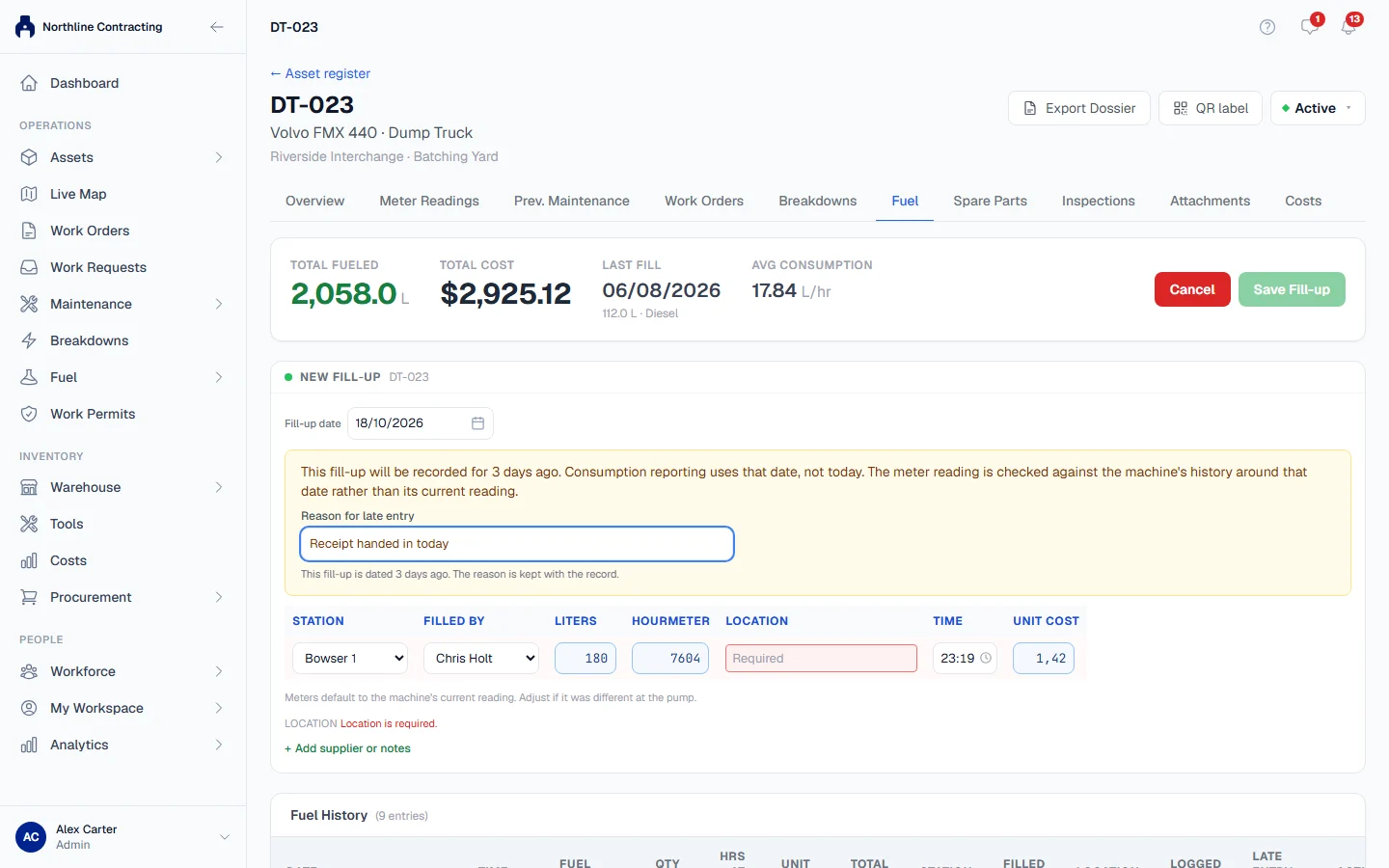
How the meter reading is checked
A fill-up for today and a fill-up for last Tuesday are checked differently:
| Entry is for | Compared with | If it does not fit |
|---|---|---|
| Today | The machine's current recorded reading | A warning. You can confirm it and save. |
| A past date | The recorded readings just before and just after that date | An error. The entry cannot be saved until it fits. |
For a past date Solmex looks for the nearest reading before the fill-up and the nearest reading after it. The new reading must be at least the earlier one and at most the later one. Readings come from:
- meter readings entered on the machine's Meter Readings tab or on Daily Meter Entry
- other fill-ups that carried a reading
- logged preventive maintenance services that recorded the meter
If only one neighbour exists, only that side is checked. If there are none, there is nothing to check against and the reading is accepted.
When a reading conflicts, the message names the record it disagrees with and when it was recorded, so you can open that record and see which one is wrong.
Times on the same day
Fill-ups carry a time, so two fill-ups on one day are put in order by it. Readings and services that were recorded with a date only count as the start of that day. Two records that land on exactly the same moment do not count against each other.
What a late entry shows afterwards
On the machine's Fuel History, a fill-up recorded after its own date is marked Late entry. Hover over the mark to see when it was recorded and by whom. The Late Entry Reason column shows the reason given.
The reason cannot be edited later. It is part of the record of why the entry was late.
Rules worth knowing
- A future date is always refused.
- The page cannot colour a late reading for you. It does not have the readings around that date, so a late meter cell stays plain until you save; Solmex then checks it properly.
- A meter jump faster than a machine can run (more than 24 hours a day or 1,500 km a day) is a warning on both today's and late entries, never an error. Meters get replaced.
Troubleshooting
| What you see | What to do |
|---|---|
| A message saying "fuel entries may only be backdated" a number of days | The date is beyond your limit. If the entry is genuine, someone with Fuel: Manage widens the limit in Fuel Settings. |
| A message that entries older than a number of days "need a reason for the late entry" | Fill in Reason for late entry. |
| "The reason for the late entry is too short" | Write at least three characters. |
| A message that the reading "conflicts with this machine's meter history" | Check the reading, then open the record the message names. If that record is the wrong one, have it corrected first. |