
How meters work
What an hourmeter, an odometer and a machine with no meter mean in Solmex, which reading counts as current, and where readings come from.
A meter reading says how much a machine has worked: engine hours on an hourmeter, kilometres on an odometer. Solmex keeps every reading as history, and preventive maintenance, fuel consumption and inspections all measure the machine against it.
The meters a machine can carry
Every machine says, on its record, which meters it has:
| Choice | What it means |
|---|---|
| Hourmeter | Engine hours. Its reading is the machine's SMR (Service Meter Reading). |
| Odometer | Kilometres travelled. |
| Both | A truck serviced by hours and by kilometres. Each meter keeps its own history. |
| No meter fitted | The machine has neither, such as a trailer, a static tank or a hand compactor. |
You choose them when you add the machine. To change them later, open the machine's Overview tab and click Edit meters on the Maintenance & Compliance card.
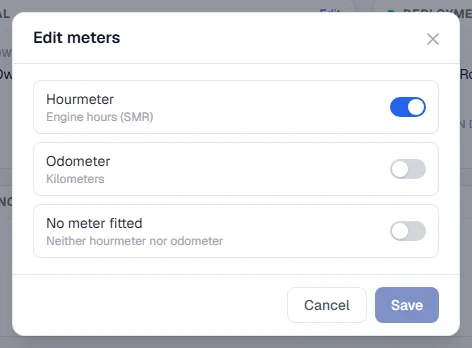
No meter fitted is not the same as not stated
A machine can be in one of three states:
- Metered: it has an hourmeter, an odometer or both, and readings are taken for them.
- No meter fitted: somebody has said it has none. No readings are asked for. It can be serviced on a calendar schedule and fuelled as usual, but nothing is worked out per hour or per kilometre.
- Not stated: nobody has said yet. The Meter Readings tab shows Meters not stated, and the machine is left out of Daily Meter Entry until somebody answers.
Which reading counts as current
The current reading on a meter is its latest reading by date and time, not the one typed most recently. A reading entered this afternoon for this morning sits in its proper place in the history.
When a machine has both meters, the hourmeter is the one Solmex treats as the machine's SMR. A machine with no meter has no SMR at all: it shows a dash, never a zero.
Where readings come from
Several parts of Solmex read the meter as part of other work, and all of them feed the same history:
| Where | Shown as |
|---|---|
| The machine's Meter Readings tab | Manual |
| Daily Meter Entry | Daily entry |
| A fuel fill with a meter reading | Fuel entry |
| A logged preventive maintenance service | PM service |
| Routine work recorded with a reading | Routine work |
Each row in a machine's meter history shows its source in the Source column, so you can always tell where a figure came from. The source is set by where the reading was entered: a reading typed on the Meter Readings tab is always Manual, and only the GPS feed and the other entry pages record their own sources. See Log a completed PM and Record a day's work.
Rules that apply everywhere
- A reading can never go below the last one. Meters only move forward. A lower figure is refused and the message names the reading it disagrees with.
- A blank is not zero. An empty box means "not read", and nothing is saved for it.
- The date and time are required on every new reading, so two readings on one day can always be put in order.
- A wrong figure is corrected, not rewritten in silence. The latest reading can be corrected with a reason, and the old value is kept in the audit log.
Tracking meters
Besides the hourmeter and odometer, a machine can carry up to eight process or condition values, such as pressure or pH. These follow different rules. See Tracking meters.