
Find and review inspections
Search the register of all inspections, see a machine's inspection history and open findings, and export the list to Excel.
Every inspection, draft or completed, is kept on one register. You can find any inspection there, or look at one machine's inspections from its own page.
Before you start
- You need Inspections: View.
The register of all inspections
- In the sidebar, open Assets > Inspections.
- The All Inspections tab opens. The figures at the top show the Total, how many are In Draft and Completed, and the Open Findings, Under Review, High Severity (active) and Critical (active) findings.
- To narrow the list, use the Status filter (Draft or Completed), or type in the search box. Search looks at the inspection number, equipment, template, inspector and Sublocation.
- Click a column heading to sort by it.
- Click a row to open the inspection.
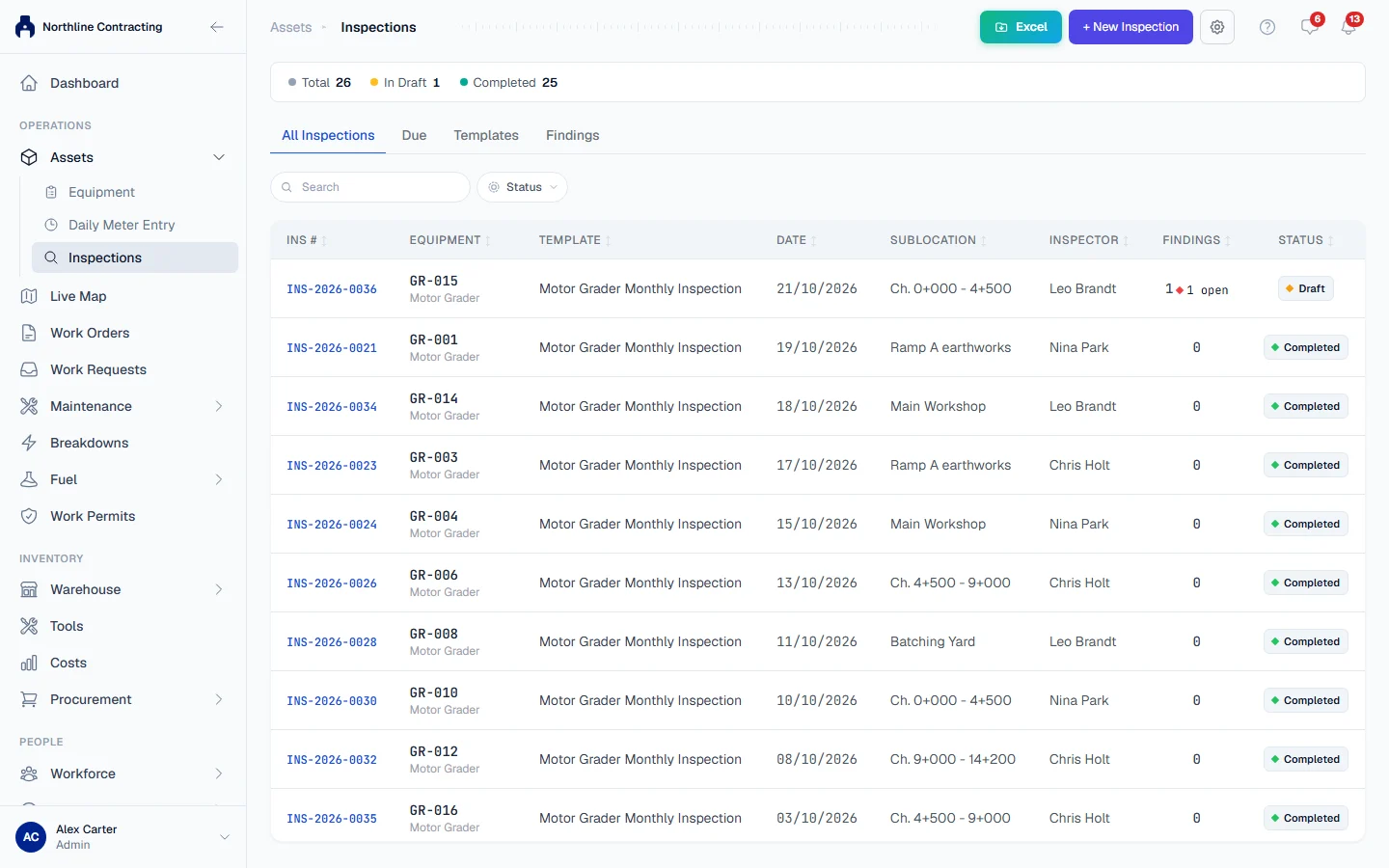
| Column | Meaning |
|---|---|
| INS # | The inspection number. |
| Equipment | The machine inspected. |
| Template | The checklist used. |
| Date | When the inspection was carried out. |
| Sublocation | The Sublocation the machine was found in. |
| Inspector | Who carried it out. |
| Findings | How many findings were logged, and how many are still open. |
| Status | Draft or Completed. |
One machine's inspections
- Open the machine from Assets > Equipment.
- Open its Inspections tab.
The tab shows the machine's Total Inspections, Open Findings, Critical Open and Last Inspection, then its Inspection History and its Open Findings. Click any row to open it. To start an inspection on this machine, click + New Inspection.
Export to Excel
- On the All Inspections tab, filter and search the list as you want it.
- Click Excel. The Export to Excel window opens.
- Under Columns to export, tick the columns you want and drag them into the order you want.
- Click Export Excel.
The spreadsheet holds the inspections currently shown, with the date, time, machine, template, Sublocation, operator, inspector, meter reading, finding counts, status and when the next inspection is due. Your column choice is remembered in this browser.
Rules worth knowing
- Drafts are on the register. An inspection is a draft from the moment it is started until someone completes it. A draft does not count towards the inspection schedule.
- Completed inspections are permanent. They cannot be edited or deleted. See Carry out an inspection.
- Each inspection keeps its own facts. The Sublocation, operator and meter reading on an inspection are what was recorded that day, even if the machine has since moved or changed operator.
Next
- See which inspections are due
- Log and follow up findings
- Print the Inspection Report and Finding Action Cards
Troubleshooting
| What you see | What to do |
|---|---|
| "No inspections found" | Clear the filters and the search box. If the list is still empty, no inspection has been started yet. |
| Inspections is missing from the sidebar | Your plan does not include inspections, or you do not have Inspections: View. |