
Fuel Settings
Decide how far back fuel entries may be dated, when a late entry needs a reason, and what happens to a fill larger than the tank.
Fuel Settings holds the rules every fuel entry screen follows, along with your lists of fuel stations and fuel attendants. The rules apply to the whole company and take effect for the next entry anyone makes.
Before you start
- Anyone with Fuel: View can read the settings.
- Changing them needs Fuel: Manage. Without it, the controls are shown but cannot be changed.
Open the settings
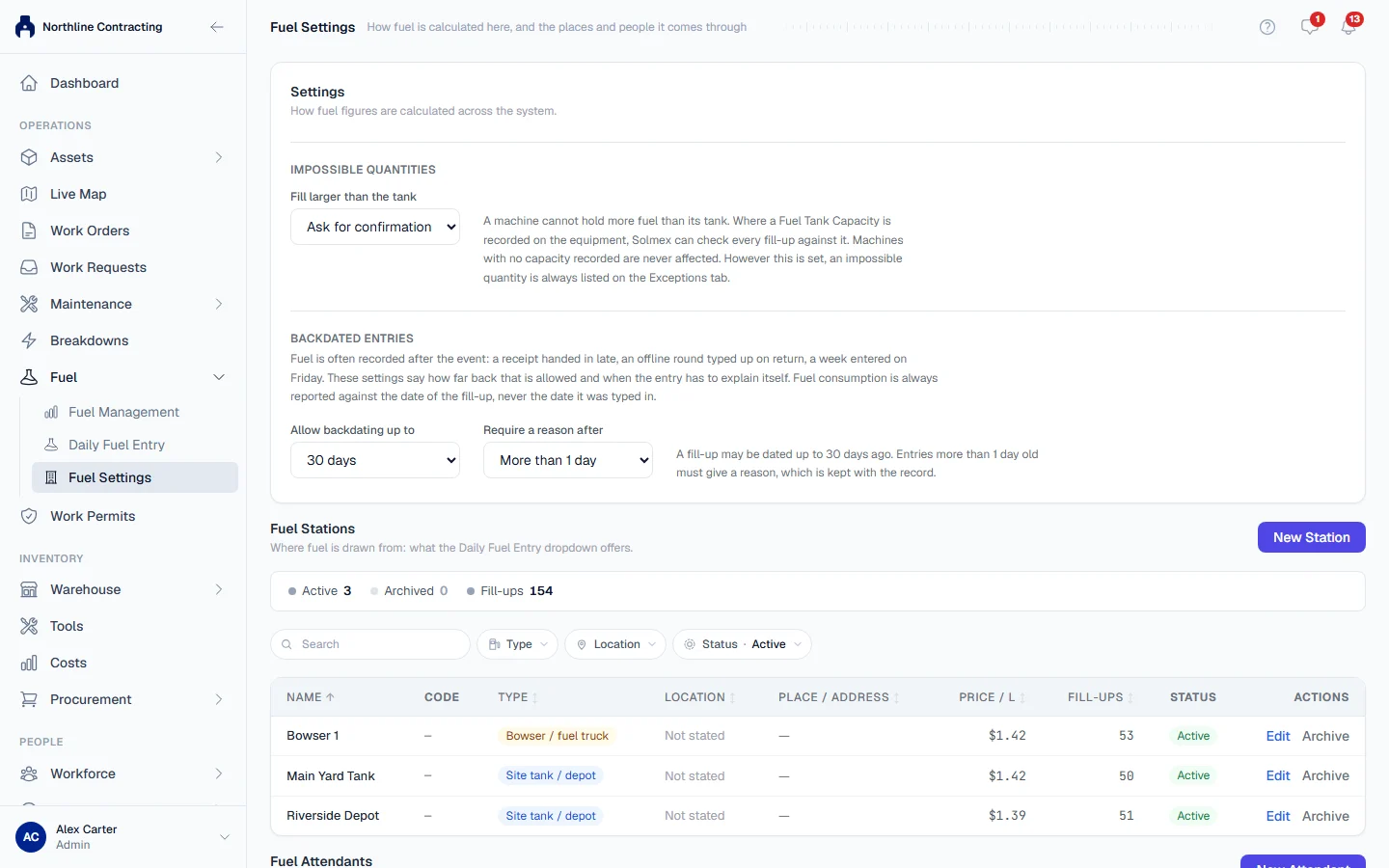
In the sidebar, open Fuel > Fuel Settings. The Settings section is at the top, above Fuel Stations and Fuel Attendants (see Fuel stations and attendants).
Each choice saves as soon as you make it, and a message confirms what is now in force. A sentence under each section states the current rule in words.
Backdated Entries
Fuel is often recorded after the event: a receipt handed in late, an offline round typed up on return, a week entered on Friday. Two settings control this.
| Setting | Choices | Default |
|---|---|---|
| Allow backdating up to | Unlimited, 3 days, 7 days, 30 days, or Custom… for any number of days | 30 days |
| Require a reason after | Never, Any past date, or More than a number of days | More than 1 day |
- Choose how far back a fill-up may be dated under Allow backdating up to. For a figure not in the list, choose Custom… and type the number of days.
- Choose when a late entry must explain itself under Require a reason after.
With the defaults, a fill-up may be dated up to 30 days ago, and one more than a day old must give a reason. The reason is kept with the record and shown in the machine's fuel history.
Impossible Quantities
A machine cannot hold more fuel than its tank. Where a Fuel Tank Capacity is recorded on the machine, Solmex can check every fill-up against it. Under Fill larger than the tank, choose:
| Choice | What happens |
|---|---|
| Ask for confirmation | The entry shows a warning and is saved only after you confirm it. This is the default. |
| Refuse the entry | The fill-up cannot be saved until the quantity or the machine is corrected. |
| Do not check | Fill-ups are not checked against the tank. |
Machines with no tank capacity recorded are never affected. However this is set, an impossible quantity is always listed on the Exceptions tab of Fuel Management.
Rules worth knowing
- Consumption is always reported against the date of the fill-up, never the date it was typed in. A late entry lands in the right week.
- A future date is always refused, whatever the settings.
- Changing a setting does not change saved fill-ups. It decides what the next entry may do.
- There is no monthly working days setting. Monthly figures in Fuel Management are based on calendar days.
Troubleshooting
| What you see | What to do |
|---|---|
| The controls cannot be changed | Your role does not include Fuel: Manage. |
| "Could not save the setting." | Check your connection and choose again. |
| A user cannot enter a fill-up dated last month | The date is beyond Allow backdating up to. Widen it if the entries are genuine. |