
Help CenterManaging Purchases and Stock
How costs work
Every cost in Solmex lands in one ledger. Most arrive on their own from fuel and parts; the rest you enter by hand.
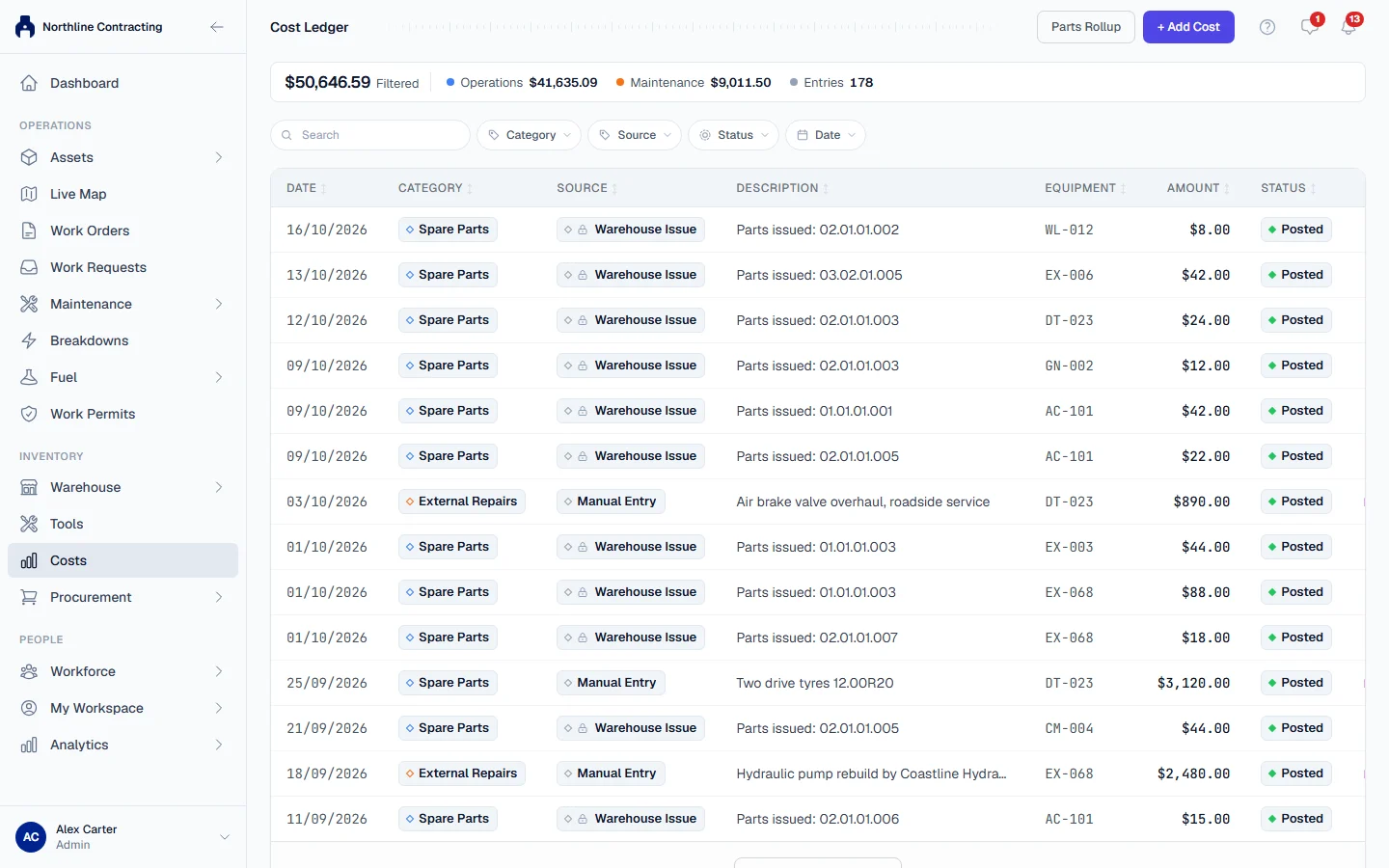
Solmex keeps every cost in one place, the Cost Ledger, opened from Costs in the sidebar. Each entry is one financial event: a fill-up, parts issued to a machine, an outside repair. Every cost figure in Solmex, including a machine's Costs tab, is read from this one ledger, so two screens can never disagree about what something cost.
Before you start
- You need Costs: View to see costs, and Costs: Edit to add, edit or void an entry.
- Costs are recorded in your company's base currency, set under Settings > Company Settings. See Set up your company.
Where costs come from
Automatic costs
You do not type these. They appear when other work is recorded:
| What you record | The cost it creates | Source shown |
|---|---|---|
| A fuel fill-up with a unit cost | The fill-up's total cost, against the machine | Fuel Log |
| Parts or fluids issued from the warehouse, including on a work order or a PM service | The value of what was issued, against the machine or job | Warehouse Issue |
An automatic entry follows its source. Correct the fill-up and its cost is corrected too; void the fill-up and its cost is voided. When parts go back to stock, for example because a logged PM service is withdrawn, their cost is reduced to match. See Log a fill-up and Edit, void or undo a fill-up.
Manual entries
Anything that does not come from fuel or the warehouse is entered by hand on the Cost Ledger: labour, a rental charge, a repair by an outside workshop, transport, calibration. You choose one of the categories below for each. See Add, edit or void a cost.
Categories
Every entry has a category. The categories are grouped:
| Group | Categories |
|---|---|
| Maintenance | Spare Parts, Fluids & Consumables, Labor, External Repairs, Attachments |
| Operations | Fuel, Rental, Transportation, Equipment Downtime |
| HSE | Inspection, Calibration |
| Other | Miscellaneous |
The Cost Ledger page shows the total for your biggest groups across the top.
Statuses
| Status | Meaning |
|---|---|
| Posted | A real cost. Counted in every total. |
| Voided | Retracted, with a reason. Kept on the ledger and shown, but never counted in any total. |
Rules worth knowing
- A fill-up with no price adds no cost. Fuel logged without a unit cost has nothing to record, so fuel costs are understated by whatever those fills cost.
- A part with no price adds no cost. Parts received without a price are stock with no value, so issuing them cannot record what they cost.
- Receiving goods adds no cost. A part's cost is recorded when it is issued, not when it arrives on a purchase order. See Receive a delivery.
- One currency. Every amount is in the base currency. To read the figures in US dollars, use the display toggle: see Read the Cost Ledger.
- Automatic entries cannot be edited on the ledger. Correct them where they were recorded. Only a fuel cost can also be voided from the ledger, which voids its fill-up too; a parts cost is reversed where it was issued.
Troubleshooting
| What you see | What to do |
|---|---|
| A fill-up or an issue has no cost entry | It was recorded without a price, so there was no cost to record. A fill-up can be corrected with a price: see Edit, void or undo a fill-up. |
| No Costs in the sidebar | Your role does not include Costs: View, or your plan does not include Costs. |