
Yardım MerkeziOrganizasyonu Yönetme
Bu makale henüz Türkçeye çevrilmedi. Aşağıda İngilizce sürümünü okuyabilirsiniz.
Session Activity
See who has used Solmex and when, per user and per session, including visits made without typing a password.
Session Activity answers "has this person used Solmex today, and how often this week?" It records one entry for each working session, including the many sessions that start from a sign-in the browser or phone already remembered, which the Audit Log never sees.
Before you start
- You need Administration: Manage.
- A session is a run of activity. It ends after 30 minutes with nothing done, and lasts at most 12 hours.
- Page views and individual clicks are deliberately not tracked. Session Activity says that someone was there, not what they looked at.
See each user's activity
- Open Settings and go to the Session Activity tab. The By User tab opens first.
- Search by username or name and click Search.
- Turn on Include deactivated users to see disabled accounts too. They are marked Inactive.
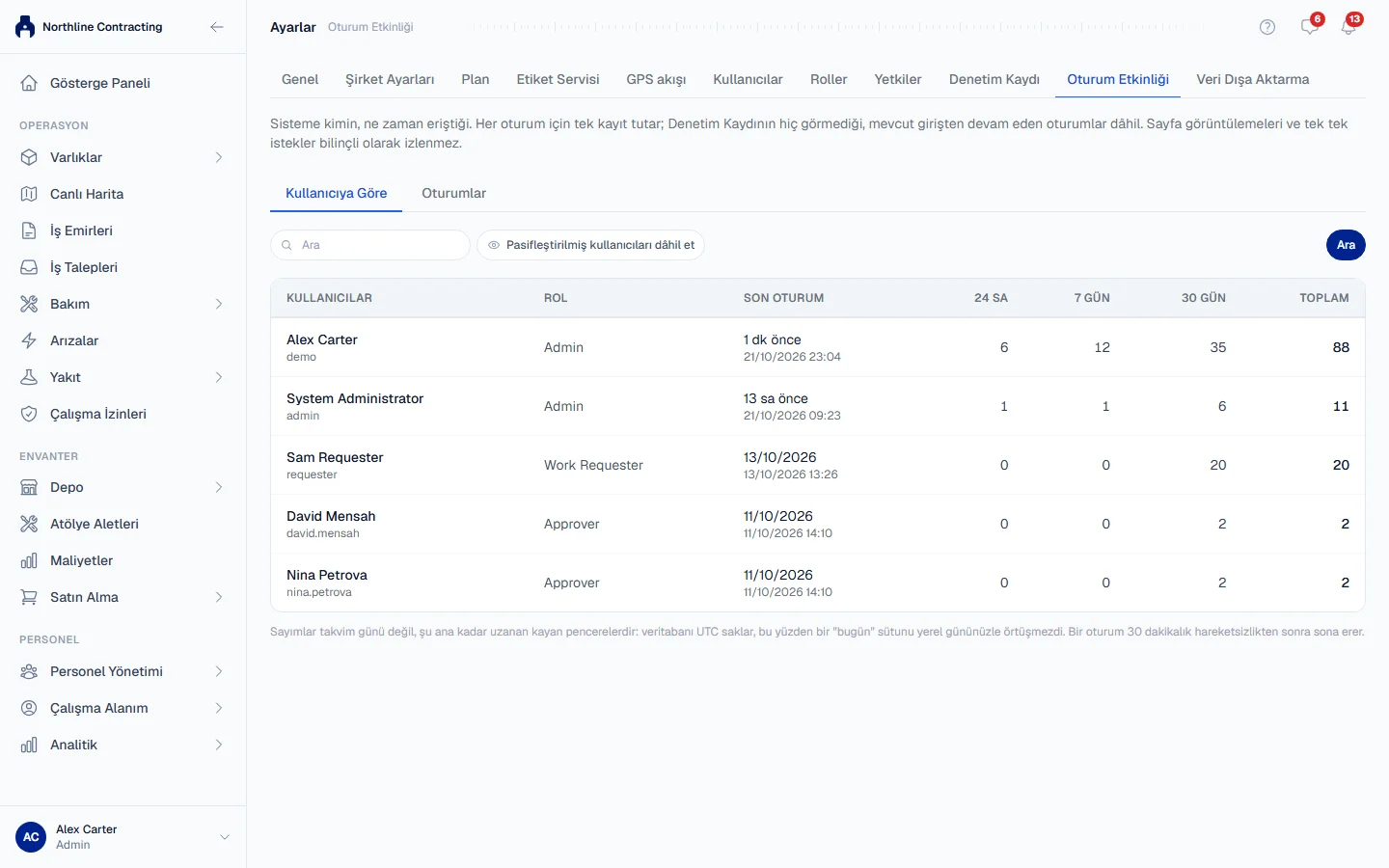
Each user's row shows:
| Column | What it shows |
|---|---|
| Users and Role | Who the person is. |
| Last Session | How long ago their latest session started, or Never. |
| 24h, 7 days, 30 days | Sessions started in the last 24 hours, 7 days and 30 days. |
| Total | All sessions ever recorded. |
A user who has never signed in still appears, with zero sessions and Never. That is the answer to "has this person ever logged in?", so they are not left out.
See individual sessions
- Click the Sessions tab.
- Filter by username (Users), Client, Started by and Date. The list updates as you choose.
| Column | What it shows |
|---|---|
| Started | When the session began. |
| Users | Who it was. |
| Started by | login if they typed their password, resumed if they came back on a sign-in their device remembered. |
| Client | web for a browser, mobile for the Solmex app. |
| Last Seen | Their latest activity. |
| Duration | From start to last activity. |
| IP | The internet address the session came from. |
Rules worth knowing
- The figures are rolling windows, not calendar days. "24h" means the 24 hours ending now, not "today", so the count does not depend on your time zone.
- Duration is accurate to about five minutes. Activity is noted every few minutes, not on every click.
- An open tab can look like presence. Solmex keeps chat and notifications up to date in the background, so a user who leaves a tab open reads as active until the 12-hour limit. Treat a very long session as "the tab was open", not "they worked 12 hours".
- Typing a password always starts a new session, even if they were active a minute ago.
Troubleshooting
| What you see | What to do |
|---|---|
| "No users match your search." | Check the spelling, or turn on Include deactivated users. |
| "No sessions match your filters." | Widen the date range or clear a filter. |
| "Failed to load session activity." | Reload the page. If it repeats, check your role still has Administration: Manage. |